cancel
Showing results for 
Search instead for 
Did you mean: 

Can't miss session! The 9 FabCon and SQLCon takeaways the community can't stop talking about. Join us on April 2nd. Register now

Reply
Simon_HJ
New Member

Fabic Lakehouse - SQL Connection

Hey All,

Last week I created my first Datalake using Fabric. After getting some data in it I wanted to start altering the data using SSMS but here I faced an issue. After fetching the SQL string from the endpoint object I get the error message below. I've tried to connect with Azure Data Studio instead, and also to create a new Lakehouse, still the same error.

What should I do?

Greatfull for any responses!!

Simon_HJ_0-1687172272790.png


1 ACCEPTED SOLUTION
GeethaT-MSFT
Microsoft Employee
Microsoft Employee

HI, @Simon_HJ Thanks for posting your question in Microsoft Fabric CommunityI hope you followed the steps correctly

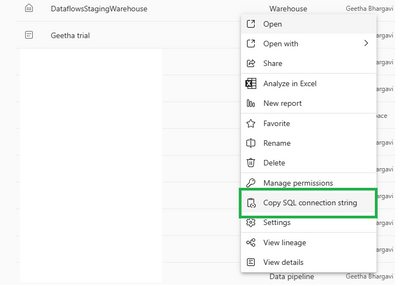
Copy the Sql connection string from the Wharehouse 

GeethaTMSFT_0-1687192651943.png

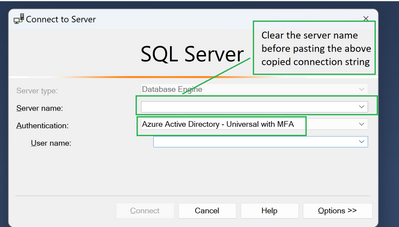
Open the data engine from SSMS and if there is any previously used server name I recommend clear the data and past the above-copied connection string

GeethaTMSFT_3-1687193683661.png


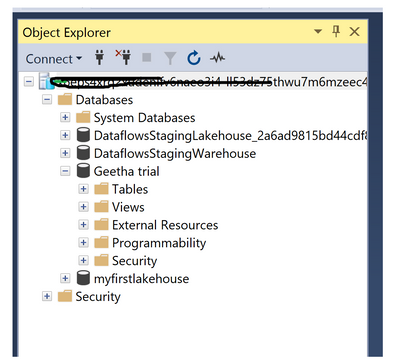
And was able to connect to SSMS successfully 

GeethaTMSFT_4-1687194022749.png

Please let me know at which step you are facing the issue

Regards

Geetha


View solution in original post

4 REPLIES 4
MaxBronder
Frequent Visitor

Hi Simon, I have the same issue, could you explain how you solved it? 
thank you very much

Hey Max, sure thing!

So my issue was that the internal zScaler from my company was blocking a specific port needed to connect to the SQL string outside of fabric. I could access it from the office or when I turned of zScaler for a few minutes. The issue was resolved quite easily with a few changes to the rules in zScaler itself.

Simon_HJ
New Member

Hey!

Thank you for this explanation. I followed these exact steps when I got the error before.
It's now solved though! Was an internal issue with whitelising over VPN....

GeethaT-MSFT
Microsoft Employee
Microsoft Employee

HI, @Simon_HJ Thanks for posting your question in Microsoft Fabric CommunityI hope you followed the steps correctly

Copy the Sql connection string from the Wharehouse 

GeethaTMSFT_0-1687192651943.png

Open the data engine from SSMS and if there is any previously used server name I recommend clear the data and past the above-copied connection string

GeethaTMSFT_3-1687193683661.png


And was able to connect to SSMS successfully 

GeethaTMSFT_4-1687194022749.png

Please let me know at which step you are facing the issue

Regards

Geetha


Helpful resources

Announcements
New to Fabric survey Carousel

New to Fabric Survey

If you have recently started exploring Fabric, we'd love to hear how it's going. Your feedback can help with product improvements.

Join our Fabric User Panel

Join our Fabric User Panel

Share feedback directly with Fabric product managers, participate in targeted research studies and influence the Fabric roadmap.

March Fabric Update Carousel

Fabric Monthly Update - March 2026

Check out the March 2026 Fabric update to learn about new features.