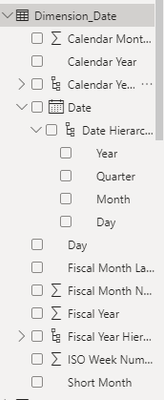
I have been having a significant issue with time intelligence quick measure function which I can't seem to find a way to fix .
I have been continuously getting that error saying " time intelligence quick measure can only be grouped or filtered by the power bi provided date hierarchy or primary date column" despite my date on date dimension is set up in a hierarchy .
autodate function in the power bi main option was already on.
I have tried a few things after googling
1. tried to set the date dimension table as " mark as date table" and nominated the " date" column to be the date. however this screwed up all my visualisations and I had to start from the beginning basically.
2. I tried to make a new table with a date, year,month and day all in separate column with hiearachy and created a relationship with the sale fact table to see if that worked and the visualisation just looked weird . It didn't seem to make sense. I am not sure what I am doing wrong 😞
Would really appreciate if someone could help!