Join us at FabCon Atlanta from March 16 - 20, 2026, for the ultimate Fabric, Power BI, AI and SQL community-led event. Save $200 with code FABCOMM.
Register now!The Power BI Data Visualization World Championships is back! Get ahead of the game and start preparing now! Learn more
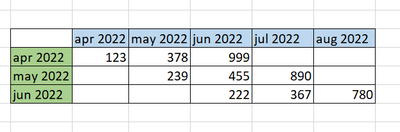
As in the picture below, I want to show the total sales amounts to cover the current month and the next 2 months.
Solved! Go to Solution.
@Anonymous , Check how to build this
Period Of Stay – Cohort Analysis: https://community.powerbi.com/t5/Community-Blog/Customer-Retention-Part-3-Period-Of-Stay-Cohort-Analysis/ba-p/1393410
If this does not help
Can you share sample data and sample output in table format? Or a sample pbix after removing sensitive data.
hi @amitchandak
i have tried the methods in the link that you share but i cant manage the get proper output. i prepared sample excel file that explains what i wanted. i hope it is understandable.
https://we.tl/t-so4QMowiJP
@Anonymous , Based on what I got.
You May's data need on additional field 202205 and jun's need 202206 in one column . Means snapshot month.
Append both the tables
Now use Snapshot month and forecast month or row/column of matrix and build visual
@Anonymous , Check how to build this
Period Of Stay – Cohort Analysis: https://community.powerbi.com/t5/Community-Blog/Customer-Retention-Part-3-Period-Of-Stay-Cohort-Analysis/ba-p/1393410
If this does not help
Can you share sample data and sample output in table format? Or a sample pbix after removing sensitive data.
Check out the November 2025 Power BI update to learn about new features.
Advance your Data & AI career with 50 days of live learning, contests, hands-on challenges, study groups & certifications and more!
| User | Count |
|---|---|
| 21 | |
| 10 | |
| 9 | |
| 4 | |
| 4 |
| User | Count |
|---|---|
| 34 | |
| 31 | |
| 20 | |
| 13 | |
| 11 |