cancel
Showing results for 
Search instead for 
Did you mean: 

The Power BI Data Visualization World Championships is back! Get ahead of the game and start preparing now! Learn more

Reply
sapirmarko
Helper I
Helper I

percent from total - remove slicers

hi!

I want to build a DAX measure that calculate % of the total quantity

in this report, I have slicers of date, territory, and product category(will be single select).

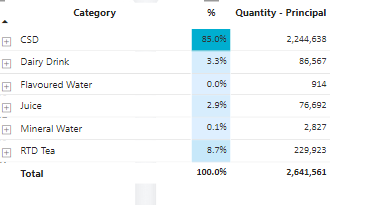
every time I pick one category  I want to get the percent from total:

sapirmarko_0-1675171554073.png

for example, if I pick CSD I want to get 85% -  2.2M / 2.6 M

important thing- I want that the date slicer will affect the measure, but if I pick another territory I want that the answer won't change. 


model looks like :

sapirmarko_1-1675171921461.png


5 REPLIES 5
olgad
Super User
Super User

It changes because the nominator changes too.
that shall be your nominator

Calculate(Sales[Sales], ALL(Wholesalers[territory_name]))

Not sure what you want to achieve, but if you dont want the slicer to affect that visual at all you can simply set edit interactions to none. 

DID I ANSWER YOUR QUESTION? PLEASE MARK MY POST AS A SOLUTION! APPRECIATE YOUR KUDO/LIKE!
PROUD TO BE A SUPER USER!
Best Stories, Interesting Cases: PowerBI Storytime Newsletter
Linkedin Profile: Linkedin
YouTube Channel: PowerBI Storytime

I need to get the total sales that only the date slicer will affect about this measure, I can't dit interactions to none because it's part od another measure that need use with the other slicers

Fine, have you tried to change the nominator as suggested?


DID I ANSWER YOUR QUESTION? PLEASE MARK MY POST AS A SOLUTION! APPRECIATE YOUR KUDO/LIKE!
PROUD TO BE A SUPER USER!
Best Stories, Interesting Cases: PowerBI Storytime Newsletter
Linkedin Profile: Linkedin
YouTube Channel: PowerBI Storytime
olgad
Super User
Super User

%=DIVIDE([Quantity Principal],  Calculate([Quantity Principal], All(WHS[TerritoryName])))
You need All to remove the filter from Territory

DID I ANSWER YOUR QUESTION? PLEASE MARK MY POST AS A SOLUTION! APPRECIATE YOUR KUDO/LIKE!
PROUD TO BE A SUPER USER!
Best Stories, Interesting Cases: PowerBI Storytime Newsletter
Linkedin Profile: Linkedin
YouTube Channel: PowerBI Storytime

If we break it down into factors, then I calculate the denominator in the following way:

CALCULATE(
[Quantity - Principal],
KEEPFILTERS(Sale_Out[paid_date]),
ALL(Product1[category_name]),
ALL(Wholesalers[territory_name]))
 
when I filter the category_name the answer doesn't change -  that good
when I filter the paid_datethe answer change -  that good
but when I filter the territory_namethe answer change -  that not good

Helpful resources

Announcements
Power BI DataViz World Championships

Power BI Dataviz World Championships

The Power BI Data Visualization World Championships is back! Get ahead of the game and start preparing now!

November Power BI Update Carousel

Power BI Monthly Update - November 2025

Check out the November 2025 Power BI update to learn about new features.

FabCon Atlanta 2026 carousel

FabCon Atlanta 2026

Join us at FabCon Atlanta, March 16-20, for the ultimate Fabric, Power BI, AI and SQL community-led event. Save $200 with code FABCOMM.