cancel
Showing results for 
Search instead for 
Did you mean: 

Get Fabric Certified for FREE during Fabric Data Days. Don't miss your chance! Request now

Reply
Anonymous
Not applicable

% of the Grand Total


Hi Guys,

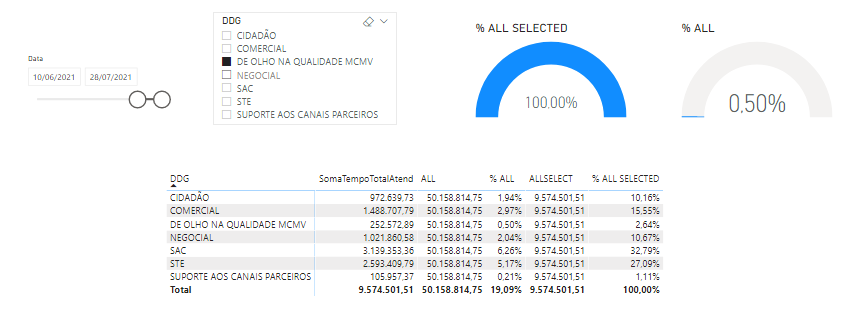
I'm creating a visualization panel to monitor the minutes of service in a call center. In one of the visuals, I would like to display, in the form of an indicator, the percentage of minutes served for a selected channel in relation to the total in a given period. I tried the formula ALL, however all filters are eliminated. When using the ALL SELECTED formula, the view always returns 100%, unlike ALL, which returns the relative value. As the image below, in the table view the % of the total of all selected works normally, but my goal is to display in the indicator. Thanks in advance.


BoraBAHEA88_0-1628036859868.png


1 ACCEPTED SOLUTION
Anonymous
Not applicable

3 REPLIES 3
giuliapiazza94
Helper IV
Helper IV

Can you write here the dax formula "% ALL SELECTED" please? 😁

Anonymous
Not applicable

Thanks!!

Mohammad_Refaei
Solution Specialist
Solution Specialist

Looks like yo need to use the ALL function on the channel column not the whole table.

Helpful resources

Announcements
November Power BI Update Carousel

Power BI Monthly Update - November 2025

Check out the November 2025 Power BI update to learn about new features.

Fabric Data Days Carousel

Fabric Data Days

Advance your Data & AI career with 50 days of live learning, contests, hands-on challenges, study groups & certifications and more!

FabCon Atlanta 2026 carousel

FabCon Atlanta 2026

Join us at FabCon Atlanta, March 16-20, for the ultimate Fabric, Power BI, AI and SQL community-led event. Save $200 with code FABCOMM.