
Join us at FabCon Atlanta from March 16 - 20, 2026, for the ultimate Fabric, Power BI, AI and SQL community-led event. Save $200 with code FABCOMM.
Register now!The Power BI Data Visualization World Championships is back! Get ahead of the game and start preparing now! Learn more
Hi.
I have a DCalendar table with a field to identify the day of the week in the month.
I need her to start counting the week from Thursday.
Example S1 from December 2020 (days 1, 2 and 3) - S2 (from 4 to 10) and so on!
Can anyone help me do the DAX for this?
Solved! Go to Solution.
Hi @Anonymous ,
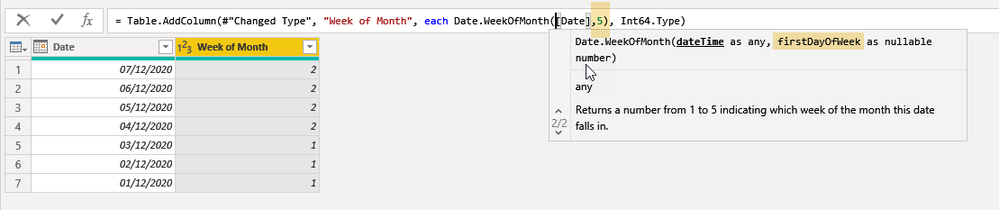
I believe from your screenshot you want you week to start on Friday (04/12/2020).
Two different options:
- Power Query Editor --> Date.WeekOfMonth
- Calculated column in DAX:
Regards,
Hi @Anonymous ,
I believe from your screenshot you want you week to start on Friday (04/12/2020).
Two different options:
- Power Query Editor --> Date.WeekOfMonth
- Calculated column in DAX:
Regards,
Dear Payeras_BI
Thank you for your feedback and time in doing the example.
It was just what I needed.
I'm new to powerquery and DAX, I did a lot of research before posting on the forum and was not getting it.
I will study the commands that you put.
hey,
you could add a new column with some nested ifs,
new column = if(weekday(date) = 5, "S2",if(weekday(date) = 6,"S2",... and so on
number 5 of the week its thursday
if this helped or resolve your problem give some kudos and mark as solutions for others to find.
Proud to be a Super User!
hello StefanoGrimaldi
Thanks for the feedback, but I didn't understand how to apply it.
Can you set up an example?
if you put S2 for every number 5 every Thursday will be S2 and that's not what I need.
The Power BI Data Visualization World Championships is back! Get ahead of the game and start preparing now!
Check out the November 2025 Power BI update to learn about new features.
| User | Count |
|---|---|
| 20 | |
| 10 | |
| 9 | |
| 4 | |
| 4 |
| User | Count |
|---|---|
| 33 | |
| 31 | |
| 19 | |
| 12 | |
| 11 |