cancel
Showing results for 
Search instead for 
Did you mean: 

We've captured the moments from FabCon & SQLCon that everyone is talking about, and we are bringing them to the community, live and on-demand. Starts on April 14th. Register now

Reply
Anonymous
Not applicable

measure to visualize day out of stock


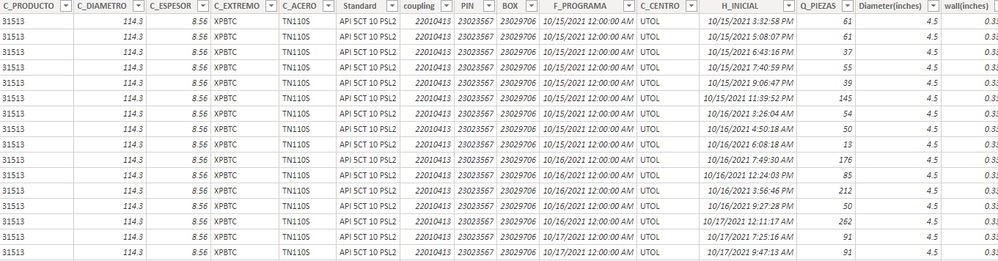
I am trying to create a visual that shows what day a product will run out. both files are linked with Sap product code and the couplings. current stock is the available stock for the code while q_pieza is the number of order for that code. The visual i am trying to build will show if x amount is ordered then with the current stock, the couplings will be done on this day. i belive i need to write  a measure to get that visual considering the current stock doesnt have a date attached. any sort of help will be appriciated and if it is confusing let me know and i will edit it. Thank you in advance 

available stockavailable stock


order  piecesorder pieces

3 REPLIES 3
Anonymous
Not applicable

@Greg_Deckler thank you for your response and i appreciate the effort but that has nothing to do with what i am trying to do 

@Anonymous OK, then will need sample data and expected output. 


Not really enough information to go on, please first check if your issue is a common issue listed here: https://community.powerbi.com/t5/Community-Blog/Before-You-Post-Read-This/ba-p/1116882

Also, please see this post regarding How to Get Your Question Answered Quickly: https://community.powerbi.com/t5/Community-Blog/How-to-Get-Your-Question-Answered-Quickly/ba-p/38490

The most important parts are:
1. Sample data as text, use the table tool in the editing bar
2. Expected output from sample data
3. Explanation in words of how to get from 1. to 2.


Follow on LinkedIn
@ me in replies or I'll lose your thread!!!
Instead of a Kudo, please vote for this idea
Become an expert!: Enterprise DNA
External Tools: MSHGQM
YouTube Channel!: Microsoft Hates Greg
Latest book!:
DAX For Humans

DAX is easy, CALCULATE makes DAX hard...
Greg_Deckler
Community Champion
Community Champion

@Anonymous I did something similar to this, Days of Supply: https://community.powerbi.com/t5/Quick-Measures-Gallery/Days-of-Supply/m-p/635656#M318


Follow on LinkedIn
@ me in replies or I'll lose your thread!!!
Instead of a Kudo, please vote for this idea
Become an expert!: Enterprise DNA
External Tools: MSHGQM
YouTube Channel!: Microsoft Hates Greg
Latest book!:
DAX For Humans

DAX is easy, CALCULATE makes DAX hard...

Helpful resources

Announcements
New to Fabric survey Carousel

New to Fabric Survey

If you have recently started exploring Fabric, we'd love to hear how it's going. Your feedback can help with product improvements.

Power BI DataViz World Championships carousel

Power BI DataViz World Championships - June 2026

A new Power BI DataViz World Championship is coming this June! Don't miss out on submitting your entry.

Join our Fabric User Panel

Join our Fabric User Panel

Share feedback directly with Fabric product managers, participate in targeted research studies and influence the Fabric roadmap.

March Power BI Update Carousel

Power BI Community Update - March 2026

Check out the March 2026 Power BI update to learn about new features.