Join us at FabCon Atlanta from March 16 - 20, 2026, for the ultimate Fabric, Power BI, AI and SQL community-led event. Save $200 with code FABCOMM.
Register now!The Power BI Data Visualization World Championships is back! Get ahead of the game and start preparing now! Learn more
Hi all,
can anyone help me?
I am using the below formula but the results are "Error".
column name =IF(Tasks[TaskName]="Initiation",Tasks[TaskStartDate].[Date],"")
I want to find a specific name and then the dates of that name.
Thanks for your help
@Anonymous
Please share the screenshot with the error.
________________________
If my answer was helpful, please click Accept it as the solution to help other members find it useful
Click on the Thumbs-Up icon if you like this reply 🙂
⭕ Subscribe and learn Power BI from these videos
⚪ Website ⚪ LinkedIn ⚪ PBI User Group
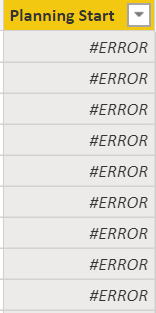
here it is
@Anonymous
If you do it in Power Query then:
=if Tasks[TaskName]="Initiation" then Tasks[TaskStartDate] else null
If you are adding it as a column using DAX in your data model then:
column name =IF(Tasks[TaskName]="Initiation",Tasks[TaskStartDate],"")________________________
If my answer was helpful, please click Accept it as the solution to help other members find it useful
Click on the Thumbs-Up icon if you like this reply 🙂
⭕ Subscribe and learn Power BI from these videos
⚪ Website ⚪ LinkedIn ⚪ PBI User Group
Thanks but it still is showing #ERROR.
your second formula is exactly I copied above
The Power BI Data Visualization World Championships is back! Get ahead of the game and start preparing now!
Check out the November 2025 Power BI update to learn about new features.
| User | Count |
|---|---|
| 20 | |
| 10 | |
| 9 | |
| 4 | |
| 4 |
| User | Count |
|---|---|
| 34 | |
| 32 | |
| 20 | |
| 12 | |
| 11 |