Join us at FabCon Atlanta from March 16 - 20, 2026, for the ultimate Fabric, Power BI, AI and SQL community-led event. Save $200 with code FABCOMM.
Register now!The Power BI Data Visualization World Championships is back! Get ahead of the game and start preparing now! Learn more
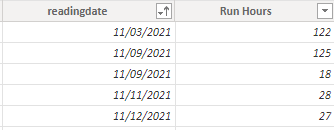
I am using this to calculate cumulative runhours
same value for same dates. I want to have 0 in first row for 11/9 and 265 in second row for 11/9
How can i achieve that?
Solved! Go to Solution.
Hi @WTAS80486 ,
I have create a simple sample, please refer to it to see if it helps you.
Add an index column first.
Then create a measure.
Measure =
VAR _count =
CALCULATE (
COUNT ( MeterReading[readingdate] ),
FILTER (
ALL ( MeterReading ),
MeterReading[readingdate] = SELECTEDVALUE ( MeterReading[readingdate] )
)
)
VAR _1mindate =
CALCULATE (
MIN ( MeterReading[Index] ),
FILTER (
ALL ( MeterReading ),
MeterReading[readingdate] = SELECTEDVALUE ( MeterReading[readingdate] )
)
)
VAR _result =
CALCULATE (
SUM ( MeterReading[Run Hours] ),
FILTER (
ALL ( MeterReading ),
MeterReading[readingdate] <= SELECTEDVALUE ( MeterReading[readingdate] )
)
)
RETURN
IF ( _count <> 1 && _1mindate = MAX ( MeterReading[Index] ), 0, _result )
or a column.
Column =
VAR _count =
CALCULATE (
COUNT ( MeterReading[readingdate] ),
FILTER (
ALL ( MeterReading ),
MeterReading[readingdate] = EARLIER ( MeterReading[readingdate] )
)
)
VAR _1mindate =
CALCULATE (
MIN ( MeterReading[Index] ),
FILTER (
ALL ( MeterReading ),
MeterReading[readingdate] = EARLIER ( MeterReading[readingdate] )
)
)
VAR _result =
CALCULATE (
SUM ( MeterReading[Run Hours] ),
FILTER (
ALL ( MeterReading ),
MeterReading[readingdate] <= EARLIER ( MeterReading[readingdate] )
)
)
RETURN
IF ( _count <> 1 && _1mindate = ( MeterReading[Index] ), 0, _result )
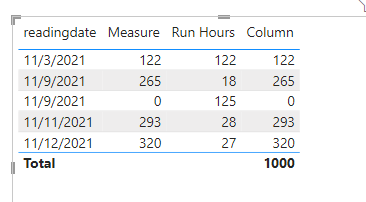
If I have misunderstood your meaning, please provide a pbix file without privacy information and more details with your desired output.
Best Regards
Community Support Team _ Polly
If this post helps, then please consider Accept it as the solution to help the other members find it more quickly.
Hi @WTAS80486 ,
I have create a simple sample, please refer to it to see if it helps you.
Add an index column first.
Then create a measure.
Measure =
VAR _count =
CALCULATE (
COUNT ( MeterReading[readingdate] ),
FILTER (
ALL ( MeterReading ),
MeterReading[readingdate] = SELECTEDVALUE ( MeterReading[readingdate] )
)
)
VAR _1mindate =
CALCULATE (
MIN ( MeterReading[Index] ),
FILTER (
ALL ( MeterReading ),
MeterReading[readingdate] = SELECTEDVALUE ( MeterReading[readingdate] )
)
)
VAR _result =
CALCULATE (
SUM ( MeterReading[Run Hours] ),
FILTER (
ALL ( MeterReading ),
MeterReading[readingdate] <= SELECTEDVALUE ( MeterReading[readingdate] )
)
)
RETURN
IF ( _count <> 1 && _1mindate = MAX ( MeterReading[Index] ), 0, _result )
or a column.
Column =
VAR _count =
CALCULATE (
COUNT ( MeterReading[readingdate] ),
FILTER (
ALL ( MeterReading ),
MeterReading[readingdate] = EARLIER ( MeterReading[readingdate] )
)
)
VAR _1mindate =
CALCULATE (
MIN ( MeterReading[Index] ),
FILTER (
ALL ( MeterReading ),
MeterReading[readingdate] = EARLIER ( MeterReading[readingdate] )
)
)
VAR _result =
CALCULATE (
SUM ( MeterReading[Run Hours] ),
FILTER (
ALL ( MeterReading ),
MeterReading[readingdate] <= EARLIER ( MeterReading[readingdate] )
)
)
RETURN
IF ( _count <> 1 && _1mindate = ( MeterReading[Index] ), 0, _result )
If I have misunderstood your meaning, please provide a pbix file without privacy information and more details with your desired output.
Best Regards
Community Support Team _ Polly
If this post helps, then please consider Accept it as the solution to help the other members find it more quickly.
@Anonymous Thanks
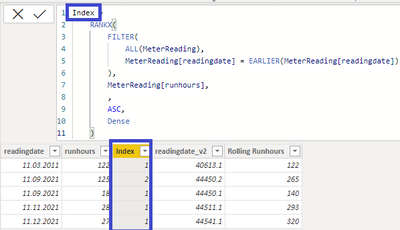
1. You can add Index column
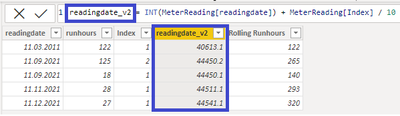
2. Then You add readingdate_v2
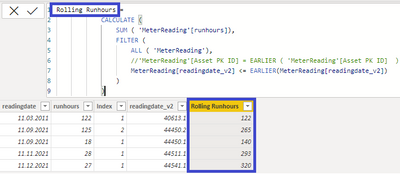
3. And finally Your [Rolling Runhours] think works fine
This solution works fine if You don't get exactly the same runhours in the same day multiple times.
If this is a case then adding additional Index column in Power Query can help here.
The Power BI Data Visualization World Championships is back! Get ahead of the game and start preparing now!
Check out the November 2025 Power BI update to learn about new features.
| User | Count |
|---|---|
| 20 | |
| 11 | |
| 10 | |
| 4 | |
| 4 |
| User | Count |
|---|---|
| 32 | |
| 28 | |
| 19 | |
| 11 | |
| 10 |