Get certified for free when you join Fabric Data Days 2026 and dive into Fabric, Power BI, SQL, AI, and other essential data skills.
Join nowTry your skills in the Power BI Dataviz World Championship! Round one ends June 26. Join now
Hi everyone
I had a table (MB51) in power pivot and I created a measure to sum of one column in this table {Quantity},
Now I want to only filter this table based on certain range of first calculated measure
How can I do that?
Thanks in advance
Solved! Go to Solution.
Hello Again @osama_ayoub
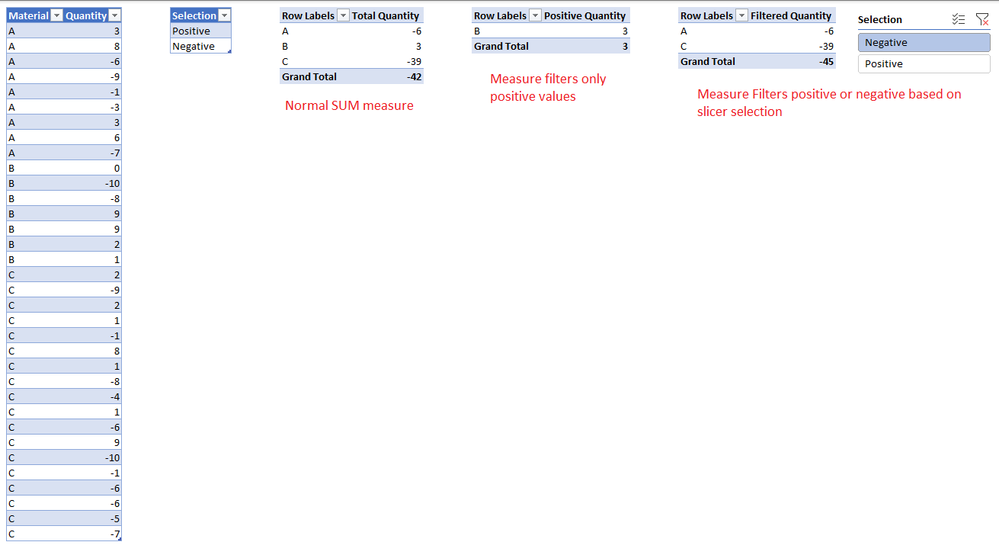
Please refer to sample file inluding couple of examples. Please let me know if you still need further help. We may also connect via zoom or teams.
Hello Again @osama_ayoub
Please refer to sample file inluding couple of examples. Please let me know if you still need further help. We may also connect via zoom or teams.
Thank you so much.
thank you for your reply,but I can not understand it, let me explain my issue:
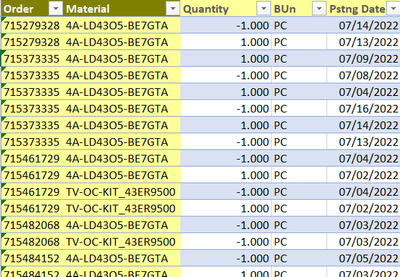
I have a table 1 like this
the column[Order} has duplicated values and I want to sum values from column[Quantity]
after that I want to make a filter on only the rows in column[order] which has sum of [quantity] greater than 0.
this table is connected with another one and I want only the order which has sum of [quantity] greater than 0 to use it to make my report.
Thanks in advance.
Regards
Hi @osama_ayoub
attached an example of how to use measures to filter a table in power pivot. Please let me know if you need any further help.
Don't miss out on Data Days, June 15 through August 7. Learn Fabric, Power BI, SQL, AI and more.
Check out the May 2026 Power BI update to learn about new features.
| User | Count |
|---|---|
| 3 | |
| 2 | |
| 2 | |
| 1 | |
| 1 |