FabCon is coming to Atlanta
Join us at FabCon Atlanta from March 16 - 20, 2026, for the ultimate Fabric, Power BI, AI and SQL community-led event. Save $200 with code FABCOMM.
Register now!- Power BI forums
- Get Help with Power BI
- Desktop
- Service
- Report Server
- Power Query
- Mobile Apps
- Developer
- DAX Commands and Tips
- Custom Visuals Development Discussion
- Health and Life Sciences
- Power BI Spanish forums
- Translated Spanish Desktop
- Training and Consulting
- Instructor Led Training
- Dashboard in a Day for Women, by Women
- Galleries
- Data Stories Gallery
- Themes Gallery
- Contests Gallery
- QuickViz Gallery
- Quick Measures Gallery
- Visual Calculations Gallery
- Notebook Gallery
- Translytical Task Flow Gallery
- TMDL Gallery
- R Script Showcase
- Webinars and Video Gallery
- Ideas
- Custom Visuals Ideas (read-only)
- Issues
- Issues
- Events
- Upcoming Events
The Power BI Data Visualization World Championships is back! Get ahead of the game and start preparing now! Learn more
- Power BI forums
- Forums
- Get Help with Power BI
- DAX Commands and Tips
- Re: creating a new table that sums values from row...
- Subscribe to RSS Feed
- Mark Topic as New
- Mark Topic as Read
- Float this Topic for Current User
- Bookmark
- Subscribe
- Printer Friendly Page


- Mark as New
- Bookmark
- Subscribe
- Mute
- Subscribe to RSS Feed
- Permalink
- Report Inappropriate Content
creating a new table that sums values from rows of another table that have the same dateid
*updated for clarity*
Hi,
I want to create a table that sums values from rows of a different table where the sum is for the desired values from the same date.
Best way I can explain:
From:
| DateId | SettingName | TotalCount |
| 20210901 | Value1 | 50 |
| 20210901 | Value2 | 20 |
| 20210901 | Value3 | 111 |
| 20210902 | Value1 | 40 |
| 20210902 | Value2 | 10 |
| 20210901 | Value3 | 222 |
Create a new table like this (where I only bring over the sum for Value 1 and Value 2):
| DateId | SettingName | TotalCount |
| 20210901 | Value1Value2 | 70 |
| 20210902 | Value1Value2 | 50 |
Note: SettingName value can be static text but can also go with concatenated.
Solved! Go to Solution.


- Mark as New
- Bookmark
- Subscribe
- Mute
- Subscribe to RSS Feed
- Permalink
- Report Inappropriate Content
Hi @darinme
Try this to exclude Value3 from the new table:
Table 2 =
SUMMARIZE (
    filter('Table','Table'[SettingName]<>"Value3"),
    'Table'[DateId],
    "SettingName", CONCATENATEX ( 'Table', 'Table'[SettingName], "" ),
    "TotalCount", SUM ( 'Table'[TotalCount] )
)
DATA :
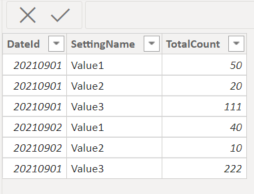
Output:
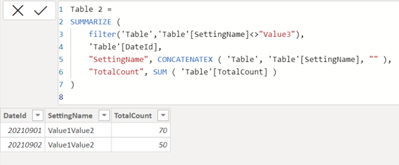
If this post helps, please consider accepting it as the solution to help the other members find it more quickly.
Appreciate your Kudos!!
LinkedIn: www.linkedin.com/in/vahid-dm/
- Mark as New
- Bookmark
- Subscribe
- Mute
- Subscribe to RSS Feed
- Permalink
- Report Inappropriate Content
HI @darinme
If you want a DAX code to create a new table, try this:
https://docs.microsoft.com/en-us/power-bi/transform-model/desktop-calculated-tables
Table 2 =
SUMMARIZE (
    'Table',
    'Table'[DateId],
    "SettingName", CONCATENATEX ( 'Table', 'Table'[SettingName], "" ),
    "TotalCount", SUM ( 'Table'[TotalCount] )
)
Output:
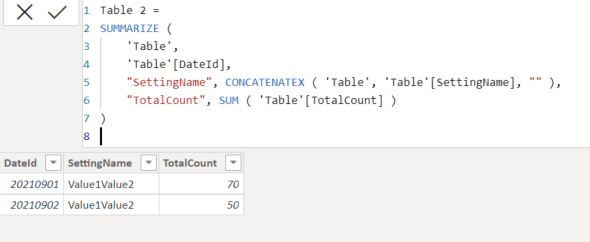
If this post helps, please consider accepting it as the solution to help the other members find it more quickly.
Appreciate your Kudos!!
LinkedIn: www.linkedin.com/in/vahid-dm/
- Mark as New
- Bookmark
- Subscribe
- Mute
- Subscribe to RSS Feed
- Permalink
- Report Inappropriate Content
Thanks for that and would be perfect to my posted question. I realize that I negelcted to state there are other SettingNames values I do not want to include.
Updating my table example where I do not want to bring over Value3 into the new table.
| DateId | SettingName | TotalCount |
| 20210901 | Value1 | 50 |
| 20210901 | Value2 | 20 |
| 20210901 | Value3 | 111 |
| 20210902 | Value1 | 40 |
| 20210902 | Value2 | 10 |
| 20210901 | Value3 | 222 |
Create a new table like this:
| DateId | SettingName | TotalCount |
| 20210901 | Value1Value2 | 70 |
| 20210902 | Value1Value2 | 50 |


- Mark as New
- Bookmark
- Subscribe
- Mute
- Subscribe to RSS Feed
- Permalink
- Report Inappropriate Content
Hi @darinme
When you said a new table, it is a table you go with Power Query or DAX Calculated table, or a table visual?
You can groupby in M
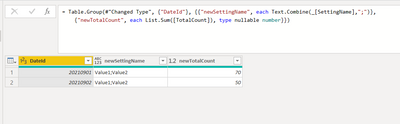
Table.Group(#"Changed Type", {"DateId"}, {{"newSettingName", each Text.Combine(_[SettingName],";")}, {"newTotalCount", each List.Sum([TotalCount]), type nullable number}})Or go with measures for a table visual
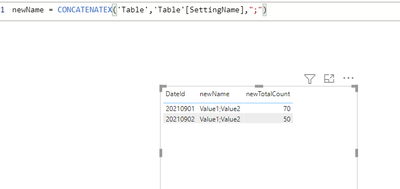
newName = CONCATENATEX('Table','Table'[SettingName],";")

newTotalCount = SUM('Table'[TotalCount])
- Mark as New
- Bookmark
- Subscribe
- Mute
- Subscribe to RSS Feed
- Permalink
- Report Inappropriate Content
Thank you. I prefer DAX table. I also neglected to state there are other SettingNames values I do not want to include.
Updating my table example where I do not want to bring over Value3 into the new table.
| DateId | SettingName | TotalCount |
| 20210901 | Value1 | 50 |
| 20210901 | Value2 | 20 |
| 20210901 | Value3 | 111 |
| 20210902 | Value1 | 40 |
| 20210902 | Value2 | 10 |
| 20210901 | Value3 | 222 |
Create a new table like this:
| DateId | SettingName | TotalCount |
| 20210901 | Value1Value2 | 70 |
| 20210902 | Value1Value2 | 50 |
- Mark as New
- Bookmark
- Subscribe
- Mute
- Subscribe to RSS Feed
- Permalink
- Report Inappropriate Content
Hi @darinme
Try this to exclude Value3 from the new table:
Table 2 =
SUMMARIZE (
    filter('Table','Table'[SettingName]<>"Value3"),
    'Table'[DateId],
    "SettingName", CONCATENATEX ( 'Table', 'Table'[SettingName], "" ),
    "TotalCount", SUM ( 'Table'[TotalCount] )
)
DATA :
Output:
If this post helps, please consider accepting it as the solution to help the other members find it more quickly.
Appreciate your Kudos!!
LinkedIn: www.linkedin.com/in/vahid-dm/
- Mark as New
- Bookmark
- Subscribe
- Mute
- Subscribe to RSS Feed
- Permalink
- Report Inappropriate Content
That does it! Thanks. I also discovered that I can do the inverse using 'IN' to only select the fields I want. Useful when there are many values and only wnat a few.
Table 2 =
SUMMARIZE (
    filter('Table','Table'[SettingName] IN {"Value1","Value2")},
    'Table'[DateId],
    "SettingName", CONCATENATEX ( 'Table', 'Table'[SettingName], "" ),
    "TotalCount", SUM ( 'Table'[TotalCount] )

Helpful resources

Power BI Dataviz World Championships
The Power BI Data Visualization World Championships is back! Get ahead of the game and start preparing now!

Power BI Monthly Update - November 2025
Check out the November 2025 Power BI update to learn about new features.

FabCon Atlanta 2026
Join us at FabCon Atlanta, March 16-20, for the ultimate Fabric, Power BI, AI and SQL community-led event. Save $200 with code FABCOMM.

| User | Count |
|---|---|
| 20 | |
| 10 | |
| 9 | |
| 4 | |
| 4 |


| User | Count |
|---|---|
| 33 | |
| 31 | |
| 19 | |
| 12 | |
| 11 |


