Join us at FabCon Atlanta from March 16 - 20, 2026, for the ultimate Fabric, Power BI, AI and SQL community-led event. Save $200 with code FABCOMM.
Register now!The Power BI Data Visualization World Championships is back! Get ahead of the game and start preparing now! Learn more
i want to apply conditional formatting in a matrix for each row separatly instead of comparing all rows along the matrix
for example, in the image below, for each item im grouping data by month and i want to apply conditional formatting to compare values for each specific item in the selected months but seperated from other items
Solved! Go to Solution.
Hi,
I am not sure if I understood your question correctly, but please try the below.
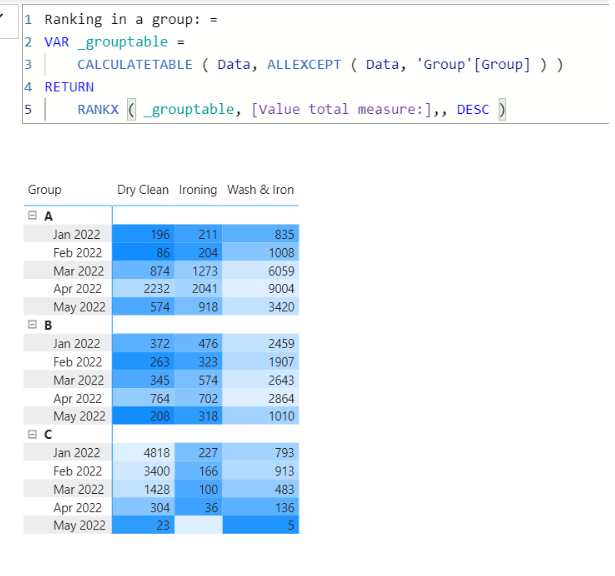
I tried to create a sample pbix file like below, and the conditional formatting for the background color can be based on the [Ranking in a group measure].
Value total measure: =
SUM( Data[Value] )
Ranking in a group measure: =
VAR _grouptable =
CALCULATETABLE ( Data, ALLEXCEPT ( Data, 'Group'[Group] ) )
RETURN
RANKX ( _grouptable, [Value total measure:],, DESC )
Hi,
I am not sure if I understood your question correctly, but please try the below.
I tried to create a sample pbix file like below, and the conditional formatting for the background color can be based on the [Ranking in a group measure].
Value total measure: =
SUM( Data[Value] )
Ranking in a group measure: =
VAR _grouptable =
CALCULATETABLE ( Data, ALLEXCEPT ( Data, 'Group'[Group] ) )
RETURN
RANKX ( _grouptable, [Value total measure:],, DESC )
The Power BI Data Visualization World Championships is back! Get ahead of the game and start preparing now!
Check out the November 2025 Power BI update to learn about new features.
| User | Count |
|---|---|
| 20 | |
| 11 | |
| 10 | |
| 4 | |
| 4 |
| User | Count |
|---|---|
| 34 | |
| 31 | |
| 19 | |
| 12 | |
| 11 |