cancel
Showing results for 
Search instead for 
Did you mean: 

The Power BI Data Visualization World Championships is back! Get ahead of the game and start preparing now! Learn more

Reply
Anonymous
Not applicable

column and another column last letter comparison

I have two column In the table first column name ID  and next column name pd-id .  I am trying to compare First column  value and Next column last num  if match  both value match its return  True  and both value not match its  return False

Example :


ID         Pd-id 

1          ID01-PS-001


 1         ID01-PS-001


 2         ID01-PS-001


 1          ID01-PS-002


 3         ID01-PS-003


  2         ID01-PS-002


  3          ID01-PS-002


  4          ID01-PS-004


Expected output:


ID         Pd-id                        Result 

1          ID01-PS-001             True 


 1         ID01-PS-001             True


 2         ID01-PS-001             False


 1          ID01-PS-002             False


 3         ID01-PS-003              True


  2         ID01-PS-002             True


  3          ID01-PS-002            False


  4          ID01-PS-004            True


I am looking for support . thanks in advance.

1 ACCEPTED SOLUTION
Anonymous
Not applicable

Hi @Anonymous 

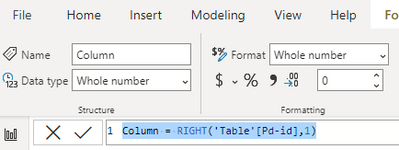
First , you need to extract the last num in your Pd-id column . Create a calculated column :

Column = RIGHT('Table'[Pd-id],1)

Change data type of the column to whole number .

Ailsamsft_0-1668996702603.png

Then create a calculated column to compare the First column  value and Next column last num .

Result = IF('Table'[Column]='Table'[ID],TRUE,false)

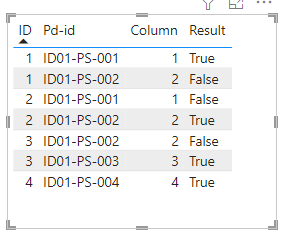
You will get a result like this :

Ailsamsft_1-1668996899092.png

Best Regards,
Community Support Team _ Ailsa Tao
If this post helps, then please consider Accept it as the solution to help the other members find it more quickly.

View solution in original post

3 REPLIES 3
Anonymous
Not applicable

Hi @Anonymous 

First , you need to extract the last num in your Pd-id column . Create a calculated column :

Column = RIGHT('Table'[Pd-id],1)

Change data type of the column to whole number .

Ailsamsft_0-1668996702603.png

Then create a calculated column to compare the First column  value and Next column last num .

Result = IF('Table'[Column]='Table'[ID],TRUE,false)

You will get a result like this :

Ailsamsft_1-1668996899092.png

Best Regards,
Community Support Team _ Ailsa Tao
If this post helps, then please consider Accept it as the solution to help the other members find it more quickly.

Anonymous
Not applicable

@Anonymous  Thank you so much . 

FreemanZ
Super User
Super User

Try to add a new column with the code below:

Result=

IF(CONTAINSSTRING([id], [pd-id]), TRUE, FALSE)

Helpful resources

Announcements
November Power BI Update Carousel

Power BI Monthly Update - November 2025

Check out the November 2025 Power BI update to learn about new features.

Fabric Data Days Carousel

Fabric Data Days

Advance your Data & AI career with 50 days of live learning, contests, hands-on challenges, study groups & certifications and more!

FabCon Atlanta 2026 carousel

FabCon Atlanta 2026

Join us at FabCon Atlanta, March 16-20, for the ultimate Fabric, Power BI, AI and SQL community-led event. Save $200 with code FABCOMM.