cancel
Showing results for 
Search instead for 
Did you mean: 

The Power BI Data Visualization World Championships is back! Get ahead of the game and start preparing now! Learn more

Reply
eliasayyy
Memorable Member
Memorable Member

change between visual if i select a field parameter

hello everyone,

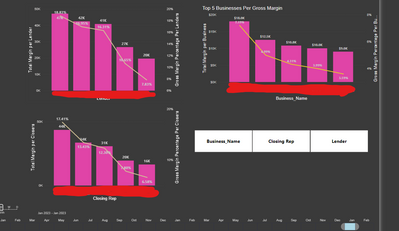
i have this visuals

annonymous1999_0-1675726689561.png


it just shows gross margin by lender,closing rep or business name,

simple measure just sum of gross margin, and shwoing from high to low,

what i want is a way to use this parameter slicer, if i press "lender" only show the lender visual, if i press "business" , only show the business visual.

I want the visuals to be stacked on each others because i have otehr visuals in this table, and thos charts will interact only with tis parameter slicer

is it possible?


1 ACCEPTED SOLUTION
amitchandak
Super User
Super User

@eliasayyy , Change between visual will happen using boomarks.

Field parameters can change axis and measure and you can also change measure when axis changes 


Bookmark way

Axis Slicer: https://www.youtube.com/watch?v=PGFTOLFGDs8&list=PLPaNVDMhUXGYzjFASXjdY7GNoFxvlkR54&index=20


Power BI Field Parameters — A Quick way for Dynamic Visuals: https://amitchandak.medium.com/power-bi-field-parameters-a-quick-way-for-dynamic-visuals-fc4095ae9af...
Power BI Field Parameters- Measure Slicer and Axis/Dimension slicer: https://youtu.be/lqF3Wa1FllE

Field Parameters- Conditional Formatting
: https://amitchandak.medium.com/field-parameters-conditional-formatting-517aacc23fdf


Change measure with Axis Slicer

Switch TOPN with Field Parameters: https://amitchandak.medium.com/switch-topn-with-field-parameters-299a0ae3725f

Changing measures based on the axis with Field Parameters in Power BI. Dynamic measures based on the axis/Dimension: https://youtu.be/7ikRAelDph0

Share with Power BI Enthusiasts: Full Power BI Video (20 Hours) YouTube
Microsoft Fabric Series 60+ Videos YouTube
Microsoft Fabric Hindi End to End YouTube

View solution in original post

1 REPLY 1
amitchandak
Super User
Super User

@eliasayyy , Change between visual will happen using boomarks.

Field parameters can change axis and measure and you can also change measure when axis changes 


Bookmark way

Axis Slicer: https://www.youtube.com/watch?v=PGFTOLFGDs8&list=PLPaNVDMhUXGYzjFASXjdY7GNoFxvlkR54&index=20


Power BI Field Parameters — A Quick way for Dynamic Visuals: https://amitchandak.medium.com/power-bi-field-parameters-a-quick-way-for-dynamic-visuals-fc4095ae9af...
Power BI Field Parameters- Measure Slicer and Axis/Dimension slicer: https://youtu.be/lqF3Wa1FllE

Field Parameters- Conditional Formatting
: https://amitchandak.medium.com/field-parameters-conditional-formatting-517aacc23fdf


Change measure with Axis Slicer

Switch TOPN with Field Parameters: https://amitchandak.medium.com/switch-topn-with-field-parameters-299a0ae3725f

Changing measures based on the axis with Field Parameters in Power BI. Dynamic measures based on the axis/Dimension: https://youtu.be/7ikRAelDph0

Share with Power BI Enthusiasts: Full Power BI Video (20 Hours) YouTube
Microsoft Fabric Series 60+ Videos YouTube
Microsoft Fabric Hindi End to End YouTube

Helpful resources

Announcements
Power BI DataViz World Championships

Power BI Dataviz World Championships

The Power BI Data Visualization World Championships is back! Get ahead of the game and start preparing now!

December 2025 Power BI Update Carousel

Power BI Monthly Update - December 2025

Check out the December 2025 Power BI Holiday Recap!

FabCon Atlanta 2026 carousel

FabCon Atlanta 2026

Join us at FabCon Atlanta, March 16-20, for the ultimate Fabric, Power BI, AI and SQL community-led event. Save $200 with code FABCOMM.