
Join us at FabCon Atlanta from March 16 - 20, 2026, for the ultimate Fabric, Power BI, AI and SQL community-led event. Save $200 with code FABCOMM.
Register now!The Power BI Data Visualization World Championships is back! Get ahead of the game and start preparing now! Learn more
I am very new to Power BI, but I have to present my work in a few days.
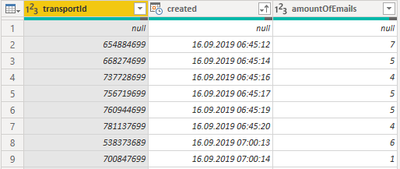
As you can see in the table, we have the collums:
- transportID
- created
- amountOfEmails
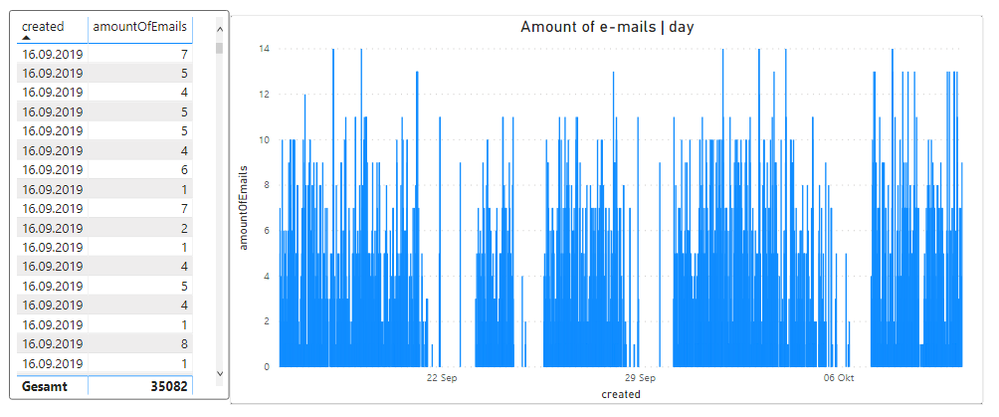
What I need to present is the total number of mails sent per day in a list and as a bar chart.
Can anyone help me?
PS: At the moment I only got this.
Thank you very much.
qwertzuiop
Solved! Go to Solution.
Hi @qwertzuiop
1. Create an additional column with the date only:
CreationDate = INT( Table1[Created] )
and and convert to Date type
2. Place Table1[CreationDate] in the rows of a table visual and in the axis of a bar chart
3. Place this measure in both visuals:
NumEmails = SUM( Table1[amountOfemails] )
Please mark the question solved when done and consider giving kudos if posts are helpful.
Cheers ![]()
Hi @qwertzuiop
1. Create an additional column with the date only:
CreationDate = INT( Table1[Created] )
and and convert to Date type
2. Place Table1[CreationDate] in the rows of a table visual and in the axis of a bar chart
3. Place this measure in both visuals:
NumEmails = SUM( Table1[amountOfemails] )
Please mark the question solved when done and consider giving kudos if posts are helpful.
Cheers ![]()
The Power BI Data Visualization World Championships is back! Get ahead of the game and start preparing now!
Check out the November 2025 Power BI update to learn about new features.
| User | Count |
|---|---|
| 20 | |
| 10 | |
| 9 | |
| 4 | |
| 4 |
| User | Count |
|---|---|
| 33 | |
| 31 | |
| 19 | |
| 12 | |
| 11 |