cancel
Showing results for 
Search instead for 
Did you mean: 

Level up your Power BI skills this month - build one visual each week and tell better stories with data! Get started

Reply
AI14
Helper III
Helper III

adjust if formula to look at relative date in date/time

Hi


how can i make my date of my date/time column relative to today?

i want to avoid going into my data everyday and changing the date


= Table.AddColumn(#"Filtered Rows", "AM/PM", each if [ST] <= #datetime(2023, 1, 20, 13, 50, 0) then "AM" else "PM")

ST  
21/01/2023 04:30:00 AM
21/01/2023 20:30:00 PM
21/01/2023 06:30:00 AM
21/01/2023 14:30:00 PM
21/01/2023 13:30:00 AM
1 ACCEPTED SOLUTION
ValtteriN
Community Champion
Community Champion

Hi,

In that case you can add the time like this: 

ValtteriN_0-1674304372199.png

newDate = Date.From(DateTime.LocalNow()) & Time.FromText("13:50:00pm"),

next_step = Table.AddColumn(#"Replaced Value", "AM/PM", each if [ST] <= newDate then "AM" else "PM")


Did I answer your question? Mark my post as a solution!

Proud to be a Super User!


View solution in original post

3 REPLIES 3
ValtteriN
Community Champion
Community Champion

Hi,

Try using DateTime.LocalNow() function.

E.g.

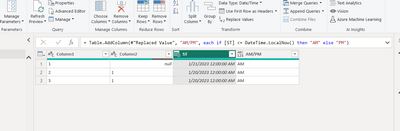
ValtteriN_0-1674298455771.png

= Table.AddColumn(#"Replaced Value", "AM/PM", each if [ST] <= DateTime.LocalNow() then "AM" else "PM")

I hope this post helps to solve your issue and if it does consider accepting it as a solution and giving the post a thumbs up!

My LinkedIn: https://www.linkedin.com/in/n%C3%A4ttiahov-00001/


Did I answer your question? Mark my post as a solution!

Proud to be a Super User!


hi,


thanks for reply.


i need the time 13:50 to be fixed - AM will always be below 13:50 and PM after.

kr


ValtteriN
Community Champion
Community Champion

Hi,

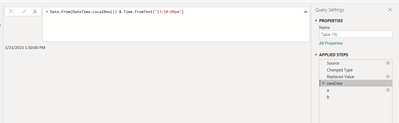
In that case you can add the time like this: 

ValtteriN_0-1674304372199.png

newDate = Date.From(DateTime.LocalNow()) & Time.FromText("13:50:00pm"),

next_step = Table.AddColumn(#"Replaced Value", "AM/PM", each if [ST] <= newDate then "AM" else "PM")


Did I answer your question? Mark my post as a solution!

Proud to be a Super User!


Helpful resources

Announcements
April Power BI Update Carousel

Power BI Monthly Update - April 2026

Check out the April 2026 Power BI update to learn about new features.

Fabric SQL PBI Data Days

Data Days 2026 coming soon!

Sign up to receive a private message when registration opens and key events begin.

New to Fabric survey Carousel

New to Fabric Survey

If you have recently started exploring Fabric, we'd love to hear how it's going. Your feedback can help with product improvements.

Power BI DataViz World Championships carousel

Power BI DataViz World Championships - June 2026

A new Power BI DataViz World Championship is coming this June! Don't miss out on submitting your entry.