
cancel
Showing results for 
Search instead for 
Did you mean: 

We've captured the moments from FabCon & SQLCon that everyone is talking about, and we are bringing them to the community, live and on-demand. Starts on April 14th. Register now

Reply
Anonymous
Not applicable

Wild card in power query

Hello so i have a column of products


Theres "product .01"


I want to make a m query formula that says if product contains "product" (anything in between) and ".01" to give me my result


I want to do this cause sometimes it "product 0.01" sometimes its "product   0.01" or "product  .01" so sometimes theres more space or no space in between so is there a wildcard i could use in m query between "product" and ".01" ?

1 ACCEPTED SOLUTION
v-xiaosun-msft
Community Support
Community Support

Hi @Anonymous ,


The wildcard filter is not directly available in Power Query. You can use Text.StartsWith() or Text.EndWith() to locate the string.

If you want to split the column, here is my solution.

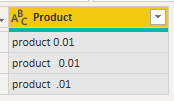
Data sample:

vxiaosunmsft_0-1665046557664.png

Split column by “space”:

vxiaosunmsft_1-1665046557671.png

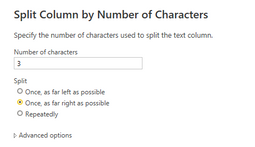
Split three columns by number of characters.

vxiaosunmsft_2-1665046557673.png

Final output:

vxiaosunmsft_3-1665046557674.png

You will see anything between "product" and ".01".


Best Regards,
Community Support Team _ xiaosun

If this post helps, then please consider Accept it as the solution to help the other members find it more quickly.

View solution in original post

3 REPLIES 3
Rickmaurinus
Helper V
Helper V

Power Query does not support wildcards, but there are alternative routes.

  • Text.StartsWith( "MyText", "My" ) resembles SQL's WHERE x = 'My%'
  • Text.EndsWith( "MyText", "xt" ) resembles SQL's WHERE x = '%xt'

For other wildcard characters, custom functions will be necessary.


I wrote an article about various wildcard approaches that work for different kinds of wildcards and others.


https://gorilla.bi/power-query/wildcards/


It can be challenging, but I am hopeful for future support of regex or wildcards.


--------------------------------------------------

@ me in replies or I'll lose your thread


Master Power Query M? -> https://powerquery.how

Read in-depth articles? -> BI Gorilla

Youtube Channel: BI Gorilla


If this post helps, then please consider accepting it as the solution to help other members find it more quickly.


v-xiaosun-msft
Community Support
Community Support

Hi @Anonymous ,


The wildcard filter is not directly available in Power Query. You can use Text.StartsWith() or Text.EndWith() to locate the string.

If you want to split the column, here is my solution.

Data sample:

vxiaosunmsft_0-1665046557664.png

Split column by “space”:

vxiaosunmsft_1-1665046557671.png

Split three columns by number of characters.

vxiaosunmsft_2-1665046557673.png

Final output:

vxiaosunmsft_3-1665046557674.png

You will see anything between "product" and ".01".


Best Regards,
Community Support Team _ xiaosun

If this post helps, then please consider Accept it as the solution to help the other members find it more quickly.

daXtreme
Solution Sage
Solution Sage

Use the Power Query native functionality to split on a delimiter and remove empty entries.

Helpful resources

Announcements
New to Fabric survey Carousel

New to Fabric Survey

If you have recently started exploring Fabric, we'd love to hear how it's going. Your feedback can help with product improvements.

Power BI DataViz World Championships carousel

Power BI DataViz World Championships - June 2026

A new Power BI DataViz World Championship is coming this June! Don't miss out on submitting your entry.

Join our Fabric User Panel

Join our Fabric User Panel

Share feedback directly with Fabric product managers, participate in targeted research studies and influence the Fabric roadmap.

March Power BI Update Carousel

Power BI Community Update - March 2026

Check out the March 2026 Power BI update to learn about new features.