cancel
Showing results for 
Search instead for 
Did you mean: 

View all the Fabric Data Days sessions on demand. View schedule

Reply
Anonymous
Not applicable

What is a simple way to add a budget amount

Hello Gurus,


What is a simple way to add a budget to your calculation? 


Scenario,

I have a budget, lets just say 20million, and I want calculate Actuals to Budget. Throughout the year, there will be new projects added and completed but the Budget will also remain at 20 million. I want to show the remaining budget as we go. What is the best way to add the budget amount for these calculations? Is there a measure I can set for the budget amount? I think that would be the easiest way.

1 ACCEPTED SOLUTION
Anonymous
Not applicable

Hi @Anonymous ,
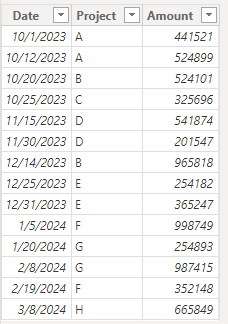
Thank you @Dangar332  for your prompt reply, I have created a data example for you to help you with your problem. You can follow the steps below:
Data Example:

vyifanwmsft_0-1710816501537.png
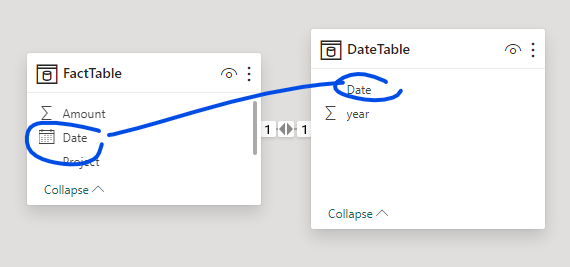
1. Add a DateTable and create a relationship with the FactTable.

DateTable = 
ADDCOLUMNS (
    CALENDAR ( DATE ( 2023, 10, 1 ), DATE ( 2024, 4, 1 ) ),
    "year", YEAR ( [Date] )
)

vyifanwmsft_1-1710816585532.png


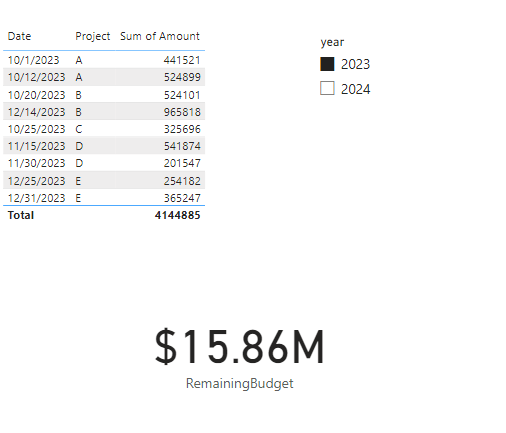
2. Add a measure and put it into the card.

RemainingBudget = 
VAR BudgetAmount = 20000000
RETURN
BudgetAmount - SUM('FactTable'[Amount])


Fianl output:

vyifanwmsft_3-1710816706627.png


How to Get Your Question Answered Quickly - Microsoft Fabric Community

If it does not help, please provide more details with your desired out put and pbix file without privacy information.


Best Regards,

Ada Wang

If this post helps, then please consider Accept it as the solution to help the other members find it more quickly.


View solution in original post

3 REPLIES 3
Anonymous
Not applicable

Hi @Anonymous ,
Thank you @Dangar332  for your prompt reply, I have created a data example for you to help you with your problem. You can follow the steps below:
Data Example:

vyifanwmsft_0-1710816501537.png
1. Add a DateTable and create a relationship with the FactTable.

DateTable = 
ADDCOLUMNS (
    CALENDAR ( DATE ( 2023, 10, 1 ), DATE ( 2024, 4, 1 ) ),
    "year", YEAR ( [Date] )
)

vyifanwmsft_1-1710816585532.png


2. Add a measure and put it into the card.

RemainingBudget = 
VAR BudgetAmount = 20000000
RETURN
BudgetAmount - SUM('FactTable'[Amount])


Fianl output:

vyifanwmsft_3-1710816706627.png


How to Get Your Question Answered Quickly - Microsoft Fabric Community

If it does not help, please provide more details with your desired out put and pbix file without privacy information.


Best Regards,

Ada Wang

If this post helps, then please consider Accept it as the solution to help the other members find it more quickly.


Anonymous
Not applicable

@Anonymous I'll look into the provided solution and report back. Thank you for your assistance.

Dangar332
Super User
Super User

hi, @Anonymous 

please provide some data or elaborate your requirnment


Helpful resources

Announcements
November Power BI Update Carousel

Power BI Monthly Update - November 2025

Check out the November 2025 Power BI update to learn about new features.

Fabric Data Days Carousel

Fabric Data Days

Advance your Data & AI career with 50 days of live learning, contests, hands-on challenges, study groups & certifications and more!

FabCon Atlanta 2026 carousel

FabCon Atlanta 2026

Join us at FabCon Atlanta, March 16-20, for the ultimate Fabric, Power BI, AI and SQL community-led event. Save $200 with code FABCOMM.