
Join us at FabCon Atlanta from March 16 - 20, 2026, for the ultimate Fabric, Power BI, AI and SQL community-led event. Save $200 with code FABCOMM.
Register now!The Power BI Data Visualization World Championships is back! Get ahead of the game and start preparing now! Learn more
Hi,
I have a date table and week number (Week Number DAX: QUOTIENT ( 'DIM Calendar' [Date]-MIN ('DIM Calendar' [Date] ), 7), + 1).
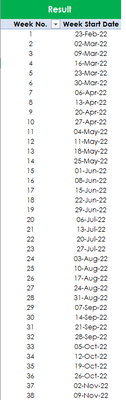
I need a unique week number and a week start date (MIN) as below.
Solved! Go to Solution.
Hi @ajisharavind_99
If you want to show that in a table visual then place the week number in the table (make sure "Do not summarize" is selected and then use a measure MIN ( 'Date'[Date] )
If you want to create a calculated table then use
New Table = SUMMARIZE ( 'Date', 'Date'[Week No], "Week Start Date", MIN ( 'Date'[Date] ) )
Hi @ajisharavind_99
If you want to show that in a table visual then place the week number in the table (make sure "Do not summarize" is selected and then use a measure MIN ( 'Date'[Date] )
If you want to create a calculated table then use
New Table = SUMMARIZE ( 'Date', 'Date'[Week No], "Week Start Date", MIN ( 'Date'[Date] ) )
Check out the November 2025 Power BI update to learn about new features.
Advance your Data & AI career with 50 days of live learning, contests, hands-on challenges, study groups & certifications and more!
| User | Count |
|---|---|
| 20 | |
| 10 | |
| 9 | |
| 4 | |
| 4 |
| User | Count |
|---|---|
| 33 | |
| 31 | |
| 19 | |
| 12 | |
| 11 |