cancel
Showing results for 
Search instead for 
Did you mean: 

The Power BI Data Visualization World Championships is back! Get ahead of the game and start preparing now! Learn more

Reply
PowerBIoverExcl
Frequent Visitor

Waterfall chart with Top N / Bottom N sales based on slicer

Dear PowerBI Community,


Despite having checked multiple threads on applicable DAX formula’s I can’t seem to find the correct solution for what I’m searching for. I would greatly appreciate it if someone could help me.


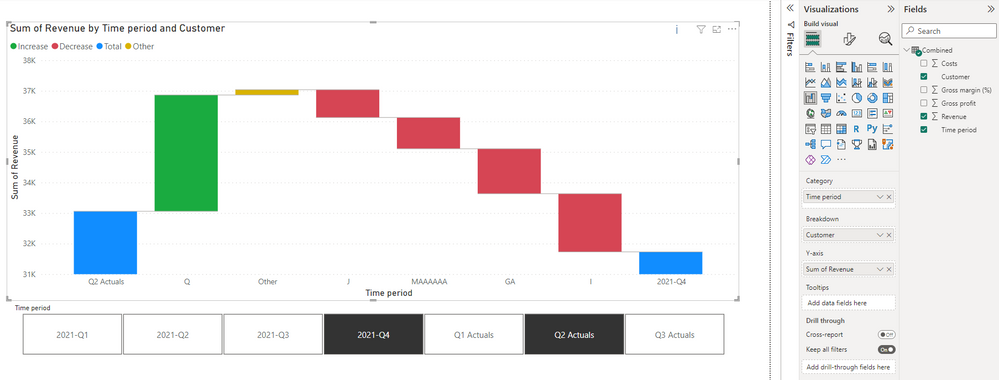
For a data source, I have a single dataset of customer names, time periods and sales values. I want to setup a waterfall chart whereby between the totals, I want to show the top-5 gainers in sales, top-5 declines in sales and have the sales change of all other customers grouped together in ‘Others’. I verified that this can only be achieved using DAX formulas (i.e. not with just visualisation options).


The thing that complicates this is that I have a slicer whereby the user can select any (2 or more) time periods, so the DAX formula needs to be dynamic to accommodate any combination of time periods.


Would appreciate any DAX help.Overview.PNG

3 REPLIES 3
Anonymous
Not applicable

Hi @PowerBIoverExcl  ,


You can create a measure, measures can change dynamically with filtering

Measure = SUM('Table'[Sales])

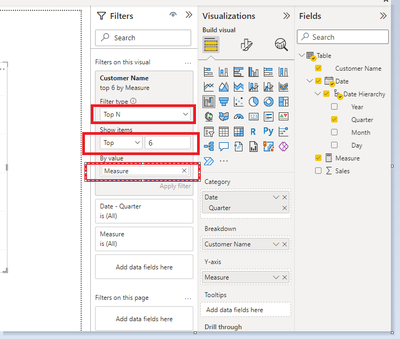
Then create the Waterfall chart and put the following fields in visual filter, ‘shown items’ select Top 6 , and put the measure to the ‘By value’, then click ‘Apply filter’

vxinruzhumsft_0-1669874261426.png


Then change the “Breakdown”  in format, input  “5”

vxinruzhumsft_1-1669874261430.png


The final output


vxinruzhumsft_2-1669874261432.png


Best Regards,

Yolo Zhu

If this post helps, then please consider Accept it as the solution to help the other members find it more quickly.

Hi Yolo Zhu,


Thanks for the response, but this method does not produce the result I’m looking for. I want to show the largest 5 customers individually, as well as the bottom-5 individually by sales, and have the effects of all other customer grouped in a subtotal ‘Others’. Furthermore, applying the filter to the Top N also affects the results of the totals in the waterfall bridge, whereas I would like the totals to include the total of all customers for the selected time periods.


I created the following DAX measures to help me sort which impacts to show separately:

  • Total_Revenue = SUM(Combined[Revenue])
  • Total_GP = SUM(Combined[Gross profit])
  • Concentration_Rank = RANKX(ALL(Combined[Customer]),SUMX(Combined,Combined[Revenue]))
  • Concentration_Display_Names = IF(Combined[Concentration_Rank]>10,"Other",0)

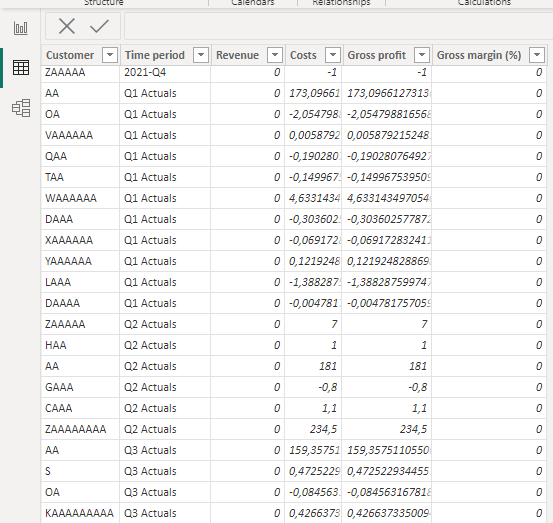
Data.PNG


However, I cant make them work. Could anyone help me further?

Anonymous
Not applicable

Hi @PowerBIoverExcl 


You can try the following code:

SUM_RE_Bytime&Customer =
SUMX(FILTER(ALL('Table'),'Table'[Customer]=SELECTEDVALUE('Table'[Customer])&&'Table'[Time period]=SELECTEDVALUE('Table'[Time period])),[Revenue])
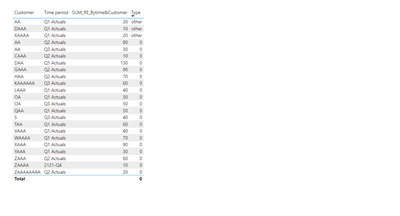
Type = var a= RANKX(FILTER(ALL('Table'),'Table'[Time period]=SELECTEDVALUE('Table'[Time period])),[SUM_RE_Bytime&Customer]) return if(a>=10,"other",0)
 
vxinruzhumsft_0-1669972508703.png


Best Regards,

Yolo Zhu

If this post helps, then please consider Accept it as the solution to help the other members find it more quickly.

Helpful resources

Announcements
Power BI DataViz World Championships

Power BI Dataviz World Championships

The Power BI Data Visualization World Championships is back! Get ahead of the game and start preparing now!

December 2025 Power BI Update Carousel

Power BI Monthly Update - December 2025

Check out the December 2025 Power BI Holiday Recap!

FabCon Atlanta 2026 carousel

FabCon Atlanta 2026

Join us at FabCon Atlanta, March 16-20, for the ultimate Fabric, Power BI, AI and SQL community-led event. Save $200 with code FABCOMM.