FabCon is coming to Atlanta
Join us at FabCon Atlanta from March 16 - 20, 2026, for the ultimate Fabric, Power BI, AI and SQL community-led event. Save $200 with code FABCOMM.
Register now!- Power BI forums
- Get Help with Power BI
- Desktop
- Service
- Report Server
- Power Query
- Mobile Apps
- Developer
- DAX Commands and Tips
- Custom Visuals Development Discussion
- Health and Life Sciences
- Power BI Spanish forums
- Translated Spanish Desktop
- Training and Consulting
- Instructor Led Training
- Dashboard in a Day for Women, by Women
- Galleries
- Data Stories Gallery
- Themes Gallery
- Contests Gallery
- QuickViz Gallery
- Quick Measures Gallery
- Visual Calculations Gallery
- Notebook Gallery
- Translytical Task Flow Gallery
- TMDL Gallery
- R Script Showcase
- Webinars and Video Gallery
- Ideas
- Custom Visuals Ideas (read-only)
- Issues
- Issues
- Events
- Upcoming Events
The Power BI Data Visualization World Championships is back! Get ahead of the game and start preparing now! Learn more
- Power BI forums
- Forums
- Get Help with Power BI
- DAX Commands and Tips
- Re: Warning alert in new column if any column valu...
- Subscribe to RSS Feed
- Mark Topic as New
- Mark Topic as Read
- Float this Topic for Current User
- Bookmark
- Subscribe
- Printer Friendly Page

- Mark as New
- Bookmark
- Subscribe
- Mute
- Subscribe to RSS Feed
- Permalink
- Report Inappropriate Content
Warning alert in new column if any column value missing
I am using single table for mulitple Graph .Check is all items are present in th table. This means that if any item is missing vs reference table, tool should show a “Warning” in new column in
Summay Table
Item BOM Height Weight Volume
FW001 Pack 450 234
FW002 Pack 450 344 234
FW003 Pack 344 234
For Example :
Item BOM Height Weight Volume alert
FW001 Pack 450 234 Warning
FW002 Pack 450 344 234 Avaialbe
FW003 Pack 344 234 Warning
Any Idea .. looking for support . Thanks in advance
Solved! Go to Solution.
- Mark as New
- Bookmark
- Subscribe
- Mute
- Subscribe to RSS Feed
- Permalink
- Report Inappropriate Content
Hi @Anonymous ,
Here are the steps you can follow:
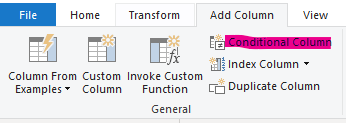
1. Go to Power query – Conditional Column.
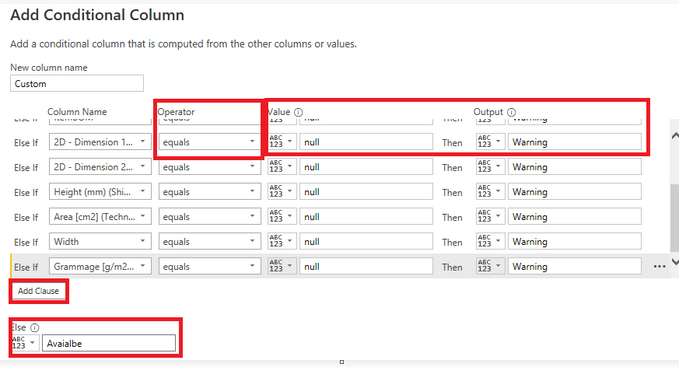
2. Select Add Clause - add each column to it.
Operator – equals
Value -- null
Output -- Warning
Else -- Avaialbe
3. Result:

Best Regards,
Liu Yang
If this post helps, then please consider Accept it as the solution to help the other members find it more quickly
- Mark as New
- Bookmark
- Subscribe
- Mute
- Subscribe to RSS Feed
- Permalink
- Report Inappropriate Content
Hi @Anonymous ,
Here are the steps you can follow:
1. Go to Power query – Conditional Column.
2. Select Add Clause - add each column to it.
Operator – equals
Value -- null
Output -- Warning
Else -- Avaialbe
3. Result:
Best Regards,
Liu Yang
If this post helps, then please consider Accept it as the solution to help the other members find it more quickly


- Mark as New
- Bookmark
- Subscribe
- Mute
- Subscribe to RSS Feed
- Permalink
- Report Inappropriate Content
Always resort to PQ when it comes to row-oriented processing.
let
    Source = Table.FromRows(Json.Document(Binary.Decompress(Binary.FromText("i45Wcgs3MDBU0lEKSEzOBlImpgZAEoiMjE2UYnUg8kbo8sYmJmhKjBFKUOVjAQ==", BinaryEncoding.Base64), Compression.Deflate)), let _t = ((type nullable text) meta [Serialized.Text = true]) in type table [Item = _t, BOM = _t, Height = _t, Weight = _t, Volume = _t]),
    #"Changed Type" = Table.TransformColumnTypes(Source,{{"Item", type text}, {"BOM", type text}, {"Height", Int64.Type}, {"Weight", Int64.Type}, {"Volume", Int64.Type}}),
    Flagged = Table.AddColumn(#"Changed Type", "Flag", each if List.Contains(Record.ToList(_), null) then "Available" else "Warning")
in
    Flagged
| Thanks to the great efforts by MS engineers to simplify syntax of DAX! Most beginners are SUCCESSFULLY MISLED to think that they could easily master DAX; but it turns out that the intricacy of the most frequently used RANKX() is still way beyond their comprehension! |
DAX is simple, but NOT EASY! |

- Mark as New
- Bookmark
- Subscribe
- Mute
- Subscribe to RSS Feed
- Permalink
- Report Inappropriate Content
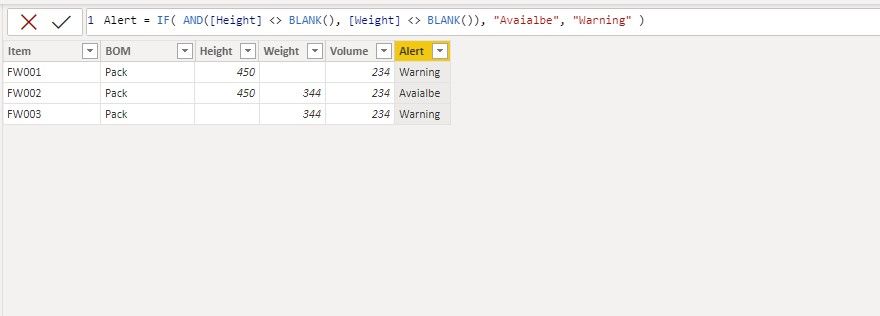
Hi, @Anonymous Try it
Maybe there are more conditions?
__________________________________________
Thank you for your like and decision
__________________________________________
Greetings from Ukraine
To help me grow PayPal: embirddima@gmail.com
- Mark as New
- Bookmark
- Subscribe
- Mute
- Subscribe to RSS Feed
- Permalink
- Report Inappropriate Content
@DimaMD How to add multiple value for above Measure . i am trying to add two more column value above Dax . but i am getting error
- Mark as New
- Bookmark
- Subscribe
- Mute
- Subscribe to RSS Feed
- Permalink
- Report Inappropriate Content
Hi @Anonymous Please provide a sample of the data
__________________________________________
Thank you for your like and decision
__________________________________________
Greetings from Ukraine
To help me grow PayPal: embirddima@gmail.com
- Mark as New
- Bookmark
- Subscribe
- Mute
- Subscribe to RSS Feed
- Permalink
- Report Inappropriate Content
- Mark as New
- Bookmark
- Subscribe
- Mute
- Subscribe to RSS Feed
- Permalink
- Report Inappropriate Content
@Anonymous What columns do you want to be in the condition?
__________________________________________
Thank you for your like and decision
__________________________________________
Greetings from Ukraine
To help me grow PayPal: embirddima@gmail.com
- Mark as New
- Bookmark
- Subscribe
- Mute
- Subscribe to RSS Feed
- Permalink
- Report Inappropriate Content
@DimaMD for all the column . if any column value missing its should warning and if all column value available its showing available alert
- Mark as New
- Bookmark
- Subscribe
- Mute
- Subscribe to RSS Feed
- Permalink
- Report Inappropriate Content
@Anonymous Try it, if you missed the column try to add yourself.
alert =
IF(
    AND(OR(
    [2D - Dimension 1 - Length [mm]] (Technical Drawing Details)] &&
    [2D - Dimension 2 - Width [mm]] (Technical Drawing Details)] <> BLANK(),
    [Area [cm2]] (Technical Drawing Details)] &&
    [BOM Number] <> BLANK()), [Cut-Off Length] && [Grammage [g/m2]] (from base mat./ TS)] && [Height (mm) (Shipping Case Details)] && [Weight [g]]] <> BLANK()),
    "Available","Warning")
__________________________________________
Thank you for your like and decision
__________________________________________
Greetings from Ukraine
To help me grow PayPal: embirddima@gmail.com
Helpful resources

Power BI Dataviz World Championships
The Power BI Data Visualization World Championships is back! Get ahead of the game and start preparing now!

Power BI Monthly Update - November 2025
Check out the November 2025 Power BI update to learn about new features.

FabCon Atlanta 2026
Join us at FabCon Atlanta, March 16-20, for the ultimate Fabric, Power BI, AI and SQL community-led event. Save $200 with code FABCOMM.

| User | Count |
|---|---|
| 20 | |
| 11 | |
| 10 | |
| 4 | |
| 4 |


| User | Count |
|---|---|
| 34 | |
| 32 | |
| 19 | |
| 12 | |
| 10 |


