Join us at FabCon Atlanta from March 16 - 20, 2026, for the ultimate Fabric, Power BI, AI and SQL community-led event. Save $200 with code FABCOMM.
Register now!The Power BI Data Visualization World Championships is back! Get ahead of the game and start preparing now! Learn more
Hello, I tried going through similar threads, but found (or at least didn't manage to succeed in implementing) no solution to fit my problem.
I have a table of pass/fail data with unique case keys and failure categories, see below:
Key Fail Category Subcategory
Key 1 x Category 1 Subcategory 1
Key 2
Key 3 x Category 2 Subcategory 4
Key 4
I have the following measures currently in use:
First, the fail and success measures
m_Success_% =
DIVIDE(
COUNTROWS(FILTER(Sheet1;Sheet1[Fail] = ""));
COUNTROWS(Sheet1)
)
m_Fail_% =
1-[m_Success_%]
I would like to have a measure with which I could have a bar chart showing the effect of different categories to the failure %. The closest I have gotten is by cheating in the sense that if I know my failure % is 45%, I just use the below measure with hardcoded scaling factor of 0.45.
m_check_% =
DIVIDE(
COUNTROWS(Sheet1);
COUNTROWS(ALLSELECTED(Sheet1))
) * 0.45
I tried referencing the [m_Fail_%] in the last measure, but that does not seem to work.
m_category_% =
DIVIDE(
COUNTROWS(Sheet1);
COUNTROWS(ALLSELECTED(Sheet1))
) * CALCULATE([m_Fail_%];ALLSELECTED(Sheet1))
Point being, that when I get new cases, the fail % will change and I would like the chart on the right always to sum up to the current fail %.
I attached a screenshot of the situation, hopefully that clarifies what I'm after.
Thanks.
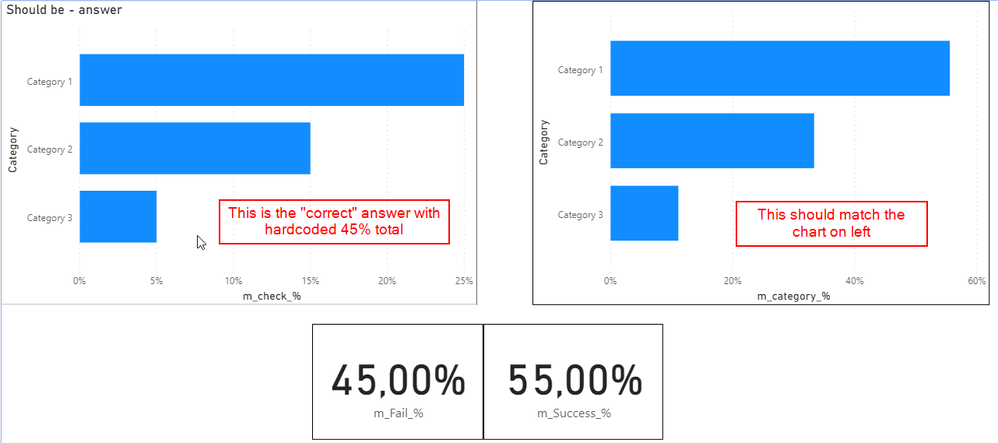
Solved! Go to Solution.
// The model is incorrect in the first place.
// A good model is a star schema. You should
// have tables of Cases and Categories/Subcategories.
// Then, a fact table that would join one to the other.
// Then the measures to write would be easier
// and more logical. For this flawed model, you
// could use the below measures but handling
// categories and subcategories is not optimal
// since you have to hard-code the columns into the
// measure.
// measure 1
[Failure Rate] =
var __failures =
calculate(
countrows( T ),
keepfilters(
T[Fail] = "x"
)
)
var __allVisible =
calculate(
countrows( T ),
ALL( T[Category], T[Subcategory] )
)
var __result =
divide(
__failures,
__allVisible
)
return
__result
// measure 2
[Success Rate] = 1 - [Failure Rate]
Best
D
// The model is incorrect in the first place.
// A good model is a star schema. You should
// have tables of Cases and Categories/Subcategories.
// Then, a fact table that would join one to the other.
// Then the measures to write would be easier
// and more logical. For this flawed model, you
// could use the below measures but handling
// categories and subcategories is not optimal
// since you have to hard-code the columns into the
// measure.
// measure 1
[Failure Rate] =
var __failures =
calculate(
countrows( T ),
keepfilters(
T[Fail] = "x"
)
)
var __allVisible =
calculate(
countrows( T ),
ALL( T[Category], T[Subcategory] )
)
var __result =
divide(
__failures,
__allVisible
)
return
__result
// measure 2
[Success Rate] = 1 - [Failure Rate]
Best
D
Thank you very much for your fast reply, I got the functionality I was after!
Additional thanks for giving advice on future improvements, this kind of data structure thinking is new to me so I really appreciate the explanation on recommended way to structure my model 🙂
The Power BI Data Visualization World Championships is back! Get ahead of the game and start preparing now!
Check out the November 2025 Power BI update to learn about new features.
| User | Count |
|---|---|
| 20 | |
| 11 | |
| 10 | |
| 4 | |
| 4 |
| User | Count |
|---|---|
| 34 | |
| 31 | |
| 19 | |
| 12 | |
| 11 |