Join us at FabCon Atlanta from March 16 - 20, 2026, for the ultimate Fabric, Power BI, AI and SQL community-led event. Save $200 with code FABCOMM.
Register now!The Power BI Data Visualization World Championships is back! Get ahead of the game and start preparing now! Learn more
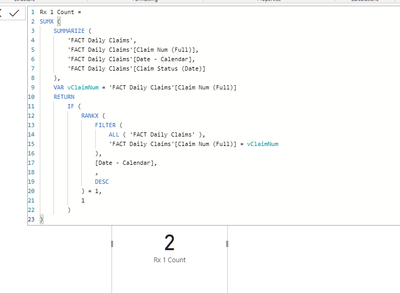
I am trying to create a formula that will first rank the data based on the [Date-Calendar] column grouped by the Claim Num (Full), then count the rows where the Rank = 1.
Here is my formula:
Test =
VAR vTable =
ADDCOLUMNS(
SUMMARIZE('FACT Daily Claims',
'FACT Daily Claims'[Claim Num (Full)],
'FACT Daily Claims'[Date - Calendar],
'FACT Daily Claims'[Claim Status (Date)]
),
"Count",
1,
"Rank by Group",
RANKX(
FILTER(ALL('FACT Daily Claims'), 'FACT Daily Claims'[Claim Num (Full)] = vClaimNum),
[Date - Calendar],,DESC
)
)
RETURN
COUNTROWS(
FILTER(vTable,
[Rank by Group] = 1
)
)
Sample Data would be
| Claim Num (Full) | Date - Calendar | Claim Status (Date) |
| 1 | 1/10/2021 | Open |
| 2 | 1/8/2021 | Open |
| 2 | 1/19/2021 | Open |
| 1 | 1/15/2021 | Closed |
I need the value to return 2.
Hi @Anonymous
I'm not sure I follow. How is this:
first rank the data based on the [Date-Calendar] column grouped by the Claim Num (Full), then count the rows where the Rank = 1
different from simply doing a DISTINCTCOUNT of Claim Num Full, i.e. the number of groups??
Please mark the question solved when done and consider giving a thumbs up if posts are helpful.
Contact me privately for support with any larger-scale BI needs, tutoring, etc.
Cheers
The Power BI Data Visualization World Championships is back! Get ahead of the game and start preparing now!
| User | Count |
|---|---|
| 19 | |
| 13 | |
| 9 | |
| 4 | |
| 4 |
| User | Count |
|---|---|
| 30 | |
| 27 | |
| 17 | |
| 11 | |
| 10 |