Join us at FabCon Atlanta from March 16 - 20, 2026, for the ultimate Fabric, Power BI, AI and SQL community-led event. Save $200 with code FABCOMM.
Register now!The Power BI Data Visualization World Championships is back! Get ahead of the game and start preparing now! Learn more
Hi All
I faced the following challenge
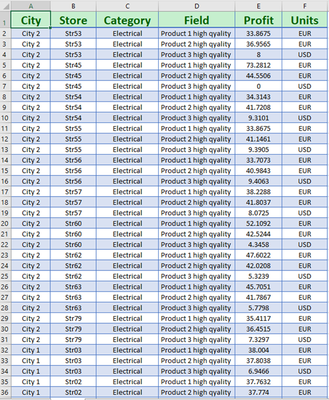
From the following virtual table I want to be able to filter through 3 slicers [ City , Store, Category]
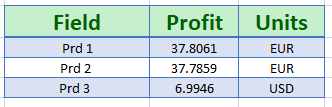
and then showing the following results:
The challenge is to be able to change the column values depend of their contents and show updated values in the resulted table.
PS, I don’t have permission to create calculated columns , so this should be done with DAX measures.
Thanks in advance
Regards
Solved! Go to Solution.
Hi @Nazdac911 ,
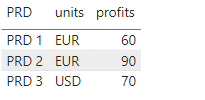
Is it probably similar to this format?(the data I use are different from yours)
create the following measure:
PRD = IF('Table'[field]="product 1 high quality","PRD 1",IF('Table'[field]="product 2 high quality","PRD 2","PRD 3"))profits = CALCULATE(SUM('Table'[profit]),FILTER(ALL('Table'),'Table'[PRD]=SELECTEDVALUE('Table'[PRD])))
You can also refer to my pbix file for better understanding.
Best regards,
Community Support Team Selina zhu
If this post helps, then please consider Accept it as the solution to help the other members find it more quickly
@Nazdac911 , Can you give example of what values you want to show here
Thanks for the fast reply
For example : if I have "Product 1 high quality value " then show in the report "Prd 1"
in other word , insted of draging a column to the table visual , i need to use a mesure that will change tests in the column
I hope this answer your question 🙂
Looking forward hearing form you
Regards
Hi @Nazdac911 ,
Is it probably similar to this format?(the data I use are different from yours)
create the following measure:
PRD = IF('Table'[field]="product 1 high quality","PRD 1",IF('Table'[field]="product 2 high quality","PRD 2","PRD 3"))profits = CALCULATE(SUM('Table'[profit]),FILTER(ALL('Table'),'Table'[PRD]=SELECTEDVALUE('Table'[PRD])))
You can also refer to my pbix file for better understanding.
Best regards,
Community Support Team Selina zhu
If this post helps, then please consider Accept it as the solution to help the other members find it more quickly
The Power BI Data Visualization World Championships is back! Get ahead of the game and start preparing now!
| User | Count |
|---|---|
| 10 | |
| 5 | |
| 5 | |
| 3 | |
| 3 |
| User | Count |
|---|---|
| 24 | |
| 10 | |
| 10 | |
| 6 | |
| 6 |