cancel
Showing results for 
Search instead for 
Did you mean: 

The Power BI Data Visualization World Championships is back! Get ahead of the game and start preparing now! Learn more

Reply
Anonymous
Not applicable

Using DAX Wild Cards

Hi 


I've been experimenting with DAX wild cards but not getting the results I expected. 


Here's a sample of the data I'm using:
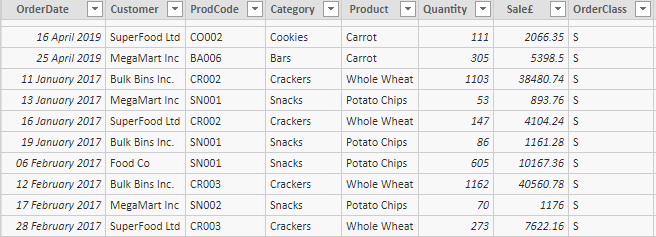
 

DAta Extract.PNG


CALCULATEI wondered whether I could, in CALCULATE statements, use just part of the "Product" text by using wildcards. I've created the  following Measures:

C1 Sales = CALCULATE([Total Sales £],Sales[Product]="C*") (**I expected this to select rows with"Carrot")
Pot Sales = CALCULATE([Total Sales £],FILTER(Sales,Sales[Product]="Pot*")) (**I expected this to select rows with"Potato")
ThirdLetterO Sales = CALCULATE([Total Sales £],Sales[Product]="??o*") (**I expected this to select rows with"Whole Wheat")


, but I can't get these to work, for example:
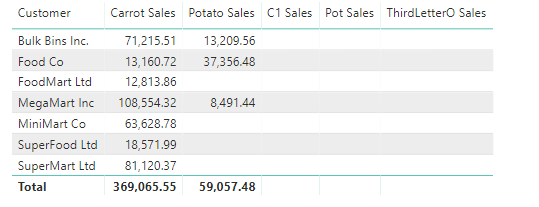
 

WC Blues.PNG

These 2 work fine - no wildcards:


Carrot Sales = CALCULATE([Total Sales £],Sales[Product]="Carrot")
Potato Sales = CALCULATE([Total Sales £],Left(Sales[Product],3)="Pot")
 
So - what's wrong with my attempts at using wildcards in CALCULATE, with or without FILTER?
 
Thanks!


2 REPLIES 2
Anonymous
Not applicable

Sorry, forgot to include link. It's at:


https://1drv.ms/u/s!AmxJyApgEAcYgu8hWCiVMg5ovezi2A?e=jFKcxr 

Hi, here are some possible strategies for solving your problem:
https://www.sqlbi.com/articles/from-sql-to-dax-string-comparison/

Helpful resources

Announcements
Power BI DataViz World Championships

Power BI Dataviz World Championships

The Power BI Data Visualization World Championships is back! Get ahead of the game and start preparing now!

December 2025 Power BI Update Carousel

Power BI Monthly Update - December 2025

Check out the December 2025 Power BI Holiday Recap!

FabCon Atlanta 2026 carousel

FabCon Atlanta 2026

Join us at FabCon Atlanta, March 16-20, for the ultimate Fabric, Power BI, AI and SQL community-led event. Save $200 with code FABCOMM.