Join us at FabCon Atlanta from March 16 - 20, 2026, for the ultimate Fabric, Power BI, AI and SQL community-led event. Save $200 with code FABCOMM.
Register now!The Power BI Data Visualization World Championships is back! Get ahead of the game and start preparing now! Learn more
Hi,
I have a measure that outputs a string. The string will be equal to a column name. I want to be able to use that measure output to reference a column i.e. table1[measureOutput] (where measureOutput is the name of my measure).
I have tried using calculated columns (mycolumn = [measureOutput]), but if I drag this column into table I don't see any values.
What is the best way to use measure output to reference a column?
Thank you for your help.
Solved! Go to Solution.
Hi @kouter
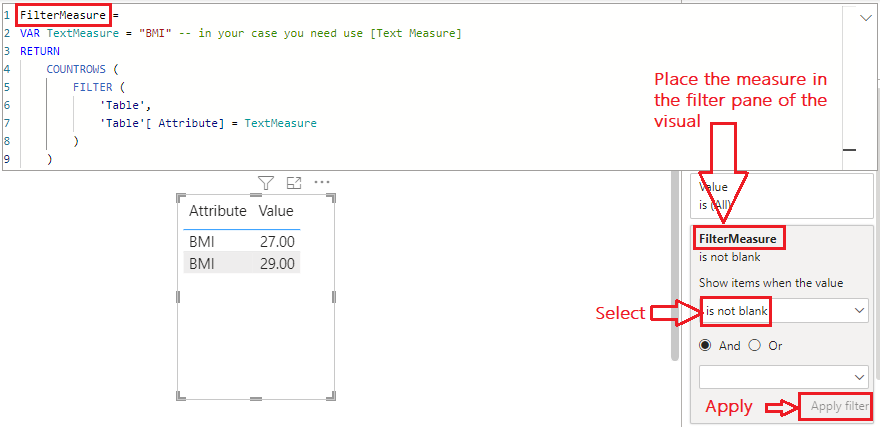
Please refer to attached sample file with the solution
FilterMeasure =
VAR TextMeasure = "BMI" -- in your case you need use [Text Measure]
RETURN
COUNTROWS (
FILTER (
'Table',
'Table'[ Attribute] = TextMeasure
)
)
Hi @kouter
Please refer to attached sample file with the solution
FilterMeasure =
VAR TextMeasure = "BMI" -- in your case you need use [Text Measure]
RETURN
COUNTROWS (
FILTER (
'Table',
'Table'[ Attribute] = TextMeasure
)
)
Hi @tamerj1
Thank you very much for your prompt reply.
I unpivoted the columns to have their names as attributes. Created the following calculated column
my_calc_column = IF(table[attribute] = [measureOutput], table[attribute], BLANK()]
however, when I drag this calculated column onto table I don't see any values. Your thoughs on where I'm going wrong? Any suggestions is much appreciated.
@kouter
Now comes the next step. Please provide some sample data along with example of the expected result to assist you further.
| Attribute | Value |
| length | 1.78 |
| weight | 89 |
| weight | 78 |
| length | 1.90 |
| BMI | 27 |
| BMI | 29 |
| length | 1.9 |
For this example, lets say my measure output will be BMI, then I would like use that measure output to filter the Attribute column resulting in
| Attribute | Value |
| BMI | 27 |
| BMI | 29 |
I hope this will suffice, bit hesitant on uploading actual data.
Hi @kouter
not possible. You need to restructure your data, perhaps unpivot the said columns so you can use their names as attributes in a column.
The Power BI Data Visualization World Championships is back! Get ahead of the game and start preparing now!
Check out the November 2025 Power BI update to learn about new features.
| User | Count |
|---|---|
| 19 | |
| 10 | |
| 9 | |
| 4 | |
| 4 |
| User | Count |
|---|---|
| 34 | |
| 32 | |
| 20 | |
| 12 | |
| 11 |