FabCon is coming to Atlanta
Join us at FabCon Atlanta from March 16 - 20, 2026, for the ultimate Fabric, Power BI, AI and SQL community-led event. Save $200 with code FABCOMM.
Register now!- Power BI forums
- Get Help with Power BI
- Desktop
- Service
- Report Server
- Power Query
- Mobile Apps
- Developer
- DAX Commands and Tips
- Custom Visuals Development Discussion
- Health and Life Sciences
- Power BI Spanish forums
- Translated Spanish Desktop
- Training and Consulting
- Instructor Led Training
- Dashboard in a Day for Women, by Women
- Galleries
- Data Stories Gallery
- Themes Gallery
- Contests Gallery
- QuickViz Gallery
- Quick Measures Gallery
- Visual Calculations Gallery
- Notebook Gallery
- Translytical Task Flow Gallery
- TMDL Gallery
- R Script Showcase
- Webinars and Video Gallery
- Ideas
- Custom Visuals Ideas (read-only)
- Issues
- Issues
- Events
- Upcoming Events
The Power BI Data Visualization World Championships is back! Get ahead of the game and start preparing now! Learn more
- Power BI forums
- Forums
- Get Help with Power BI
- DAX Commands and Tips
- Use Selectedvalue (from 2 different slicers) to cr...
- Subscribe to RSS Feed
- Mark Topic as New
- Mark Topic as Read
- Float this Topic for Current User
- Bookmark
- Subscribe
- Printer Friendly Page

- Mark as New
- Bookmark
- Subscribe
- Mute
- Subscribe to RSS Feed
- Permalink
- Report Inappropriate Content
Use Selectedvalue (from 2 different slicers) to creating a cumulative metric with DAX
Hi, I hope you can help me as I have been trying to do this for days and somehow it doesnt work.
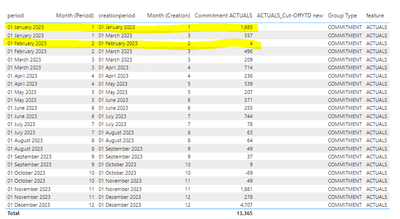
I have a data table like the example below (this is just an example), a Calendar table and a Parameter (Reference Plan).
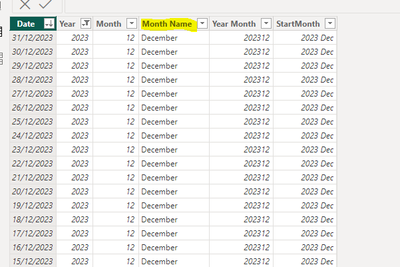
I would like to use 2 slicers, one with the Calendar[Month Name] and the other with the Paramenter[RefNo], so wehn I filter for example Month= February and Reference Plan = February I will get the cumulative sum for those records that are January & February (highlighted in yeloow below).
Data table:
Paramenter:

Calendar:
I have created the folloing metric attemps but none work:
Many thanks!
- Mark as New
- Bookmark
- Subscribe
- Mute
- Subscribe to RSS Feed
- Permalink
- Report Inappropriate Content
I need to be able to use a selector for period month (using the calendar table) and a selector from a parameter (RefNo) which is either Feb or Sep. This wold be the SelectedValues.
With this I need to be able to create a metric to summarize the amounts where the Month (period) are <= selected Month (Period) and Month (creationdate)<=selected RefNo.
I tried maany ways but it doesnt work:


- Mark as New
- Bookmark
- Subscribe
- Mute
- Subscribe to RSS Feed
- Permalink
- Report Inappropriate Content
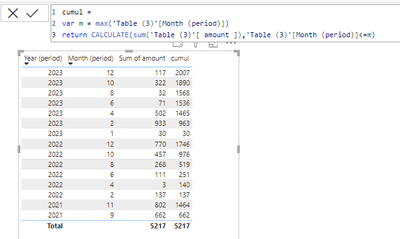
You want a cumulative measure ?
- Mark as New
- Bookmark
- Subscribe
- Mute
- Subscribe to RSS Feed
- Permalink
- Report Inappropriate Content
Hi, what I need is a cummulative metric compared to 2 dates. These 2 dates come from a selectedvalue on two slicers. I really dont seem to be able to calculate this.
- Mark as New
- Bookmark
- Subscribe
- Mute
- Subscribe to RSS Feed
- Permalink
- Report Inappropriate Content
Please indicate the expected outcome based on the sample data you provided.
- Mark as New
- Bookmark
- Subscribe
- Mute
- Subscribe to RSS Feed
- Permalink
- Report Inappropriate Content
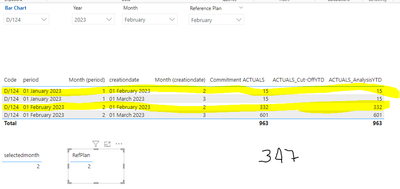
Hi, here is a simple example, i would like to have a cummulative or runnning sum of the amount (commitment Actuals), where Month (period) is <= to the selected value from the slicer (Month) (in this screenshot is 2); and the Month (creationperios) is <= to the selected value in Reference Plan (in this case also 2). My result on this example should be 347:
- Mark as New
- Bookmark
- Subscribe
- Mute
- Subscribe to RSS Feed
- Permalink
- Report Inappropriate Content
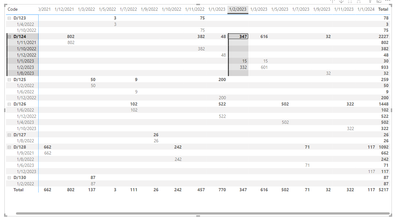
Change your visual to a matrix and put the "Month creation date" as a column
- Mark as New
- Bookmark
- Subscribe
- Mute
- Subscribe to RSS Feed
- Permalink
- Report Inappropriate Content
I need to be able to use a selector for period month (using the calendar table) and a selector from a parameter (RefNo) which is either Feb or Sep. This wold be the SelectedValues.
With this I need to be able to create a metric to summarize the amounts where the Month (period) are <= selected Month (Period) and Month (creationdate)<=selected RefNo.
I tried maany ways but it doesnt work:
- Mark as New
- Bookmark
- Subscribe
- Mute
- Subscribe to RSS Feed
- Permalink
- Report Inappropriate Content
Please provide sample data that covers your issue or question completely, in a usable format (not as a screenshot).
Do not include sensitive information or anything not related to the issue or question.
If you are unsure how to upload data please refer to https://community.fabric.microsoft.com/t5/Community-Blog/How-to-provide-sample-data-in-the-Power-BI-...
Please show the expected outcome based on the sample data you provided.
Want faster answers? https://community.fabric.microsoft.com/t5/Desktop/How-to-Get-Your-Question-Answered-Quickly/m-p/1447...
- Mark as New
- Bookmark
- Subscribe
- Mute
- Subscribe to RSS Feed
- Permalink
- Report Inappropriate Content
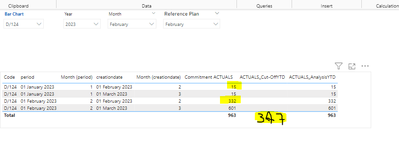
I simplify the data and attaching here report, many thanks!
- Mark as New
- Bookmark
- Subscribe
- Mute
- Subscribe to RSS Feed
- Permalink
- Report Inappropriate Content
You tried to link to your report - that is not recommended. Please prepare sanitized sample data and share that.
- Mark as New
- Bookmark
- Subscribe
- Mute
- Subscribe to RSS Feed
- Permalink
- Report Inappropriate Content
| Code | Year (period) | Month (period) | period | Year (creationdate) | Month (creationdate) | creationdate | amount | group | Type | Feature |
| D/124 | 2023 | 2 | 01/02/2023 | 2023 | 3 | 01/03/2023 | 301 | B | COMMITMENT | ACTUALS |
| D/126 | 2023 | 4 | 01/04/2023 | 2023 | 5 | 01/05/2023 | 402 | D | COMMITMENT | ACTUALS |
| D/128 | 2023 | 6 | 01/06/2023 | 2023 | 7 | 01/07/2023 | 2 | A | COMMITMENT | ACTUALS |
| D/124 | 2023 | 1 | 01/01/2023 | 2023 | 3 | 01/03/2023 | 5 | C | COMMITMENT | ACTUALS |
| D/126 | 2023 | 10 | 01/10/2023 | 2023 | 11 | 01/11/2023 | 22 | E | COMMITMENT | ACTUALS |
| D/128 | 2023 | 12 | 01/12/2023 | 2024 | 1 | 01/01/2024 | 49 | B | COMMITMENT | ACTUALS |
| D/124 | 2023 | 2 | 01/02/2023 | 2023 | 3 | 01/03/2023 | 300 | D | COMMITMENT | ACTUALS |
| D/126 | 2023 | 4 | 01/04/2023 | 2023 | 5 | 01/05/2023 | 100 | A | COMMITMENT | ACTUALS |
| D/128 | 2023 | 6 | 01/06/2023 | 2023 | 7 | 01/07/2023 | 69 | C | COMMITMENT | ACTUALS |
| D/124 | 2023 | 2 | 01/02/2023 | 2023 | 2 | 01/02/2023 | 32 | E | COMMITMENT | ACTUALS |
| D/126 | 2023 | 10 | 01/10/2023 | 2023 | 11 | 01/11/2023 | 300 | B | COMMITMENT | ACTUALS |
| D/128 | 2023 | 12 | 01/12/2023 | 2024 | 1 | 01/01/2024 | 68 | D | COMMITMENT | ACTUALS |
| D/130 | 2022 | 2 | 01/02/2022 | 2022 | 3 | 01/03/2022 | 87 | A | COMMITMENT | ACTUALS |
| D/123 | 2022 | 4 | 01/04/2022 | 2022 | 5 | 01/05/2022 | 3 | C | COMMITMENT | ACTUALS |
| D/125 | 2022 | 6 | 01/06/2022 | 2022 | 7 | 01/07/2022 | 9 | E | COMMITMENT | ACTUALS |
| D/127 | 2022 | 8 | 01/08/2022 | 2022 | 9 | 01/09/2022 | 26 | B | COMMITMENT | ACTUALS |
| D/123 | 2022 | 10 | 01/10/2022 | 2022 | 11 | 01/11/2022 | 75 | D | COMMITMENT | ACTUALS |
| D/125 | 2022 | 12 | 01/12/2022 | 2023 | 1 | 01/01/2023 | 200 | A | COMMITMENT | ACTUALS |
| D/125 | 2022 | 2 | 01/02/2022 | 2022 | 3 | 01/03/2022 | 50 | C | COMMITMENT | ACTUALS |
| D/124 | 2022 | 12 | 01/12/2022 | 2022 | 1 | 01/01/2023 | 48 | E | COMMITMENT | ACTUALS |
| D/126 | 2022 | 6 | 01/06/2022 | 2022 | 7 | 01/07/2022 | 102 | B | COMMITMENT | ACTUALS |
| D/128 | 2022 | 8 | 01/08/2022 | 2022 | 10 | 01/10/2022 | 242 | D | COMMITMENT | ACTUALS |
| D/124 | 2022 | 10 | 01/10/2022 | 2022 | 11 | 01/11/2022 | 382 | A | COMMITMENT | ACTUALS |
| D/126 | 2022 | 12 | 01/12/2022 | 2023 | 1 | 01/01/2023 | 522 | C | COMMITMENT | ACTUALS |
| D/128 | 2021 | 9 | 01/09/2021 | 2021 | 10 | 01/10/2021 | 662 | E | COMMITMENT | ACTUALS |
| D/124 | 2021 | 11 | 01/11/2021 | 2021 | 12 | 01/12/2021 | 802 | B | COMMITMENT | ACTUALS |
| D/124 | 2023 | 2 | 01/02/2023 | 2023 | 2 | 01/02/2023 | 300 | D | COMMITMENT | ACTUALS |
| D/124 | 2023 | 1 | 01/01/2023 | 2023 | 2 | 01/02/2023 | 15 | C | COMMITMENT | ACTUALS |
| D/124 | 2023 | 1 | 01/01/2023 | 2023 | 3 | 01/03/2023 | 10 | C | COMMITMENT | ACTUALS |
| D/124 | 2023 | 8 | 01/08/2023 | 2023 | 9 | 01/09/2023 | 32 | E | COMMITMENT | ACTUALS |

Helpful resources

Power BI Dataviz World Championships
The Power BI Data Visualization World Championships is back! Get ahead of the game and start preparing now!

Power BI Monthly Update - November 2025
Check out the November 2025 Power BI update to learn about new features.

FabCon Atlanta 2026
Join us at FabCon Atlanta, March 16-20, for the ultimate Fabric, Power BI, AI and SQL community-led event. Save $200 with code FABCOMM.

| User | Count |
|---|---|
| 20 | |
| 10 | |
| 9 | |
| 4 | |
| 4 |


| User | Count |
|---|---|
| 32 | |
| 31 | |
| 18 | |
| 12 | |
| 11 |


