Join us at FabCon Atlanta from March 16 - 20, 2026, for the ultimate Fabric, Power BI, AI and SQL community-led event. Save $200 with code FABCOMM.
Register now!The Power BI Data Visualization World Championships is back! Get ahead of the game and start preparing now! Learn more
Hi,
I'm trying to add a calculated column based on conditions in other two columns in the same table to to have three age groups
Age groups = Calculate(IF(filter('Table', 'Table'[Year group] = "N" || able', 'Table'[Year group]able', 'Table'[Year group]="E" && FILTER(Table', 'Table'[Age] < 5)), "Nursery", IF(filter(able', 'Table'[Year group] = "12" || 'Table'[Year group]= "13" && FILTER(Table', 'Table'[Age] > 15)), "Other year groups", "5-15 years")))
The code above gives me this error:
The expression refers to multiple columns. Multiple columns cannot be converted to a scalar value.
Could you please hel me fixx the code?
Solved! Go to Solution.
Hi, @Walaa_86
You can try using only the IF function.
Age groups =
IF (
[Year group] = "N",
"Nursery",
IF (
[Year group] = "E"
&& [Age] < 5,
"Nursery",
IF (
[Year group] = "12"
|| [Year group] = "13"
&& [Age] > 5,
"Other year groups",
"5-15 years"
)
)
)
Best Regards,
Community Support Team _Charlotte
If this post helps, then please consider Accept it as the solution to help the other members find it more quickly.
Hi, @Walaa_86
You can try using only the IF function.
Age groups =
IF (
[Year group] = "N",
"Nursery",
IF (
[Year group] = "E"
&& [Age] < 5,
"Nursery",
IF (
[Year group] = "12"
|| [Year group] = "13"
&& [Age] > 5,
"Other year groups",
"5-15 years"
)
)
)
Best Regards,
Community Support Team _Charlotte
If this post helps, then please consider Accept it as the solution to help the other members find it more quickly.
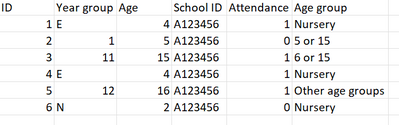
This is how I want my Age group column to look like:
This is how my table looks like. I need to separate the age grous so that I can have Age group as a filter and while I'm filtering for the "nursery" it only shows me year N or E in the year group filter.
can you share an example of your underlying table data?
The Power BI Data Visualization World Championships is back! Get ahead of the game and start preparing now!
Check out the November 2025 Power BI update to learn about new features.
| User | Count |
|---|---|
| 20 | |
| 11 | |
| 10 | |
| 4 | |
| 4 |
| User | Count |
|---|---|
| 34 | |
| 31 | |
| 19 | |
| 12 | |
| 11 |