FabCon is coming to Atlanta
Join us at FabCon Atlanta from March 16 - 20, 2026, for the ultimate Fabric, Power BI, AI and SQL community-led event. Save $200 with code FABCOMM.
Register now!- Power BI forums
- Get Help with Power BI
- Desktop
- Service
- Report Server
- Power Query
- Mobile Apps
- Developer
- DAX Commands and Tips
- Custom Visuals Development Discussion
- Health and Life Sciences
- Power BI Spanish forums
- Translated Spanish Desktop
- Training and Consulting
- Instructor Led Training
- Dashboard in a Day for Women, by Women
- Galleries
- Data Stories Gallery
- Themes Gallery
- Contests Gallery
- QuickViz Gallery
- Quick Measures Gallery
- Visual Calculations Gallery
- Notebook Gallery
- Translytical Task Flow Gallery
- TMDL Gallery
- R Script Showcase
- Webinars and Video Gallery
- Ideas
- Custom Visuals Ideas (read-only)
- Issues
- Issues
- Events
- Upcoming Events
Get Fabric Certified for FREE during Fabric Data Days. Don't miss your chance! Request now
- Power BI forums
- Forums
- Get Help with Power BI
- DAX Commands and Tips
- Re: Urgent- Dax requirement for desired output
- Subscribe to RSS Feed
- Mark Topic as New
- Mark Topic as Read
- Float this Topic for Current User
- Bookmark
- Subscribe
- Printer Friendly Page

- Mark as New
- Bookmark
- Subscribe
- Mute
- Subscribe to RSS Feed
- Permalink
- Report Inappropriate Content
Urgent- Dax requirement for desired output
Hey, Hope all of you are good.
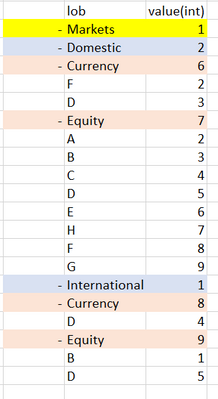
Please find below data,
| remark | reportdate | lob | geography | assetclass | sublob | Value(int) |
| lob | 13-Dec-21 | Markets | 1 | |||
| lgas | 13-Dec-21 | Markets | Domestic | Equity | A | 2 |
| lgas | 13-Dec-21 | Markets | Domestic | Equity | B | 3 |
| lgas | 13-Dec-21 | Markets | Domestic | Equity | C | 4 |
| lgas | 13-Dec-21 | Markets | Domestic | Equity | D | 5 |
| lgas | 13-Dec-21 | Markets | Domestic | Equity | E | 6 |
| lgas | 13-Dec-21 | Markets | Domestic | Equity | H | 7 |
| lgas | 13-Dec-21 | Markets | Domestic | Equity | F | 8 |
| lgas | 13-Dec-21 | Markets | Domestic | Equity | G | 9 |
| lgas | 13-Dec-21 | Markets | International | Equity | B | 1 |
| lgas | 13-Dec-21 | Markets | Domestic | Currency | F | 2 |
| lgas | 13-Dec-21 | Markets | Domestic | Currency | D | 3 |
| lgas | 13-Dec-21 | Markets | International | Currency | D | 4 |
| lgas | 13-Dec-21 | Markets | International | Equity | D | 5 |
| lga | 13-Dec-21 | Markets | Domestic | Currency | 6 | |
| lga | 13-Dec-21 | Markets | Domestic | Equity | 7 | |
| lga | 13-Dec-21 | Markets | International | Equity | 8 | |
| lga | 13-Dec-21 | Markets | International | Currency | 9 | |
| lg | 13-Dec-21 | Markets | International | 1 | ||
| lg | 13-Dec-21 | Markets | Domestic | 2 |
====>>>>Wrong Output coming,
hierarchy of matrix shown below,
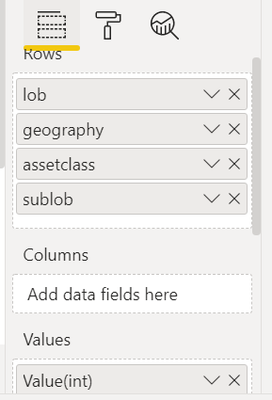
1)
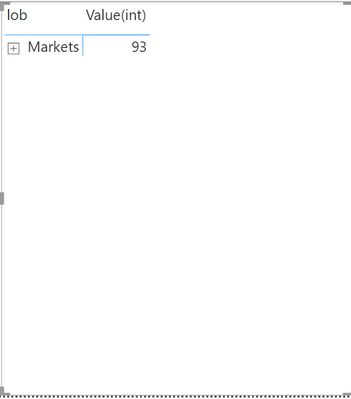
2)
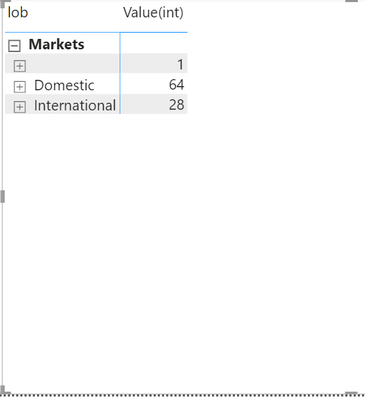
3)
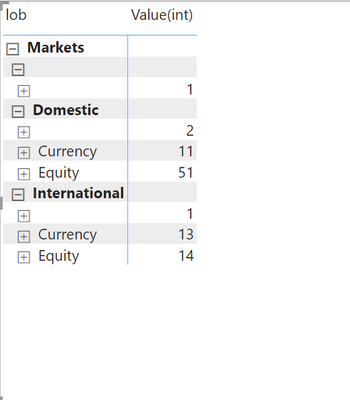
4)
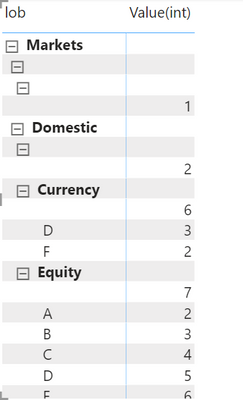
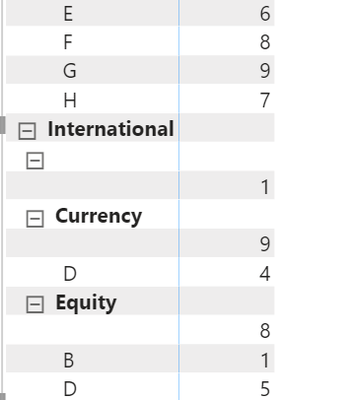
I need output in hierarchy wise below, Kindly help asap.
1)
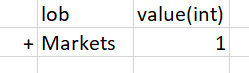
2)
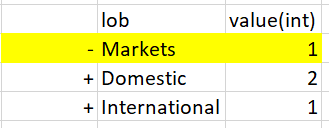
3)

4)
Solved! Go to Solution.


- Mark as New
- Bookmark
- Subscribe
- Mute
- Subscribe to RSS Feed
- Permalink
- Report Inappropriate Content
Hi @Anonymous ,
The following output is what you want.
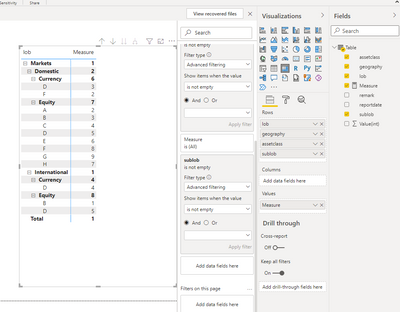
Base on table ,create a measure:
measure=
IF (
    HASONEVALUE ( 'Table'[sublob] ),
    MAX ( 'Table'[Value(int)] ),
    IF (
        HASONEVALUE ( 'Table'[assetclass] ),
        CALCULATE (
            MAX ( 'Table'[Value(int)] ),
            FILTER (
                ALL ( 'Table' ),
                'Table'[lob] = MAX ( 'Table'[lob] )
                    && 'Table'[geography] = MAX ( 'Table'[geography] )
                    && 'Table'[assetclass] = MAX ( 'Table'[assetclass] )
                    && 'Table'[sublob] = BLANK ()
            )
        ),
        IF (
            HASONEVALUE ( 'Table'[geography] ),
            CALCULATE (
                MAX ( 'Table'[Value(int)] ),
                FILTER (
                    ALL ( 'Table' ),
                    'Table'[lob] = MAX ( 'Table'[lob] )
                        && 'Table'[geography] = MAX ( 'Table'[geography] )
                        && 'Table'[assetclass] = BLANK ()
                )
            ),
            IF (
                HASONEVALUE ( 'Table'[lob] ),
                CALCULATE (
                    MAX ( 'Table'[Value(int)] ),
                    FILTER (
                        ALL ( 'Table' ),
                        'Table'[lob] = MAX ( 'Table'[lob] )
                            && 'Table'[geography] = BLANK ()
                    )
                ),
                CALCULATE (
                    MAX ( 'Table'[Value(int)] ),
                    FILTER ( ALL ( 'Table' ), 'Table'[lob] = BLANK () )
                )
            )
        )
    )
)
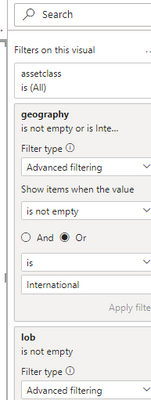
Then use the measure create visual ,and set filter is not empty:
Did I answer your question? Mark my post as a solution!
Best Regards
Lucien


- Mark as New
- Bookmark
- Subscribe
- Mute
- Subscribe to RSS Feed
- Permalink
- Report Inappropriate Content
- Mark as New
- Bookmark
- Subscribe
- Mute
- Subscribe to RSS Feed
- Permalink
- Report Inappropriate Content
- Mark as New
- Bookmark
- Subscribe
- Mute
- Subscribe to RSS Feed
- Permalink
- Report Inappropriate Content
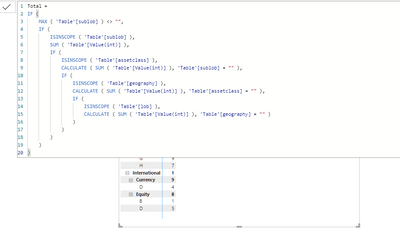
Working perfect but Market showing wrong value
- Mark as New
- Bookmark
- Subscribe
- Mute
- Subscribe to RSS Feed
- Permalink
- Report Inappropriate Content
Working perfect but Market showing wrong value
- Mark as New
- Bookmark
- Subscribe
- Mute
- Subscribe to RSS Feed
- Permalink
- Report Inappropriate Content
Hi @Anonymous ,
The following output is what you want.
Base on table ,create a measure:
measure=
IF (
    HASONEVALUE ( 'Table'[sublob] ),
    MAX ( 'Table'[Value(int)] ),
    IF (
        HASONEVALUE ( 'Table'[assetclass] ),
        CALCULATE (
            MAX ( 'Table'[Value(int)] ),
            FILTER (
                ALL ( 'Table' ),
                'Table'[lob] = MAX ( 'Table'[lob] )
                    && 'Table'[geography] = MAX ( 'Table'[geography] )
                    && 'Table'[assetclass] = MAX ( 'Table'[assetclass] )
                    && 'Table'[sublob] = BLANK ()
            )
        ),
        IF (
            HASONEVALUE ( 'Table'[geography] ),
            CALCULATE (
                MAX ( 'Table'[Value(int)] ),
                FILTER (
                    ALL ( 'Table' ),
                    'Table'[lob] = MAX ( 'Table'[lob] )
                        && 'Table'[geography] = MAX ( 'Table'[geography] )
                        && 'Table'[assetclass] = BLANK ()
                )
            ),
            IF (
                HASONEVALUE ( 'Table'[lob] ),
                CALCULATE (
                    MAX ( 'Table'[Value(int)] ),
                    FILTER (
                        ALL ( 'Table' ),
                        'Table'[lob] = MAX ( 'Table'[lob] )
                            && 'Table'[geography] = BLANK ()
                    )
                ),
                CALCULATE (
                    MAX ( 'Table'[Value(int)] ),
                    FILTER ( ALL ( 'Table' ), 'Table'[lob] = BLANK () )
                )
            )
        )
    )
)
Then use the measure create visual ,and set filter is not empty:
Did I answer your question? Mark my post as a solution!
Best Regards
Lucien
- Mark as New
- Bookmark
- Subscribe
- Mute
- Subscribe to RSS Feed
- Permalink
- Report Inappropriate Content
Thanks working perfect.
- Mark as New
- Bookmark
- Subscribe
- Mute
- Subscribe to RSS Feed
- Permalink
- Report Inappropriate Content
Thanks working perfect.

- Mark as New
- Bookmark
- Subscribe
- Mute
- Subscribe to RSS Feed
- Permalink
- Report Inappropriate Content
@Anonymous , Based on what I got.
There are few solutions discussed on this issue, see if those can help
Helpful resources

Power BI Monthly Update - November 2025
Check out the November 2025 Power BI update to learn about new features.

Fabric Data Days
Advance your Data & AI career with 50 days of live learning, contests, hands-on challenges, study groups & certifications and more!

FabCon Atlanta 2026
Join us at FabCon Atlanta, March 16-20, for the ultimate Fabric, Power BI, AI and SQL community-led event. Save $200 with code FABCOMM.

| User | Count |
|---|---|
| 11 | |
| 9 | |
| 9 | |
| 6 | |
| 5 |


| User | Count |
|---|---|
| 27 | |
| 22 | |
| 19 | |
| 17 | |
| 11 |


