Join us at FabCon Atlanta from March 16 - 20, 2026, for the ultimate Fabric, Power BI, AI and SQL community-led event. Save $200 with code FABCOMM.
Register now!The Power BI Data Visualization World Championships is back! Get ahead of the game and start preparing now! Learn more
Hello,
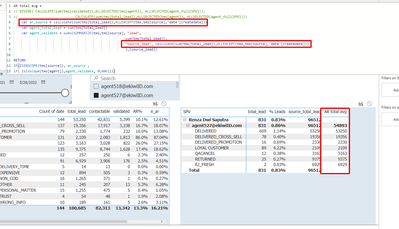
In the measure 'AR total avg', I use 2 variables, 'ar_source' and 'agent_validate'
At lowest level of the hierarchy, variable 'ar_source' shows total leads of each source.
On the next level of the hierarchy, variable 'agent_validate' shows the sum of total leads of all sources.
However, variable 'agent_validate' shows 54893 leads which is incorrect, the correct number is 96512 (sum of total leads of all sources calculated by variable 'ar_source')
Please help me with this case :(.
Solved! Go to Solution.
You should never perform any calculations in SUMMARIZE in measures. SUMMARIZE is such a complex function (in terms of behaviour) that Alberto Ferrari and Marco Russo strongly advise against performing calculations within it (they themselves never do it). Please, instead use the combination ADDCOLUMNS/SUMMARIZE. SUMMARIZE must only be used for grouping, nothing else, if you want to stay sane.
Hi mate,
Thanks for your advice, do you have any idea how I can apply ADDCOLUMNS with this case?
Check out the November 2025 Power BI update to learn about new features.
Advance your Data & AI career with 50 days of live learning, contests, hands-on challenges, study groups & certifications and more!
| User | Count |
|---|---|
| 21 | |
| 10 | |
| 9 | |
| 4 | |
| 4 |
| User | Count |
|---|---|
| 34 | |
| 31 | |
| 20 | |
| 13 | |
| 12 |