Join us at FabCon Atlanta from March 16 - 20, 2026, for the ultimate Fabric, Power BI, AI and SQL community-led event. Save $200 with code FABCOMM.
Register now!The Power BI Data Visualization World Championships is back! Get ahead of the game and start preparing now! Learn more
Hello everybody!
I need to calculate the number of rows for a specific table (archive) that is linked to our sales master and calendar table.
The sales master has a date column is linked to our calendar and attribute table.
The sales master has this structure:
| Order (key to Archive) | Date (Key to Calendar) | Article (Key to Attribute List) |
| 100 | 01.01.2021 | ABC |
This table contains a unique row per order number.
The archive table has this structure:
| Order (key to Sales Master) | Date (Key to Calendar) |
| 100 | 01.01.2021 |
| 100 | 07.01.2021 |
The goal is to calculate the number of rows of this table per week based on some attributes out of the attribute table.
The archive table is linked (active) to the Calender and to Sales Master (Inactive).
This measure won't work since then the Sales master already has an active relation to the calendar.
# Rows =
CALCULATE(
COUNTROWS('Arhive'),
USERELATIONSHIP('Archive'[Order], 'Sales Master'[Order])
What would you propose?
How can I deactivate the relation between Sales master and Calendar within this measure?
Solved! Go to Solution.
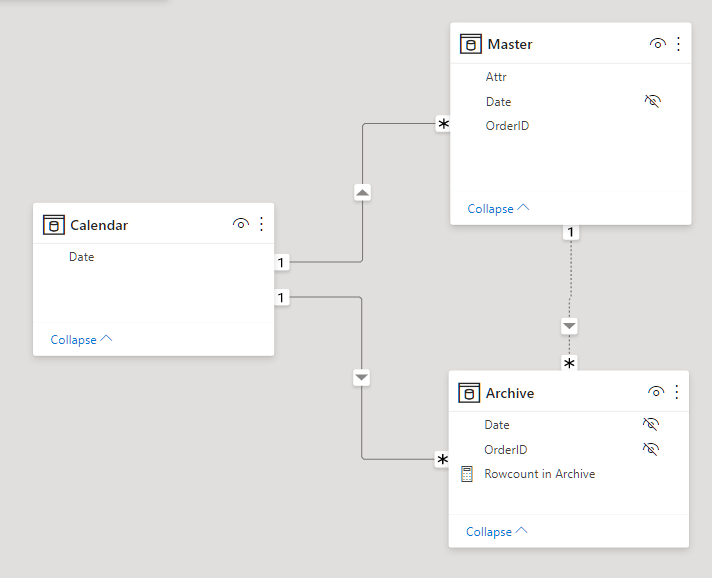
Here's me playing around with a simple model. Attached a picture of it below.
// I understand Calendar is connected
// to Master on Date and Calendar is
// also connected to Archive. There's
// a connection from Master to Archive
// on OrderID. The connection from
// Calendar to Archive is active, the
// other one, from Master to Archive,
// is inactive. The Attribute dimension
// is also linked to Master on Article.
// The goal is to calculate the number of
// rows of this table (Archive) per week based
// on some attributes out of the attribute table.
DEFINE MEASURE Archive[Rowcount in Archive] =
CALCULATE(
COUNTROWS( Archive ),
// Deactivate Calendar -> Master
CROSSFILTER(
'Calendar'[Date],
Master[Date],
NONE
),
// Activate Master -> Archive
USERELATIONSHIP(
Master[OrderID],
Archive[OrderID]
)
)
EVALUATE
CALCULATETABLE(
{
[Rowcount in Archive]
},
'Calendar'[Date] = date(2020, 1, 1),
Master[OrderID] in {1, 5}
)
Here's me playing around with a simple model. Attached a picture of it below.
// I understand Calendar is connected
// to Master on Date and Calendar is
// also connected to Archive. There's
// a connection from Master to Archive
// on OrderID. The connection from
// Calendar to Archive is active, the
// other one, from Master to Archive,
// is inactive. The Attribute dimension
// is also linked to Master on Article.
// The goal is to calculate the number of
// rows of this table (Archive) per week based
// on some attributes out of the attribute table.
DEFINE MEASURE Archive[Rowcount in Archive] =
CALCULATE(
COUNTROWS( Archive ),
// Deactivate Calendar -> Master
CROSSFILTER(
'Calendar'[Date],
Master[Date],
NONE
),
// Activate Master -> Archive
USERELATIONSHIP(
Master[OrderID],
Archive[OrderID]
)
)
EVALUATE
CALCULATETABLE(
{
[Rowcount in Archive]
},
'Calendar'[Date] = date(2020, 1, 1),
Master[OrderID] in {1, 5}
)
The Power BI Data Visualization World Championships is back! Get ahead of the game and start preparing now!
| User | Count |
|---|---|
| 14 | |
| 5 | |
| 4 | |
| 3 | |
| 2 |
| User | Count |
|---|---|
| 25 | |
| 10 | |
| 10 | |
| 6 | |
| 6 |