cancel
Showing results for 
Search instead for 
Did you mean: 

The Power BI Data Visualization World Championships is back! Get ahead of the game and start preparing now! Learn more

Reply
Anonymous
Not applicable

UK PostCode to Area Code

Hi,


I would like to break down the UK postcode into an area code. For example, SE27 9HR to SE27. 


I found a solution for a DAX command to return the first 2 characters (in this case SE) but I'd like the number as well. This was the solution: 

POSTCODEnew =
IF (
    RIGHT ( LEFT ( 'UK Post Code'[POSTCODEold], 2 ), 1 )
        IN { "0", "1", "2", "3", "4", "5", "6", "7", "8", "9" },
    LEFT ( 'UK Post Code'[POSTCODEold], 1 ),
    LEFT ( 'UK Post Code'[POSTCODEold], 2 )
)


Also, some postcodes have 3 characters at the start instead of 4 e.g. E14 0RW. So is there a DAX command to return whatever is in front of the break between the 2 sets of characters. 

1 ACCEPTED SOLUTION
goncalogeraldes
Super User
Super User

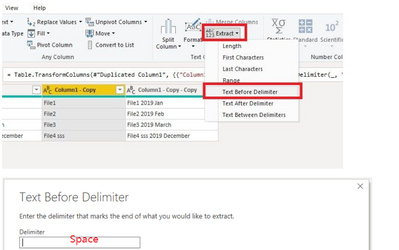
Hello there @Anonymous ! Wouldn't it be easier for you to do this in Power Query Editor with either the "split column" function or the "extract" function? 


goncalogeraldes_0-1630944938049.png


Alternatively, you can also try this!


ColumnB = 
Var FirstSpace = FIND(" ";'UK Post Code'[POSTCODEold]) 
Return 
LEFT('UK Post Code'[POSTCODEold]; LEN('UK Post Code'[POSTCODEold]) - FirstSpace)


Hope this answer solves your problem! If you need any additional help please tag me in your reply.
If my reply provided you with a solution, pleased mark it as a solution ✔️ or give it a kudoe 👍
Thanks!

Best regards,
Gonçalo Geraldes 

View solution in original post

1 REPLY 1
goncalogeraldes
Super User
Super User

Hello there @Anonymous ! Wouldn't it be easier for you to do this in Power Query Editor with either the "split column" function or the "extract" function? 


goncalogeraldes_0-1630944938049.png


Alternatively, you can also try this!


ColumnB = 
Var FirstSpace = FIND(" ";'UK Post Code'[POSTCODEold]) 
Return 
LEFT('UK Post Code'[POSTCODEold]; LEN('UK Post Code'[POSTCODEold]) - FirstSpace)


Hope this answer solves your problem! If you need any additional help please tag me in your reply.
If my reply provided you with a solution, pleased mark it as a solution ✔️ or give it a kudoe 👍
Thanks!

Best regards,
Gonçalo Geraldes 

Helpful resources

Announcements
Power BI DataViz World Championships

Power BI Dataviz World Championships

The Power BI Data Visualization World Championships is back! Get ahead of the game and start preparing now!

December 2025 Power BI Update Carousel

Power BI Monthly Update - December 2025

Check out the December 2025 Power BI Holiday Recap!

FabCon Atlanta 2026 carousel

FabCon Atlanta 2026

Join us at FabCon Atlanta, March 16-20, for the ultimate Fabric, Power BI, AI and SQL community-led event. Save $200 with code FABCOMM.