cancel
Showing results for 
Search instead for 
Did you mean: 

Data Days is here! Join us now for 60+ days of learning, challenges, and connection. Learn more

Reply
juanmontes
Frequent Visitor

Translate excel RATE function to DAX

Hi,


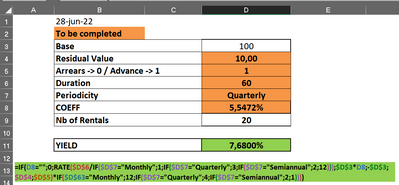
I've tried to use RATE function in DAX  like in Excel, but without success.  Some explanation about as I want to do:


I've the following data :


juanmontes_2-1656412598423.png


Could you help me to reproduce this function, please?


Thanks in advance,


Juan


1 ACCEPTED SOLUTION
v-jianboli-msft
Community Support
Community Support

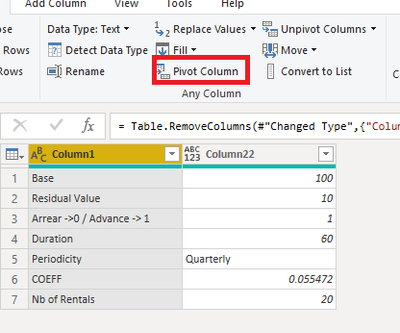
Please follow these steps:

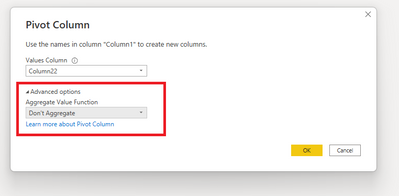
1. Pivot the table

vjianbolimsft_0-1656668112141.png


vjianbolimsft_1-1656668112144.png


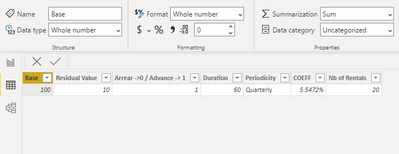
2. Then change the data type of these values

vjianbolimsft_2-1656668112145.png


3. Create a Measure, here is the DAX:


FIELD =

VAR _a =

    SWITCH (

        MAX ( [Periodicity] ),

        "Monthly", 1,

        "Quarterly", 3,

        "Semiannual", 2,

        12

    )

VAR _b =

    SWITCH (

        MAX ( [Periodicity] ),

        "Monthly", 12,

        "Quarterly", 4,

        "Semiannual", 2,

        1

    )

VAR _r =

    RATE (

        DIVIDE ( MAX ( [Duration] ), _a ),

        MAX ( [Base] ) * MAX ( [COEFF] ),

        - MAX ( [Base] ),

        MAX ( [Residual Value] ),

        MAX ( [Arrear ->0 / Advance -> 1] )

    )

RETURN

IF ( ISBLANK ( MAX ( [COEFF] ) ), 0, _b * _r )

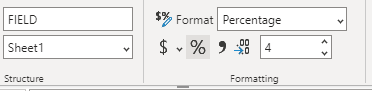
4. Change the format of the measure


vjianbolimsft_3-1656668112146.png

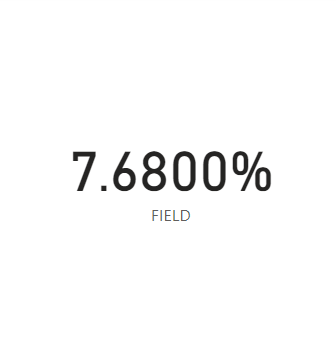
5. Apply it to a card


Final output:

vjianbolimsft_4-1656668112146.png


Best Regards,

Jianbo Li

If this post helps, then please consider Accept it as the solution to help the other members find it more quickly.

View solution in original post

2 REPLIES 2
v-jianboli-msft
Community Support
Community Support

Please follow these steps:

1. Pivot the table

vjianbolimsft_0-1656668112141.png


vjianbolimsft_1-1656668112144.png


2. Then change the data type of these values

vjianbolimsft_2-1656668112145.png


3. Create a Measure, here is the DAX:


FIELD =

VAR _a =

    SWITCH (

        MAX ( [Periodicity] ),

        "Monthly", 1,

        "Quarterly", 3,

        "Semiannual", 2,

        12

    )

VAR _b =

    SWITCH (

        MAX ( [Periodicity] ),

        "Monthly", 12,

        "Quarterly", 4,

        "Semiannual", 2,

        1

    )

VAR _r =

    RATE (

        DIVIDE ( MAX ( [Duration] ), _a ),

        MAX ( [Base] ) * MAX ( [COEFF] ),

        - MAX ( [Base] ),

        MAX ( [Residual Value] ),

        MAX ( [Arrear ->0 / Advance -> 1] )

    )

RETURN

IF ( ISBLANK ( MAX ( [COEFF] ) ), 0, _b * _r )

4. Change the format of the measure


vjianbolimsft_3-1656668112146.png

5. Apply it to a card


Final output:

vjianbolimsft_4-1656668112146.png


Best Regards,

Jianbo Li

If this post helps, then please consider Accept it as the solution to help the other members find it more quickly.

amitchandak
Super User
Super User

@juanmontes , is this not one financial function supported?

https://www.youtube.com/watch?v=9VYqbj2h4zE

https://www.youtube.com/watch?v=6oaSdjZ_FLQ

Share with Power BI Enthusiasts: Full Power BI Video (20 Hours) YouTube
Microsoft Fabric Series 60+ Videos YouTube
Microsoft Fabric Hindi End to End YouTube

Helpful resources

Announcements
Fabric Data Days is here Carousel

Fabric Data Days 2026

Don't miss out on Data Days, June 15 through August 7. Learn Fabric, Power BI, SQL, AI and more.

May Power BI Update Carousel

Power BI Monthly Update - May 2026

Check out the May 2026 Power BI update to learn about new features.

Power BI DataViz World Championships carousel

Power BI DataViz World Championships - June 2026

A new Power BI DataViz World Championship is coming this June! Don't miss out on submitting your entry.