Join us at FabCon Atlanta from March 16 - 20, 2026, for the ultimate Fabric, Power BI, AI and SQL community-led event. Save $200 with code FABCOMM.
Register now!The Power BI Data Visualization World Championships is back! Get ahead of the game and start preparing now! Learn more
Hello,
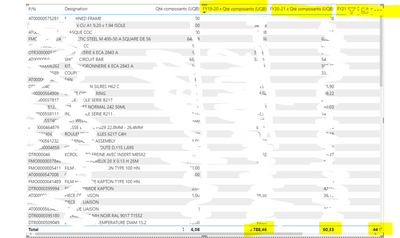
I need help to change the total of these measures.
To explain I already done a measure that multiply a price by a quantity,
the probleme is that the total multiply the final price by the quantity too, I just a need a sum of the column in the total.
Solved! Go to Solution.
Hi @Anonymous
Please try
FY19-20 x Qté composants (UQB) =
SUMX (
CROSSJOIN ( VALUES ( TableName[P/N] ), VALUES ( TableName[Designation] ) ),
CALCULATE (
SUM ( 'Fichier Acheteur'[FY19-20] ) * SUM ( 'Mapping'[Qté composants (UQB)] )
)
)
Hi @Anonymous
Please try
FY19-20 x Qté composants (UQB) =
SUMX (
CROSSJOIN ( VALUES ( TableName[P/N] ), VALUES ( TableName[Designation] ) ),
CALCULATE (
SUM ( 'Fichier Acheteur'[FY19-20] ) * SUM ( 'Mapping'[Qté composants (UQB)] )
)
)
As I see it seems working !! Thank you
@Anonymous , This needs to be done at some common level
example
sumx(summarize(CommonDim, CommonDim[P/N], CommonDim[Designation] , "_1", calculate(SUM('Fichier Acheteur'[FY19-20]) * SUM('Mapping'[Qté composants (UQB)])) ) , [_1])
The Power BI Data Visualization World Championships is back! Get ahead of the game and start preparing now!
Check out the November 2025 Power BI update to learn about new features.
| User | Count |
|---|---|
| 20 | |
| 10 | |
| 9 | |
| 4 | |
| 4 |
| User | Count |
|---|---|
| 33 | |
| 31 | |
| 19 | |
| 12 | |
| 11 |