cancel
Showing results for 
Search instead for 
Did you mean: 

The Power BI Data Visualization World Championships is back! Get ahead of the game and start preparing now! Learn more

Reply
Anonymous
Not applicable

TopN - User selects N

Good Morning!

I am trying to create a table that shows the sales of Top N stores.  

User selects N - via clicking on a value (e.g., 1, 3, 5, 10, ...) in a slicer / 1 col table i have created - SelectNumber[Select Number]

Below is my Dax -  using SelectedValue does not work; if i give it a number like 3 or 4, it works.  I also tried calculate Max - did not work either.  

Please suggest.

Thanks!, Pavan


TopStores =
var RowCountbyUser = SelectedValue('SelectNumber'[Select Number])) -- 3 -- Calculate(Max('SelectNumber'[Select Number])) -- 
return
TOPN(RowCountbyUser,
--TOPN(SelectedValue('SelectNumber'[Select Number]),
SUMMARIZE('StoreSales', 'StoreSales'[Region], 'StoreSales'[State],'StoreSales'[Location],'StoreSales'[Store Type],
'StoreSales'[Volume Cluster], 'StoreSales'[Internal Net Sales]),
'StoreSales'[Internal Net Sales], Desc)
5 REPLIES 5
Anonymous
Not applicable

Hi @Anonymous ,


Would you mind sharing your sample data (with sensitive information removed) in a way that is not an image so that we can better help you?

How to provide sample data in the Power BI Forum 


Hope it helps,


Community Support Team _ Caitlyn

If this post helps then please consider Accept it as the solution to help the other members find it more quickly.

Greg_Deckler
Community Champion
Community Champion

@Anonymous SELECTEDVALUE will not work if you choose more than one item in the slicer. You could use MAX('SelectNumber'[SelectNumber]) instead.


Follow on LinkedIn
@ me in replies or I'll lose your thread!!!
Instead of a Kudo, please vote for this idea
Become an expert!: Enterprise DNA
External Tools: MSHGQM
YouTube Channel!: Microsoft Hates Greg
Latest book!:
DAX For Humans

DAX is easy, CALCULATE makes DAX hard...
Anonymous
Not applicable

Thanks Greg.

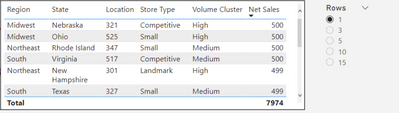
User can only select 1 value.  I tried Max as well.  Did not work.

Pic attached below.  


pkbidani_1-1640882281920.png


amitchandak
Super User
Super User

@Anonymous , you need only TOPN stores?


Top 10 by duration = calculate(Sum(Table[Value]),TOPN(10,allselected(table[Store]),[Total Duration],DESC), values(table[Store]))


Can you share sample data and sample output in table format? Or a sample pbix after removing sensitive data.


Share with Power BI Enthusiasts: Full Power BI Video (20 Hours) YouTube
Microsoft Fabric Series 60+ Videos YouTube
Microsoft Fabric Hindi End to End YouTube
Anonymous
Not applicable

Thanks Amit.

Table pic and slicer / user selection pic attached below.  


pkbidani_0-1640882180565.png


Helpful resources

Announcements
Power BI DataViz World Championships

Power BI Dataviz World Championships

The Power BI Data Visualization World Championships is back! Get ahead of the game and start preparing now!

December 2025 Power BI Update Carousel

Power BI Monthly Update - December 2025

Check out the December 2025 Power BI Holiday Recap!

FabCon Atlanta 2026 carousel

FabCon Atlanta 2026

Join us at FabCon Atlanta, March 16-20, for the ultimate Fabric, Power BI, AI and SQL community-led event. Save $200 with code FABCOMM.