cancel
Showing results for 
Search instead for 
Did you mean: 

The Power BI Data Visualization World Championships is back! Get ahead of the game and start preparing now! Learn more

Reply
thisiskl
Frequent Visitor

Top N / Rank for a specific month and return the last 12 month value for those Top N

Hi folks, 


I need to build a line chart where I need to 1. find the top 10 brands (legend) of the brand share (Y axis) for the current month. 2. Return the last 12 months (X axis) brand share for those top 10 brands identified in step 1. 


(Don't worry about the last 12 months, I can use filter to mannually select the 12 months)


I have no clue what function I should use. Rank or Related or others?


For now, I'm able to build the chart using top N as a filter for the legend. However this approach returned the top 10 brands based on the average brand share for the last 12 months, not the current month's brand share. 

1 ACCEPTED SOLUTION
Anonymous
Not applicable

Hi @thisiskl ,


Here I create a sample to show you how to achieve your goal. If you want to get dynamic Top N, you can create a what if parameter for slicer.

My Data model:
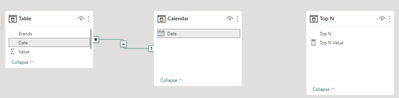
RicoZhou_0-1675320341639.png

Then create a measure as below.

Top N Brand Value =
VAR _TopN =
    SELECTEDVALUE ( 'Top N'[Top N] )
VAR _SUMMARIZE =
    SUMMARIZE (
        ALL ( 'Table' ),
        [Brands],
        "CurrentMonth",
            CALCULATE (
                SUM ( 'Table'[Value] ),
                FILTER (
                    'Calendar',
                    YEAR ( [Date] ) * 100
                        + MONTH ( [Date] )
                        = YEAR ( TODAY () ) * 100
                            + MONTH ( TODAY () )
                )
            )
    )
VAR _ADDRANK =
    ADDCOLUMNS (
        _SUMMARIZE,
        "Rank", RANKX ( _SUMMARIZE, [CurrentMonth],, DESC, DENSE )
    )
VAR _RANK =
    SUMX ( FILTER ( _ADDRANK, [Brands] = MAX ( 'Table'[Brands] ) ), [Rank] )
RETURN
    CALCULATE ( SUM ( 'Table'[Value] ), FILTER ( 'Table', _RANK <= _TopN ) )

To show last 12 months data, you can use relative data function in filter field. Result is as below.
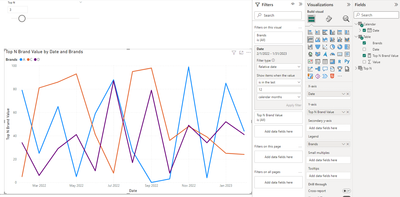
RicoZhou_1-1675320367318.png


Best Regards,
Rico Zhou


If this post helps, then please consider Accept it as the solution to help the other members find it more quickly.


View solution in original post

3 REPLIES 3
thisiskl
Frequent Visitor

This solution is awesome!

It works perfect for my case. I have a few filters, so I changed TODAY() to MAX(calendar[dt]) , ALL() to ALLSELECTED(). 

Anonymous
Not applicable

Hi @thisiskl ,


Here I create a sample to show you how to achieve your goal. If you want to get dynamic Top N, you can create a what if parameter for slicer.

My Data model:

RicoZhou_0-1675320341639.png

Then create a measure as below.

Top N Brand Value =
VAR _TopN =
    SELECTEDVALUE ( 'Top N'[Top N] )
VAR _SUMMARIZE =
    SUMMARIZE (
        ALL ( 'Table' ),
        [Brands],
        "CurrentMonth",
            CALCULATE (
                SUM ( 'Table'[Value] ),
                FILTER (
                    'Calendar',
                    YEAR ( [Date] ) * 100
                        + MONTH ( [Date] )
                        = YEAR ( TODAY () ) * 100
                            + MONTH ( TODAY () )
                )
            )
    )
VAR _ADDRANK =
    ADDCOLUMNS (
        _SUMMARIZE,
        "Rank", RANKX ( _SUMMARIZE, [CurrentMonth],, DESC, DENSE )
    )
VAR _RANK =
    SUMX ( FILTER ( _ADDRANK, [Brands] = MAX ( 'Table'[Brands] ) ), [Rank] )
RETURN
    CALCULATE ( SUM ( 'Table'[Value] ), FILTER ( 'Table', _RANK <= _TopN ) )

To show last 12 months data, you can use relative data function in filter field. Result is as below.

RicoZhou_1-1675320367318.png


Best Regards,
Rico Zhou


If this post helps, then please consider Accept it as the solution to help the other members find it more quickly.


Thank you so much @Anonymous !!!

Helpful resources

Announcements
Power BI DataViz World Championships

Power BI Dataviz World Championships

The Power BI Data Visualization World Championships is back! Get ahead of the game and start preparing now!

December 2025 Power BI Update Carousel

Power BI Monthly Update - December 2025

Check out the December 2025 Power BI Holiday Recap!

FabCon Atlanta 2026 carousel

FabCon Atlanta 2026

Join us at FabCon Atlanta, March 16-20, for the ultimate Fabric, Power BI, AI and SQL community-led event. Save $200 with code FABCOMM.