cancel
Showing results for 
Search instead for 
Did you mean: 

Get Fabric Certified for FREE during Fabric Data Days. Don't miss your chance! Request now

Reply
VR_123
Frequent Visitor

To get the Selected and previous to the selected Value

Hi Team,

I am new to PowerBI and getting familier with the tool and DAX.

I have the following Data:

QtrIndex
2019Q11
2019Q22
2019Q33
2019Q44


I have a slicer on Qtr.

Need to get the selected Slicer Value and its previous value.

Example:

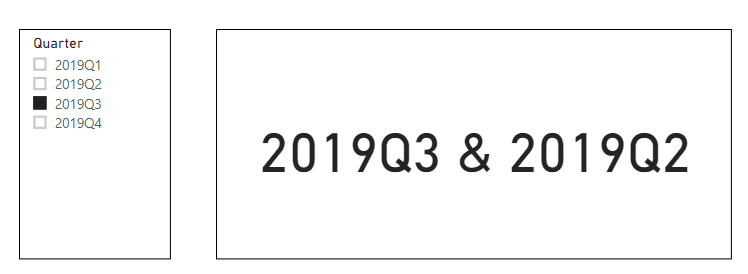
Selected slicer value is "2019Q3"

Result on Card should be : "2019Q3 & 2019Q2"

Result on card if no slicer Selection: "2019Q4 & 2019Q3" (Max value and its previous value)


Thanks in advance


1 ACCEPTED SOLUTION
Pragati11
Super User
Super User

Hi @VR_123 ,


You can follow the steps below to achieve the desired result:

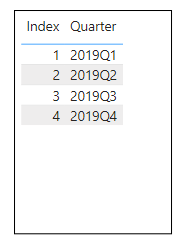
  1.  The sample data used is 

viz1.png

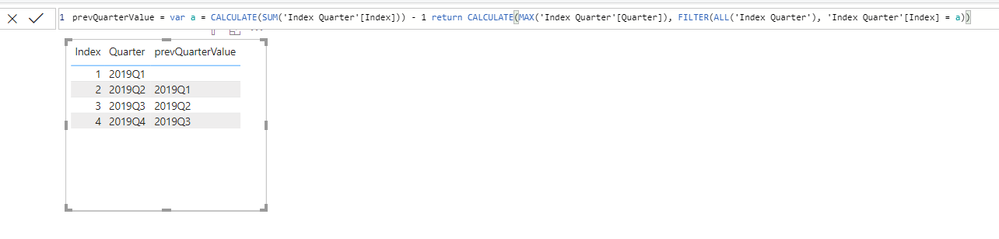
2. Create a column as follows:

   viz2.png

3. Create the following calculated column:

viz3.png


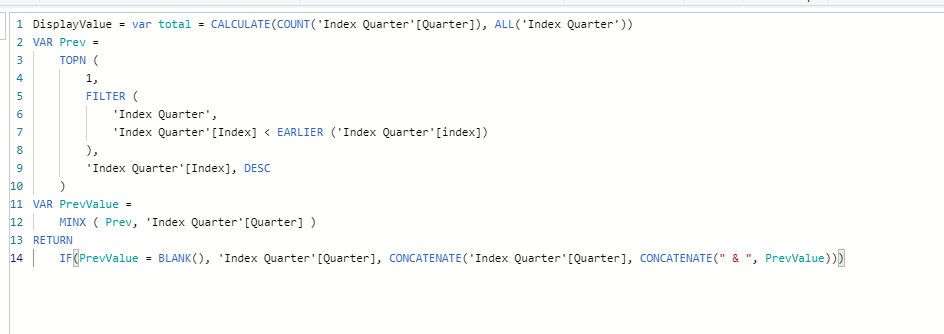
4. Create the following measure:

viz4.png

5. Move the above created measure "DISPLAYVALUECARD" to a card visual and create a slicer with QUARTER column:

viz5.png

This shows the dafault value which you asked for when nothing is selected in the filter.


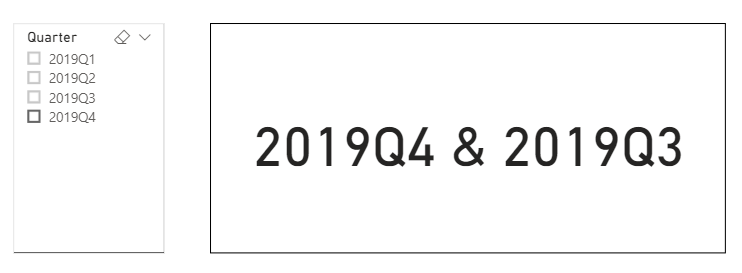
6. Let's select a value:

viz6.png

Desired result is displayed.

Similarly, if you check other filter selections, the desired value is displayed in the card.


Hope this solution helps.


If this helps and resolves the issue, appreciate a Kudos and mark it as a Solution! 🙂


Thanks,

Pragati


Best Regards,

Pragati Jain


MVP logo


LinkedIn | Twitter | Blog YouTube 

Did I answer your question? Mark my post as a solution! This will help others on the forum!

Appreciate your Kudos!!

Proud to be a Super User!!

View solution in original post

3 REPLIES 3
ash123
Regular Visitor

Hi ,


There is also another way of achieving the functionality you are looking for to be inplemented in your report.


Step 1 :  Create a measure to capture previous Qtr  based on your selection .


Previous_Qtr =
IF (
ISFILTERED ( 'Table'[Qtr] ),
LOOKUPVALUE ( 'Table'[Qtr], 'Table'[Index], MAX ( 'Table'[Index] ) - 1 )
)


Step 2 : Create another measure select_measure which you have to place in the card. Here when you  have selected any Qtr then that qtr and previous qtr will be shown else last qtr and its previous qtr will be shown.


select_measure =
IF (
    ISFILTERED ( 'Table'[Qtr] ),
    MAX ( 'Table'[Qtr] ) & " & " & [Previous_Qtr],
    LOOKUPVALUE ( 'Table'[Qtr], 'Table'[Index], MAX ( 'Table'[Index] ) ) & " & "
        LOOKUPVALUE ( 'Table'[Qtr], 'Table'[Index], MAX ( 'Table'[Index] ) - 1 )
)

Also, It is suggested not to use calculated column as it hampers performance.


Hope it helps.


Thanks.

Kaushlendra Mishra 

www.powerbitalks.com

Linkedin: https://www.linkedin.com/in/kaushlendra-mishra-49627310/


Pragati11
Super User
Super User

Hi @VR_123 ,


You can follow the steps below to achieve the desired result:

  1.  The sample data used is 

viz1.png

2. Create a column as follows:

   viz2.png

3. Create the following calculated column:

viz3.png


4. Create the following measure:

viz4.png

5. Move the above created measure "DISPLAYVALUECARD" to a card visual and create a slicer with QUARTER column:

viz5.png

This shows the dafault value which you asked for when nothing is selected in the filter.


6. Let's select a value:

viz6.png

Desired result is displayed.

Similarly, if you check other filter selections, the desired value is displayed in the card.


Hope this solution helps.


If this helps and resolves the issue, appreciate a Kudos and mark it as a Solution! 🙂


Thanks,

Pragati


Best Regards,

Pragati Jain


MVP logo


LinkedIn | Twitter | Blog YouTube 

Did I answer your question? Mark my post as a solution! This will help others on the forum!

Appreciate your Kudos!!

Proud to be a Super User!!

Hi @VR_123 ,


If my solution helped you, can you please mark and accept it as a solution for others to refer in future.


Thanks,

Pragati

Best Regards,

Pragati Jain


MVP logo


LinkedIn | Twitter | Blog YouTube 

Did I answer your question? Mark my post as a solution! This will help others on the forum!

Appreciate your Kudos!!

Proud to be a Super User!!

Helpful resources

Announcements
November Power BI Update Carousel

Power BI Monthly Update - November 2025

Check out the November 2025 Power BI update to learn about new features.

Fabric Data Days Carousel

Fabric Data Days

Advance your Data & AI career with 50 days of live learning, contests, hands-on challenges, study groups & certifications and more!

FabCon Atlanta 2026 carousel

FabCon Atlanta 2026

Join us at FabCon Atlanta, March 16-20, for the ultimate Fabric, Power BI, AI and SQL community-led event. Save $200 with code FABCOMM.