cancel
Showing results for 
Search instead for 
Did you mean: 

The Power BI Data Visualization World Championships is back! Get ahead of the game and start preparing now! Learn more

Reply
vishu263
Helper II
Helper II

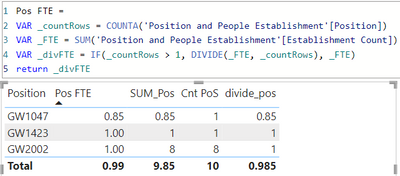
The total is coming incorrect.

@member, I am using the below measure to divide the sum i.e. _FTE by _countRows. The VAR_FTE gives me 9.85. VAR_countRows gives me 10.

I want to see the total of VAR_divFTE as 2.85 i.e. 0.85+1+1.  However, it is dividing (=9.85/10) and giving me total as 0.985.

Can someone please suggest what changes needs to be done in VAR_divFTE to get the total of 2.85

NOTE : I am using Power BI dataset as a source here and cannot resolve this issue by creating calculated column, writing a DAX meausre is the only option.

Capture.png

1 ACCEPTED SOLUTION
tamerj1
Super User
Super User

Hi @vishu263 

please try

divide_pos =
SUMX ( VALUES ( 'Table'[Position] ), DIVIDE ( [Sum_Pos], [Cnt PoS] ) )

View solution in original post

6 REPLIES 6
tamerj1
Super User
Super User

Hi @vishu263 

please try

divide_pos =
SUMX ( VALUES ( 'Table'[Position] ), DIVIDE ( [Sum_Pos], [Cnt PoS] ) )

tamerj1
Super User
Super User

Hi @vishu263 

Please try

Pos FTE Correct Total =
SUMX (

VALUES ( 'Table'[Position] ),

[Pos FTE] 

)

Hi @tamerj1 ,


Where exactly are you suggesting to make this change?

I am putting the text version of the above DAX to make it easier.


Pos FTE =
VAR _countRows = COUNTA('Position and People Establishment'[Position])
VAR _FTE = SUM('Position and People Establishment'[Establishment Count])
VAR _divFTE = IF(_countRows > 1, DIVIDE(_FTE, _countRows), _FTE)
return _divFTE

Hi @vishu263 
Apologies for the late reply. Please try

Pos FTE =
SUMX (
    VALUES ( 'Position and People Establishment'[Position] ),
    VAR _Table =
        CALCULATETABLE ( 'Position and People Establishment' )
    VAR _CountRows =
        COUNTROWS ( 'Position and People Establishment' )
    VAR _FTE =
        SUMX ( _Table, 'Position and People Establishment'[Establishment Count] )
    VAR _DivFTE =
        DIVIDE ( _FTE, _CountRows )
    RETURN
        _DivFTE
)

Thanks for your response @tamerj1 .

I tried using the above DAX however, it is giving the same total count of 0.985

@vishu263 

It should work based on your description and presented visual. Unless both have been over simplified. 

Helpful resources

Announcements
Power BI DataViz World Championships

Power BI Dataviz World Championships

The Power BI Data Visualization World Championships is back! Get ahead of the game and start preparing now!

November Power BI Update Carousel

Power BI Monthly Update - November 2025

Check out the November 2025 Power BI update to learn about new features.

FabCon Atlanta 2026 carousel

FabCon Atlanta 2026

Join us at FabCon Atlanta, March 16-20, for the ultimate Fabric, Power BI, AI and SQL community-led event. Save $200 with code FABCOMM.