Join us at FabCon Atlanta from March 16 - 20, 2026, for the ultimate Fabric, Power BI, AI and SQL community-led event. Save $200 with code FABCOMM.
Register now!Get Fabric Certified for FREE during Fabric Data Days. Don't miss your chance! Request now
Hi Team ,
I have hit a wall and I need some help.
I need to create a measure that captures my quarterly totals but some are aggregated and some are not and are just based on the last entered value for that month. The aggregation is fine but when I don't know how to get the last value to show in the qtr total as I have displayed below.
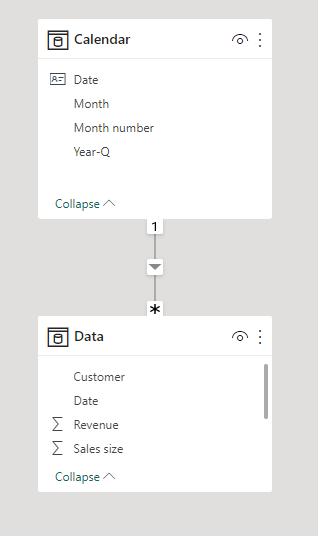
I have a date dimension table connected to the sales table in my model.
any help is greatly appreciated.
Solved! Go to Solution.
Hi,
I am not sure if I understood your question correctly, but I tried to create a sample pbix file like below.
Please check the below picture and the attached pbix file.
I hope the below can provide some ideas on how to create a solution for your datamodel.
Revenue: =
SWITCH (
TRUE (),
ISINSCOPE ( 'Calendar'[Month number] ), SUM ( Data[Revenue] ),
ISINSCOPE ( 'Calendar'[Year-Q] ),
VAR _yearquarter =
MAX ( 'Calendar'[Year-Q] )
VAR _quartertable =
FILTER ( ALL ( 'Calendar' ), 'Calendar'[Year-Q] = _yearquarter )
VAR _lastnonblankmonth =
MAXX (
FILTER (
ADDCOLUMNS ( _quartertable, "@rev", CALCULATE ( SUM ( Data[Revenue] ) ) ),
[@rev] <> BLANK ()
),
'Calendar'[Month number]
)
RETURN
CALCULATE (
SUM ( Data[Revenue] ),
'Calendar'[Year-Q] = _yearquarter,
'Calendar'[Month number] = _lastnonblankmonth
)
)
Customoer count: =
SWITCH (
TRUE (),
ISINSCOPE ( 'Calendar'[Month number] ), DISTINCTCOUNT(Data[Customer]),
ISINSCOPE ( 'Calendar'[Year-Q] ),
VAR _yearquarter =
MAX ( 'Calendar'[Year-Q] )
VAR _quartertable =
FILTER ( ALL ( 'Calendar' ), 'Calendar'[Year-Q] = _yearquarter )
VAR _lastnonblankmonth =
MAXX (
FILTER (
ADDCOLUMNS ( _quartertable, "@count", CALCULATE ( DISTINCTCOUNT(Data[Customer]) ) ),
[@count] <> BLANK ()
),
'Calendar'[Month number]
)
RETURN
CALCULATE (
DISTINCTCOUNT(Data[Customer]),
'Calendar'[Year-Q] = _yearquarter,
'Calendar'[Month number] = _lastnonblankmonth
)
)
Sales size: =
SUM( Data[Sales size] )
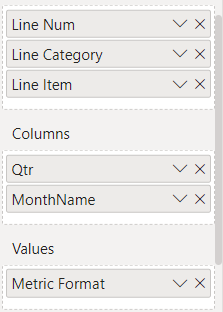
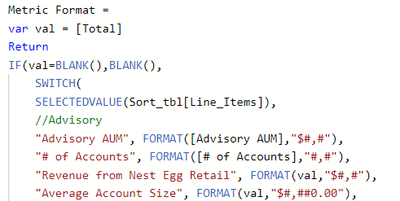
Hi @Jihwan_Kim quick question. I noticed in my Matrix visual that when I drill up to the quarter level the values do not show. For the value I am also using a switch function for the values See the below example. I need to be able to drill up and show the data at the quarter level.
Hi,
I am not sure if I understood your question correctly, but I tried to create a sample pbix file like below.
Please check the below picture and the attached pbix file.
I hope the below can provide some ideas on how to create a solution for your datamodel.
Revenue: =
SWITCH (
TRUE (),
ISINSCOPE ( 'Calendar'[Month number] ), SUM ( Data[Revenue] ),
ISINSCOPE ( 'Calendar'[Year-Q] ),
VAR _yearquarter =
MAX ( 'Calendar'[Year-Q] )
VAR _quartertable =
FILTER ( ALL ( 'Calendar' ), 'Calendar'[Year-Q] = _yearquarter )
VAR _lastnonblankmonth =
MAXX (
FILTER (
ADDCOLUMNS ( _quartertable, "@rev", CALCULATE ( SUM ( Data[Revenue] ) ) ),
[@rev] <> BLANK ()
),
'Calendar'[Month number]
)
RETURN
CALCULATE (
SUM ( Data[Revenue] ),
'Calendar'[Year-Q] = _yearquarter,
'Calendar'[Month number] = _lastnonblankmonth
)
)
Customoer count: =
SWITCH (
TRUE (),
ISINSCOPE ( 'Calendar'[Month number] ), DISTINCTCOUNT(Data[Customer]),
ISINSCOPE ( 'Calendar'[Year-Q] ),
VAR _yearquarter =
MAX ( 'Calendar'[Year-Q] )
VAR _quartertable =
FILTER ( ALL ( 'Calendar' ), 'Calendar'[Year-Q] = _yearquarter )
VAR _lastnonblankmonth =
MAXX (
FILTER (
ADDCOLUMNS ( _quartertable, "@count", CALCULATE ( DISTINCTCOUNT(Data[Customer]) ) ),
[@count] <> BLANK ()
),
'Calendar'[Month number]
)
RETURN
CALCULATE (
DISTINCTCOUNT(Data[Customer]),
'Calendar'[Year-Q] = _yearquarter,
'Calendar'[Month number] = _lastnonblankmonth
)
)
Sales size: =
SUM( Data[Sales size] )
Check out the November 2025 Power BI update to learn about new features.
Advance your Data & AI career with 50 days of live learning, contests, hands-on challenges, study groups & certifications and more!
| User | Count |
|---|---|
| 11 | |
| 9 | |
| 9 | |
| 6 | |
| 5 |
| User | Count |
|---|---|
| 27 | |
| 22 | |
| 19 | |
| 17 | |
| 11 |