cancel
Showing results for 
Search instead for 
Did you mean: 

The Power BI Data Visualization World Championships is back! Get ahead of the game and start preparing now! Learn more

Reply
EEPB
Regular Visitor

Taking the Average of Values only if they meet a Criteria

I have 4 columns containing data, I would like to know the average of these columns per row, but only if they contain data that meets a set criteria, otherwise I need the data excluded from the average calculation. For example, I want to take the average of these four columns (C 1-4) but to exclude any value less than 10 from the average. 


C1C2C3C4AVG Needed Actual AVG
20304053023.75
2202022011


Ex.) I attempted using a version of the following code for a calculated column with no success.


AVG_C =
AVERAGE(
    (IF(C1>(10),C1,),
    IF(C2>(10),C2,),
    IF(C3>(10),C3,),
    IF(C4>10(10),C4,))
)
1 REPLY 1
FreemanZ
Super User
Super User

hi @EEPB 

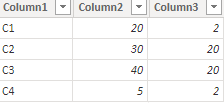
1) tranpose the data table in Power Query Editor to:

FreemanZ_0-1677139658858.png


2) then write two measures like:

Columm2Avg = 
AVERAGEX(
    FILTER(
        TableName,
        TableName[Column2]>=10
    ),
    TableName[Column2]
)

Columm3Avg = 
AVERAGEX(
    FILTER(
        TableName,
        TableName[Column3]>=10
    ),
    TableName[Column3]
)


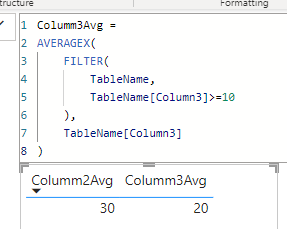
it worked like:

FreemanZ_1-1677139713763.png


Helpful resources

Announcements
Power BI DataViz World Championships

Power BI Dataviz World Championships

The Power BI Data Visualization World Championships is back! Get ahead of the game and start preparing now!

November Power BI Update Carousel

Power BI Monthly Update - November 2025

Check out the November 2025 Power BI update to learn about new features.

FabCon Atlanta 2026 carousel

FabCon Atlanta 2026

Join us at FabCon Atlanta, March 16-20, for the ultimate Fabric, Power BI, AI and SQL community-led event. Save $200 with code FABCOMM.