Join us at FabCon Atlanta from March 16 - 20, 2026, for the ultimate Fabric, Power BI, AI and SQL community-led event. Save $200 with code FABCOMM.
Register now!The Power BI Data Visualization World Championships is back! Get ahead of the game and start preparing now! Learn more
I have 4 columns containing data, I would like to know the average of these columns per row, but only if they contain data that meets a set criteria, otherwise I need the data excluded from the average calculation. For example, I want to take the average of these four columns (C 1-4) but to exclude any value less than 10 from the average.
| C1 | C2 | C3 | C4 | AVG Needed | Actual AVG |
| 20 | 30 | 40 | 5 | 30 | 23.75 |
| 2 | 20 | 20 | 2 | 20 | 11 |
Ex.) I attempted using a version of the following code for a calculated column with no success.
hi @EEPB
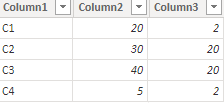
1) tranpose the data table in Power Query Editor to:
2) then write two measures like:
Columm2Avg =
AVERAGEX(
FILTER(
TableName,
TableName[Column2]>=10
),
TableName[Column2]
)
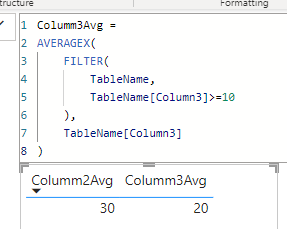
Columm3Avg =
AVERAGEX(
FILTER(
TableName,
TableName[Column3]>=10
),
TableName[Column3]
)
it worked like:
The Power BI Data Visualization World Championships is back! Get ahead of the game and start preparing now!
| User | Count |
|---|---|
| 16 | |
| 8 | |
| 4 | |
| 4 | |
| 3 |
| User | Count |
|---|---|
| 25 | |
| 13 | |
| 12 | |
| 10 | |
| 6 |