Hi all,
need your help to understand and correct a trendline measure found in the forum.
below my explanation
thx in advance
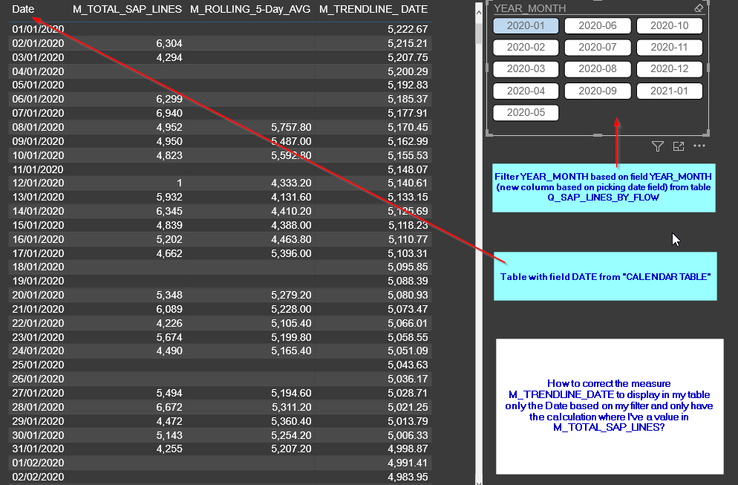
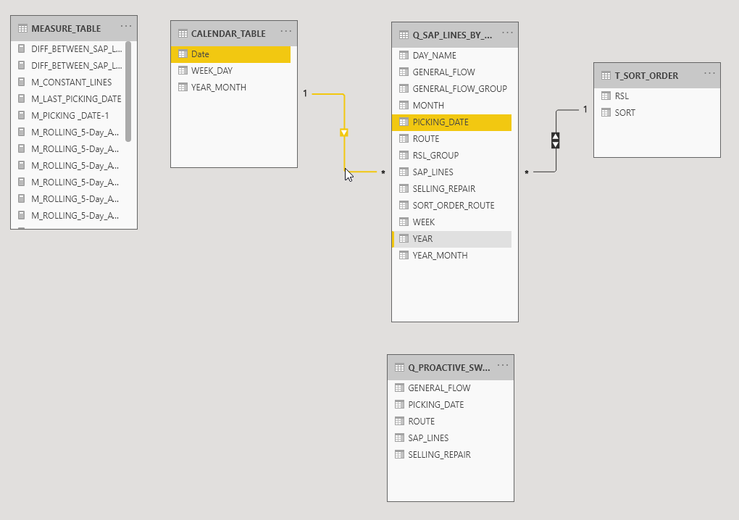
MEASURE M_TRENDLINE_DATE :
My request :
How to correct the measure M_TRENDLINE_DATE to display in my table only the Date based on my filter and only have the calculation where I've a value in M_TOTAL_SAP_LINES?
M_TRENDLINE_ DATE =
VAR Known =
FILTER (
SELECTCOLUMNS (
CALCULATETABLE ( VALUES ( CALENDAR_TABLE[Date] ), ALLSELECTED(Q_SAP_LINES_BY_FLOW) ),
"Known[X]", CALENDAR_TABLE[Date],
"Known[Y]", [M_TOTAL_SAP_LINES]
),
AND ( NOT ( ISBLANK ( Known[X] ) ), NOT ( ISBLANK ( Known[Y] ) ) )
)
VAR Count_Items =
COUNTROWS ( Known )
VAR Sum_X =
SUMX ( Known, Known[X] )
VAR Sum_X2 =
SUMX ( Known, Known[X] ^ 2 )
VAR Sum_Y =
SUMX ( Known, Known[Y] )
VAR Sum_XY =
SUMX ( Known, Known[X] * Known[Y] )
VAR Average_X =
AVERAGEX ( Known, Known[X] )
VAR Average_Y =
AVERAGEX ( Known, Known[Y] )
VAR Slope =
DIVIDE (
Count_Items * Sum_XY - Sum_X * Sum_Y,
Count_Items * Sum_X2 - Sum_X ^ 2
)
VAR Intercept = Average_Y
- Slope * Average_X
VAR Result = SUMX ( DISTINCT ( CALENDAR_TABLE[Date] ),
Intercept + Slope * CALENDAR_TABLE[Date]
)
RETURN
    IF(SELECTEDVALUE( CALENDAR_TABLE[Date] ) >= TODAY(),
Result,
        Result)
Thx in advance for your help,
Fabri


