Don't miss your chance to take exam DP-600 or DP-700 on us!
Request nowLearn from the best! Meet the four finalists headed to the FINALS of the Power BI Dataviz World Championships! Register now
Hello Guys,
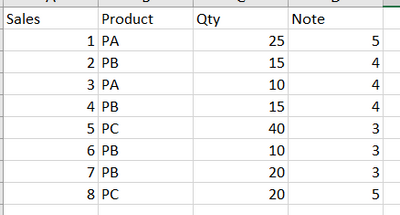
I need your help, because I a have a fact table like this :
I need to identify the product with the best average "Note", but only with products sold over to 50 units (sum of quantity).
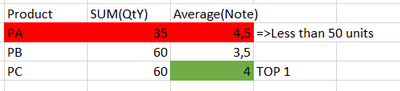
With the summarize/addcolumns, it's easy to retrieve for each product the both information : "average note" & "total quantity":
As, you can see, the TOP1 Product, with the best average note AND with more of 50 units sold is Product C.
Please, can you help me to find the correct formula to apply the top 1 on the "Summarize table" but with the filter on the "Total Quantity" (or another method...) ?
For information, I have a fact table with a lot of dimension (date, product, region, Supplier etc...) and the formula need to work with all slicer in the report.
Thanks in advance.
Solved! Go to Solution.
Hi @VGuichard
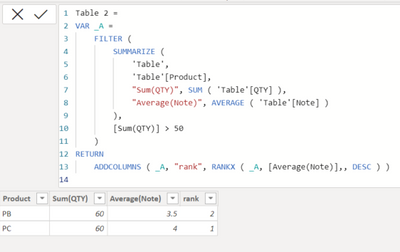
try this code to create a new table:
Table 2 =
VAR _A =
FILTER (
SUMMARIZE (
'Table',
'Table'[Product],
"Sum(QTY)", SUM ( 'Table'[QTY] ),
"Average(Note)", AVERAGE ( 'Table'[Note] )
),
[Sum(QTY)] > 50
)
RETURN
ADDCOLUMNS ( _A, "rank", RANKX ( _A, [Average(Note)],, DESC ) )
Output:
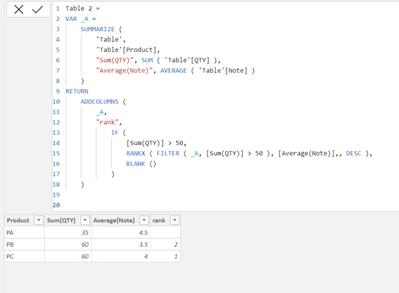
Or if you need all Products in the new table, use this code:
Table 2 =
VAR _A =
SUMMARIZE (
'Table',
'Table'[Product],
"Sum(QTY)", SUM ( 'Table'[QTY] ),
"Average(Note)", AVERAGE ( 'Table'[Note] )
)
RETURN
ADDCOLUMNS (
_A,
"rank",
IF (
[Sum(QTY)] > 50,
RANKX ( FILTER ( _A, [Sum(QTY)] > 50 ), [Average(Note)],, DESC ),
BLANK ()
)
)
Output:
If this post helps, please consider accepting it as the solution to help the other members find it more quickly.
Appreciate your Kudos!!
Thank you Vahid. I just added a filter (Rank = 1 => in order to push the TOP1 Product in a card) and an "allselected" to update the ranking according to the use of a slicer product.
Hi @VGuichard
try this code to create a new table:
Table 2 =
VAR _A =
FILTER (
SUMMARIZE (
'Table',
'Table'[Product],
"Sum(QTY)", SUM ( 'Table'[QTY] ),
"Average(Note)", AVERAGE ( 'Table'[Note] )
),
[Sum(QTY)] > 50
)
RETURN
ADDCOLUMNS ( _A, "rank", RANKX ( _A, [Average(Note)],, DESC ) )
Output:
Or if you need all Products in the new table, use this code:
Table 2 =
VAR _A =
SUMMARIZE (
'Table',
'Table'[Product],
"Sum(QTY)", SUM ( 'Table'[QTY] ),
"Average(Note)", AVERAGE ( 'Table'[Note] )
)
RETURN
ADDCOLUMNS (
_A,
"rank",
IF (
[Sum(QTY)] > 50,
RANKX ( FILTER ( _A, [Sum(QTY)] > 50 ), [Average(Note)],, DESC ),
BLANK ()
)
)
Output:
If this post helps, please consider accepting it as the solution to help the other members find it more quickly.
Appreciate your Kudos!!
Share feedback directly with Fabric product managers, participate in targeted research studies and influence the Fabric roadmap.
Check out the February 2026 Power BI update to learn about new features.
| User | Count |
|---|---|
| 5 | |
| 4 | |
| 3 | |
| 3 | |
| 2 |