cancel
Showing results for 
Search instead for 
Did you mean: 

The Power BI Data Visualization World Championships is back! Get ahead of the game and start preparing now! Learn more

Reply
TomaKavi
Helper I
Helper I

Switch not showing correct result

Hello guys, 
I have a problem and I am desperate. The below DAX is not showing proper result. If i hard code it and replace [SR1100 Total test] with lets say ,,10000,, it works, shows 10000 in the specific row and other figures are measured properly as [Total Value]. But If I leave the [SR1100 Total test] it will show 0 (its becasue the  [Total Value] was defined to show 0 if its blank.

This measure is simple [SR1100 Total test]  =
CALCULATE (
[Total Value],
Total_2021[Consolidation account]
IN {
"V10000",
"V20000",
"V30000"
}
)

Switch Values =
VAR CurrentItem = SELECTEDVALUE( Conso_Temp[Description - Normalized] )

RETURN
SWITCH( TRUE(),
CurrentItem = "Operating profit or loss (+/-)", [SR1100 Total test],
CALCULATE( [Total Value], FILTER( Conso_Temp,Conso_Temp[Description - Normalized] = CurrentItem )))
 
as you can see it shows 0 but should be (lets say 143900) the Value above is correct.
 
TomaKavi_2-1655117796791.png
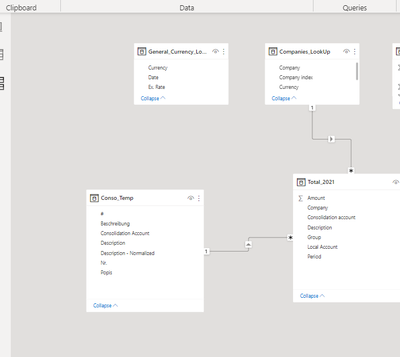
Table where I show these result is connected to Fact Table where the ,,Total Value,, are counted. I also need to filter it via country a loop up table which has direct connection to Fact table. I use the SWITCH in a Table vizual which is take from Conso Temp. 
TomaKavi_0-1655117553869.png

 Any ideas why I cant see what I need? 

 
1 ACCEPTED SOLUTION
Anonymous
Not applicable

Hi @TomaKavi 

I am so glad to hear that your problem has been solved , please consider Accept it as the solution to help the other members find it more quickly. 


Best Regards,
Community Support Team _ Ailsa Tao
If this post helps, then please consider Accept it as the solution to help the other members find it more quickly.

View solution in original post

3 REPLIES 3
Anonymous
Not applicable

Hi @TomaKavi 

I am so glad to hear that your problem has been solved , please consider Accept it as the solution to help the other members find it more quickly. 


Best Regards,
Community Support Team _ Ailsa Tao
If this post helps, then please consider Accept it as the solution to help the other members find it more quickly.

TomaKavi
Helper I
Helper I

actually I have added into the
SR1100=

CALCULATE (
[Total Value],

Allselected (),All() Total_2021[Consolidation account]........ works now

johnt75
Super User
Super User

Try changing the measure to

[SR1100 Total test]  =
CALCULATE (
[Total Value],
Total_2021[Consolidation account]
IN {
"V10000",
"V20000",
"V30000"
},
REMOVEFILTERS(Conso_Temp[Description - Normalized])
)

Helpful resources

Announcements
Power BI DataViz World Championships

Power BI Dataviz World Championships

The Power BI Data Visualization World Championships is back! Get ahead of the game and start preparing now!

November Power BI Update Carousel

Power BI Monthly Update - November 2025

Check out the November 2025 Power BI update to learn about new features.

FabCon Atlanta 2026 carousel

FabCon Atlanta 2026

Join us at FabCon Atlanta, March 16-20, for the ultimate Fabric, Power BI, AI and SQL community-led event. Save $200 with code FABCOMM.