cancel
Showing results forย 
Search instead forย 
Did you mean:ย 

Data Days is here! Join us now for 60+ days of learning, challenges, and connection. Learn more

Reply
RichieDazza123
New Member

Surely this is possible?... Relative Dates across multiple measures

Hey DAX fans: struggling with this.

I have a series of measures which calculate the satisfaction score for differet car manufacturers (dummy data). Each individual is askied to rank each manufacturer as they've driven all of these cars (factTable is ''surveycompleted-ID' and contains multiple car ratings for each submission)
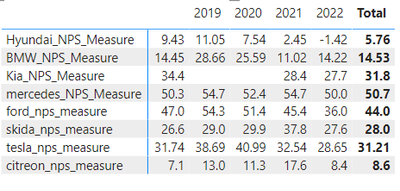
 

RichieDazza123_0-1667066529387.png


However I want to know satisfaction score (NPS) for each manufacturer across Last30Days, Last90Days, PreviousYearLast30Days etc. The trouble is, NPS isn't a calcuated column, it's a measure because it's based on an aggregation:

**If you're not familiar with NPS (satifation score), I've posted the calculation below, in short it's: (((no. of Promoters - no. of Detractors)/Number of Respondents)*100) and returns a decimal based score.  A promoter is someone who submits a satisfaction score of 9 or 10 and detractor is anyone who submitted a score of 0-6. Those who scored 7/8 are cateogrised as passive.**

** The Dax below works perfectly and is applied to each manufacturer
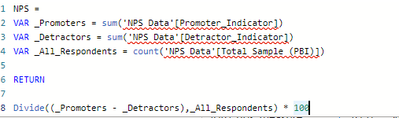
Kia_NPSKia_NPS


This is fine, however I'm having serious trouble when trying to compare L30D performance of these measures side-by-side. The below table is exactly what I want to achieve: 

RichieDazza123_2-1667066879006.png


If I try this by year it works, because the dates are based on column data:


But how do I go about creating a relative time measure that applies across all of these measures? The time measure needs to sit across multiple measures at once - anyone got any ideas of how to achieve this? I've tried SUMMARIZE but it only wants column name's, which I don't have.


Thanks,

Dale


1 ACCEPTED SOLUTION
Anonymous
Not applicable

hmm i think you could try :


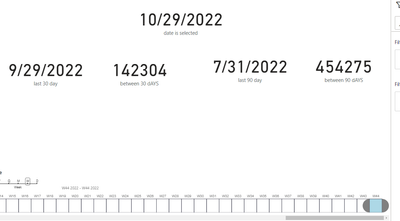
last 30 days = calculate(measure,datesbetween(dimdate[date],max(dimdate[date])-30,max(dimdate[date])))

last 90 days = 
calculate(measure,datesbetween(dimdate[date],max(dimdate[date])-90,max(dimdate[date])))


Screenshot 2022-10-29 220135.png


now for the previous 30 days you can do something like 


last period of 30 days measure = CALCULATE([TOTAL],DATESBETWEEN(Table1[Date],MAX(Table1[Date])-60,MAX(Table1[Date])-30))


โ€ƒand finally 


same period last year for 30 days = CALCULATE([last 30 days],SAMEPERIODLASTYEAR(Table1[Date]))


View solution in original post

1 REPLY 1
Anonymous
Not applicable

hmm i think you could try :


last 30 days = calculate(measure,datesbetween(dimdate[date],max(dimdate[date])-30,max(dimdate[date])))

last 90 days = 
calculate(measure,datesbetween(dimdate[date],max(dimdate[date])-90,max(dimdate[date])))


Screenshot 2022-10-29 220135.png


now for the previous 30 days you can do something like 


last period of 30 days measure = CALCULATE([TOTAL],DATESBETWEEN(Table1[Date],MAX(Table1[Date])-60,MAX(Table1[Date])-30))


โ€ƒand finally 


same period last year for 30 days = CALCULATE([last 30 days],SAMEPERIODLASTYEAR(Table1[Date]))


Helpful resources

Announcements
Fabric Data Days is here Carousel

Fabric Data Days 2026

Don't miss out on Data Days, June 15 through August 7. Learn Fabric, Power BI, SQL, AI and more.

May Power BI Update Carousel

Power BI Monthly Update - May 2026

Check out the May 2026 Power BI update to learn about new features.

Power BI DataViz World Championships carousel

Power BI DataViz World Championships - June 2026

A new Power BI DataViz World Championship is coming this June! Don't miss out on submitting your entry.