FabCon is coming to Atlanta
Join us at FabCon Atlanta from March 16 - 20, 2026, for the ultimate Fabric, Power BI, AI and SQL community-led event. Save $200 with code FABCOMM.
Register now!- Power BI forums
- Get Help with Power BI
- Desktop
- Service
- Report Server
- Power Query
- Mobile Apps
- Developer
- DAX Commands and Tips
- Custom Visuals Development Discussion
- Health and Life Sciences
- Power BI Spanish forums
- Translated Spanish Desktop
- Training and Consulting
- Instructor Led Training
- Dashboard in a Day for Women, by Women
- Galleries
- Data Stories Gallery
- Themes Gallery
- Contests Gallery
- QuickViz Gallery
- Quick Measures Gallery
- Visual Calculations Gallery
- Notebook Gallery
- Translytical Task Flow Gallery
- TMDL Gallery
- R Script Showcase
- Webinars and Video Gallery
- Ideas
- Custom Visuals Ideas (read-only)
- Issues
- Issues
- Events
- Upcoming Events
The Power BI Data Visualization World Championships is back! Get ahead of the game and start preparing now! Learn more
- Power BI forums
- Forums
- Get Help with Power BI
- DAX Commands and Tips
- Re: Summing values in a column based on two condit...
- Subscribe to RSS Feed
- Mark Topic as New
- Mark Topic as Read
- Float this Topic for Current User
- Bookmark
- Subscribe
- Printer Friendly Page


- Mark as New
- Bookmark
- Subscribe
- Mute
- Subscribe to RSS Feed
- Permalink
- Report Inappropriate Content
Summing values in a column based on two conditions in other columns
I have a huge table, and example of four columns from the table is as follows:
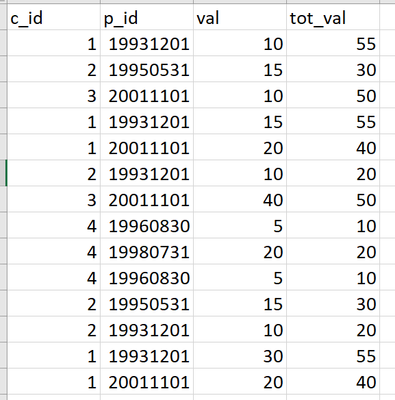
In this table i have c_id (clients), p_id (periods) and val=values. I want to be able to calculate tot_val. The way I want tot_val to be calculated is, for example, for c_id=1 and p_id=19931201, we have that val = (10,15,30), so tot_val should return 55 on all three rows with c_id=1 and p_id=19931201. I tried many options but did not get the correct results. Please let me know if you have any suggestions on how to do this.
Solved! Go to Solution.


- Mark as New
- Bookmark
- Subscribe
- Mute
- Subscribe to RSS Feed
- Permalink
- Report Inappropriate Content
Calculate (sum(Val), allexcept(Cid,oid))
Proud to be a Super User!
Awesome Keyboard Shortcusts in Power BI, thumbs up if you like the article
My Community Blog Articles (check them out!)
My Blog - Power M code to automatically detect column types -
How to create test data using DAX!


- Mark as New
- Bookmark
- Subscribe
- Mute
- Subscribe to RSS Feed
- Permalink
- Report Inappropriate Content
Something like this?
TotalValue =
VAR Client = Bamba[C_ID]
VAR Periods = Bamba[P_ID]
VAR Outstanding = Bamba[Outstanding]
VAR SameRows =
    FILTER (
        Bamba,
        Bamba[C_ID] = Client
            && Bamba[P_ID] = Periods
            && Bamba[Outstanding] <> 0
    )
VAR Result =
    CALCULATE ( SUM ( Bamba[Val] ), SameRows )
RETURN
    IF ( Outstanding = 0, 0, Result )


- Mark as New
- Bookmark
- Subscribe
- Mute
- Subscribe to RSS Feed
- Permalink
- Report Inappropriate Content
HI @bamba98 ,
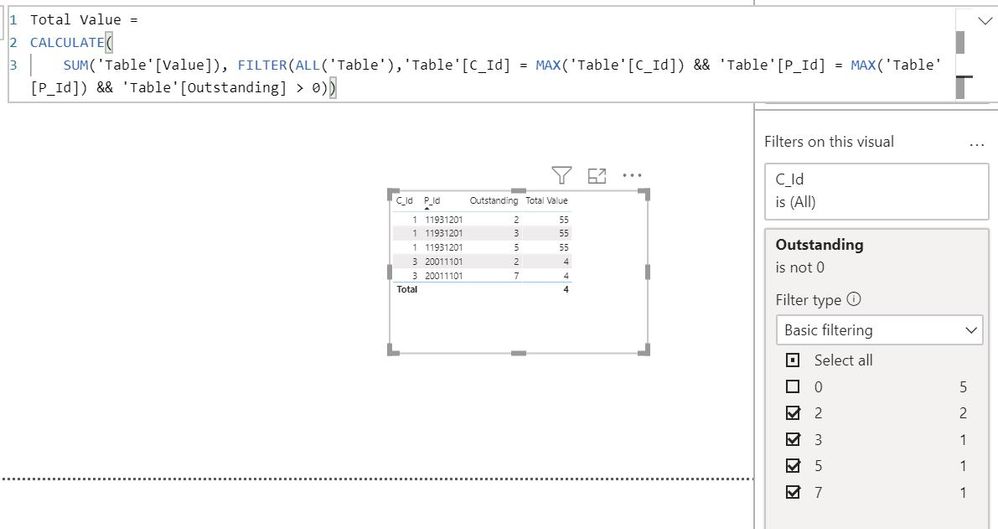
Create a measure
Total Value =
CALCULATE (
    SUM ( 'Table'[Value] ),
    FILTER (
        ALL ( 'Table' ),
        'Table'[C_Id]
            = MAX ( 'Table'[C_Id] )
            && 'Table'[P_Id]
                = MAX ( 'Table'[P_Id] )
            && 'Table'[Outstanding] > 0
    )
)
Do a Visual Filter for Outstanding.
Regards,
Harsh Nathani
Appreciate with a Kudos!! (Click the Thumbs Up Button)
Did I answer your question? Mark my post as a solution!
- Mark as New
- Bookmark
- Subscribe
- Mute
- Subscribe to RSS Feed
- Permalink
- Report Inappropriate Content
Calculate (sum(Val), allexcept(Cid,oid))
Proud to be a Super User!
Awesome Keyboard Shortcusts in Power BI, thumbs up if you like the article
My Community Blog Articles (check them out!)
My Blog - Power M code to automatically detect column types -
How to create test data using DAX!
- Mark as New
- Bookmark
- Subscribe
- Mute
- Subscribe to RSS Feed
- Permalink
- Report Inappropriate Content
Thank you very much @stevedep , that works fine!
However, I noticed that there is another column "Outstanding" in my table that contains values which are zero. How can I exclude these rows in my calculation?
- Mark as New
- Bookmark
- Subscribe
- Mute
- Subscribe to RSS Feed
- Permalink
- Report Inappropriate Content
- Mark as New
- Bookmark
- Subscribe
- Mute
- Subscribe to RSS Feed
- Permalink
- Report Inappropriate Content
@AntrikshSharma This return the values of val in tot_val. Allow me to explain it better:
Let zoom in to c_id=1 and p_id=19931201.
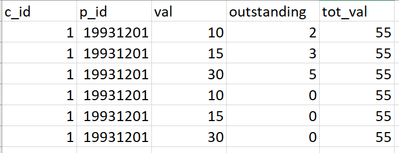
What I want is for the expression to return the sum of val where outstanding is greater than 0. With the solution of @stevedep , I get tot_val = 110, but I want it to return 55 as it should ignore the rows where outstanding =0.
- Mark as New
- Bookmark
- Subscribe
- Mute
- Subscribe to RSS Feed
- Permalink
- Report Inappropriate Content
Something like this?
TotalValue =
VAR Client = Bamba[C_ID]
VAR Periods = Bamba[P_ID]
VAR Outstanding = Bamba[Outstanding]
VAR SameRows =
    FILTER (
        Bamba,
        Bamba[C_ID] = Client
            && Bamba[P_ID] = Periods
            && Bamba[Outstanding] <> 0
    )
VAR Result =
    CALCULATE ( SUM ( Bamba[Val] ), SameRows )
RETURN
    IF ( Outstanding = 0, 0, Result )

- Mark as New
- Bookmark
- Subscribe
- Mute
- Subscribe to RSS Feed
- Permalink
- Report Inappropriate Content
You can do this in many ways, with SUMX, ALLEXCEPT etc. Here's a pedestrian method:
tot_val =
var c= selectedvalue(Table[c_id])
var p= selectedvalue(Table[p_id])
return calculate(sum(Table[val]),allselected(Table),Table[c_id]=c,Table[p_id]=p)

Helpful resources

Power BI Dataviz World Championships
The Power BI Data Visualization World Championships is back! Get ahead of the game and start preparing now!

Power BI Monthly Update - November 2025
Check out the November 2025 Power BI update to learn about new features.

FabCon Atlanta 2026
Join us at FabCon Atlanta, March 16-20, for the ultimate Fabric, Power BI, AI and SQL community-led event. Save $200 with code FABCOMM.

| User | Count |
|---|---|
| 20 | |
| 10 | |
| 9 | |
| 4 | |
| 4 |


| User | Count |
|---|---|
| 32 | |
| 31 | |
| 18 | |
| 12 | |
| 11 |


