Hi,
I have two data sets merged into 1 by a join.
in data set A I have complete data for forecast at volume and value level.
in data set B I only have the volumes only which are available for sales.
Sample data set:
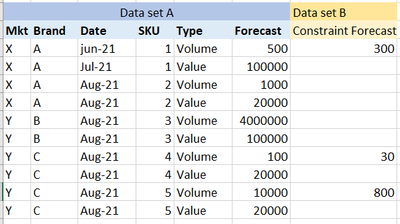
I need to calculate the value of the constraint Forecast in value based on following:
- Blanks means the volume and value are same as the unconstraint forecast.
- Value is calculated by dividing value by volume for each SKU. (i m using sumx formula to calculate the value for each line)
For instance for SKU 4, the constraint value is 6000.
And total constraint value across all SKUs is 187,600
I am getting following result when I view it SKU-wise. However, at the total level its not summing up unconstrained + constrained forecast value and just giving a sum of constrained value.
(not based on sample above)
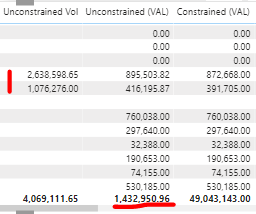
Would really appreciate if someone can help me out on calculating the correct total constraint value!


