Join the #PBI10 DataViz contest
Power BI is turning 10, and we’re marking the occasion with a special community challenge. Use your creativity to tell a story, uncover trends, or highlight something unexpected.
Get started- Power BI forums
- Get Help with Power BI
- Desktop
- Service
- Report Server
- Power Query
- Mobile Apps
- Developer
- DAX Commands and Tips
- Custom Visuals Development Discussion
- Health and Life Sciences
- Power BI Spanish forums
- Translated Spanish Desktop
- Training and Consulting
- Instructor Led Training
- Dashboard in a Day for Women, by Women
- Galleries
- Webinars and Video Gallery
- Data Stories Gallery
- Themes Gallery
- Contests Gallery
- Quick Measures Gallery
- Notebook Gallery
- Translytical Task Flow Gallery
- R Script Showcase
- Ideas
- Custom Visuals Ideas (read-only)
- Issues
- Issues
- Events
- Upcoming Events
Join us for an expert-led overview of the tools and concepts you'll need to become a Certified Power BI Data Analyst and pass exam PL-300. Register now.
- Power BI forums
- Forums
- Get Help with Power BI
- DAX Commands and Tips
- Re: Summarize and Filter to keep only the first ti...
- Subscribe to RSS Feed
- Mark Topic as New
- Mark Topic as Read
- Float this Topic for Current User
- Bookmark
- Subscribe
- Printer Friendly Page


- Mark as New
- Bookmark
- Subscribe
- Mute
- Subscribe to RSS Feed
- Permalink
- Report Inappropriate Content
Summarize and Filter to keep only the first time a customer came to our school
Hello community,
I m trying to create a table or a column to retrieve unique Student ID and their respective date of the first time they came in our school from the enrollment table.
What I've tried so far:
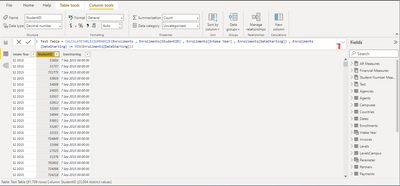
So Student ID musst be unique and the date should be the first time he came to our school. So Minimum start date by Student ID.
Any help? Should be simple but can't do it 🙂
Thanks for you help
Solved! Go to Solution.

- Mark as New
- Bookmark
- Subscribe
- Mute
- Subscribe to RSS Feed
- Permalink
- Report Inappropriate Content
Hi @mlovejoy
Please find this below solution.
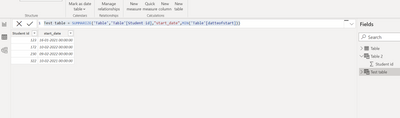
Best Regards,
Shreya Mukkawar
Appreciate with a Kudos!! (Click the Thumbs Up Button)
Did I answer your question? Mark my post as a solution!
- Mark as New
- Bookmark
- Subscribe
- Mute
- Subscribe to RSS Feed
- Permalink
- Report Inappropriate Content
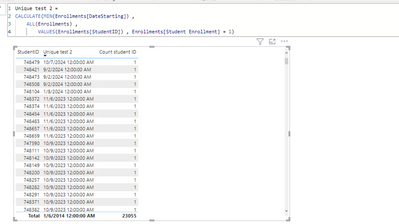
@NikhilChenna @Anonymous I'm doing this in DAX and it works, except that I want to retrieve the Intake Year of that "related Min Starting Date". Any ideas 🙂
Thanks a lot for your help.


- Mark as New
- Bookmark
- Subscribe
- Mute
- Subscribe to RSS Feed
- Permalink
- Report Inappropriate Content
Hi @mlovejoy ,
It is easy to map, but for that you have to create a unique key between 2 tables.
1. Create a concat of studentid and date using this in both the tables, =CONCATENATE('table1'[studentID],TEXT('table1'[Date],"mmddyyyy")
2. Create a new column in the summarized table, using lookup function,
Calculated column = LOOKUPVALUE('table1'[Intake Year],'table1'[concat],'summarizedtable'[concat])
This will solve your issue.
Regards,
Nikhil Chenna
Appreciate with a Kudos!! (Click the Thumbs Up Button)
Did I answer your question? Mark my post as a solution!
- Mark as New
- Bookmark
- Subscribe
- Mute
- Subscribe to RSS Feed
- Permalink
- Report Inappropriate Content
Hi @mlovejoy ,
It is easy to map, but for that you have to create a unique key between 2 tables.
1. Create a concat of studentid and date using this in both the tables, =CONCATENATE('table1'[studentID],TEXT('table1'[Date],"mmddyyyy")
2. Create a new column in the summarized table, using lookup function,
Calculated column = LOOKUPVALUE('table1'[Intake Year],'table1'[concat],'summarizedtable'[concat])
This will solve your issue.
Regards,
Nikhil Chenna
Appreciate with a Kudos!! (Click the Thumbs Up Button)
Did I answer your question? Mark my post as a solution!
- Mark as New
- Bookmark
- Subscribe
- Mute
- Subscribe to RSS Feed
- Permalink
- Report Inappropriate Content
Hi @mlovejoy , You can achieve this by this below solution.
1. Go the modelling tab and click on the new table option.
2. Use this below logic,
Summarize_table =
"Min Intake Year",MIN('Enrollments'[Intake Year])
Did I answer your question? Mark my post as a solution!
- Mark as New
- Bookmark
- Subscribe
- Mute
- Subscribe to RSS Feed
- Permalink
- Report Inappropriate Content
@NikhilChenna @Anonymous I'm doing this in DAX and it works, except that I want to retrieve the Intake Year of that "related Min Starting Date". Any ideas 🙂
Thanks a lot for your help.
- Mark as New
- Bookmark
- Subscribe
- Mute
- Subscribe to RSS Feed
- Permalink
- Report Inappropriate Content
Hello @NikhilChenna ,
thanks for your answer. Howerver Intake Year is a text column Q1 2022, S2 2023,... so there is no minimum. Would there be a possiblity to add a column in the Student table to get this information? Basically I want to use Min start date as a criteria to put the related Intake Year (Q2 2022, S2 2023, ...) comming from the enrollment table in every student ID of the student table.

Thanks
Mark
- Mark as New
- Bookmark
- Subscribe
- Mute
- Subscribe to RSS Feed
- Permalink
- Report Inappropriate Content
Hi @mlovejoy
Please find this below solution.
Best Regards,
Shreya Mukkawar
Appreciate with a Kudos!! (Click the Thumbs Up Button)
Did I answer your question? Mark my post as a solution!
- Mark as New
- Bookmark
- Subscribe
- Mute
- Subscribe to RSS Feed
- Permalink
- Report Inappropriate Content
Hello @Anonymous ,
thanks for your answer. For every Student ID I need to get the Intake Year which is text (Q2 2022, S1 2023,..). So actually the Date Min date start is the criteria to filter adn get the Intake Date.
Regards
Mark
Helpful resources

Join our Fabric User Panel
This is your chance to engage directly with the engineering team behind Fabric and Power BI. Share your experiences and shape the future.

Power BI Monthly Update - June 2025
Check out the June 2025 Power BI update to learn about new features.

Fabric Community Update - June 2025
Find out what's new and trending in the Fabric community.

| User | Count |
|---|---|
| 10 | |
| 10 | |
| 10 | |
| 9 | |
| 7 |


| User | Count |
|---|---|
| 17 | |
| 12 | |
| 11 | |
| 11 | |
| 10 |


