Join us at FabCon Atlanta from March 16 - 20, 2026, for the ultimate Fabric, Power BI, AI and SQL community-led event. Save $200 with code FABCOMM.
Register now!The Power BI Data Visualization World Championships is back! Get ahead of the game and start preparing now! Learn more
Hi everyone !
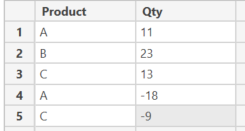
I have a simple table, like this one :
I want to create a measure with different steps :
1 - Sum "Qty" column grouping on "Product" column
2 - Evaluate if the result of "Step 1" is negative. If it's true, return 0 else return "Step 1"
3 - Sum "Step 2"
The result i'm expecting for this dataset is : 27
I can't specify in my measure every products with a switch formula because in my original dataset there is between 700 and 3500 different cases.
An important information is that, in the bar chart which will show the measure evolution through time, there is no "Product" filter context.
Any idea ? 🙂
Solved! Go to Solution.
Hi @Anonymous
This measure may help
M_Product =
VAR __Step1 = SUMMARIZE(TableProduct;TableProduct[Product];"TotalProduct";sum(TableProduct[Qty]))
VAR __Step2and3 = CALCULATE(SUM([Qty]);FILTER(__Step1;[TotalProduct]>0))
RETURN __Step2and3Let me know if that is fine.
Hi @Anonymous
This measure may help
M_Product =
VAR __Step1 = SUMMARIZE(TableProduct;TableProduct[Product];"TotalProduct";sum(TableProduct[Qty]))
VAR __Step2and3 = CALCULATE(SUM([Qty]);FILTER(__Step1;[TotalProduct]>0))
RETURN __Step2and3Let me know if that is fine.
The Power BI Data Visualization World Championships is back! Get ahead of the game and start preparing now!
| User | Count |
|---|---|
| 19 | |
| 13 | |
| 10 | |
| 4 | |
| 4 |
| User | Count |
|---|---|
| 31 | |
| 28 | |
| 19 | |
| 11 | |
| 10 |