FabCon is coming to Atlanta
Join us at FabCon Atlanta from March 16 - 20, 2026, for the ultimate Fabric, Power BI, AI and SQL community-led event. Save $200 with code FABCOMM.
Register now!- Power BI forums
- Get Help with Power BI
- Desktop
- Service
- Report Server
- Power Query
- Mobile Apps
- Developer
- DAX Commands and Tips
- Custom Visuals Development Discussion
- Health and Life Sciences
- Power BI Spanish forums
- Translated Spanish Desktop
- Training and Consulting
- Instructor Led Training
- Dashboard in a Day for Women, by Women
- Galleries
- Data Stories Gallery
- Themes Gallery
- Contests Gallery
- QuickViz Gallery
- Quick Measures Gallery
- Visual Calculations Gallery
- Notebook Gallery
- Translytical Task Flow Gallery
- TMDL Gallery
- R Script Showcase
- Webinars and Video Gallery
- Ideas
- Custom Visuals Ideas (read-only)
- Issues
- Issues
- Events
- Upcoming Events
The Power BI Data Visualization World Championships is back! Get ahead of the game and start preparing now! Learn more
- Power BI forums
- Forums
- Get Help with Power BI
- DAX Commands and Tips
- Re: Sum of column A' values based on distinct valu...
- Subscribe to RSS Feed
- Mark Topic as New
- Mark Topic as Read
- Float this Topic for Current User
- Bookmark
- Subscribe
- Printer Friendly Page

- Mark as New
- Bookmark
- Subscribe
- Mute
- Subscribe to RSS Feed
- Permalink
- Report Inappropriate Content
Sum of column A' values based on distinct values in column B
Dear
I got a problem when calculate the distinct sum value.
I want to get the sum value of different "category" based on the distinct value in column "Time", which means I want the value"sum technical =60+15","sum External = 20+10".
I have try this DAX
"
Technical-Distinct =
calculate(
sum('Test'[Value]),
'Test'[Category]="Technical",
distinct('Test'[Time])
)
"
But it seems didn't work.😭
Anybody could help that?
Very appreciate it!
| ID | Category | Value | Time |
| 1 | Technical | 60 | 8/25/2023 11:00 |
| 2 | Technical | 60 | 8/25/2023 11:00 |
| 3 | Technical | 60 | 8/25/2023 11:00 |
| 1 | External | 20 | 8/25/2023 11:00 |
| 2 | External | 20 | 8/25/2023 11:00 |
| 3 | External | 20 | 8/25/2023 11:00 |
| 4 | Technical | 15 | 9/15/2023 17:00 |
| 5 | Technical | 15 | 9/15/2023 17:00 |
| 4 | External | 10 | 9/15/2023 17:00 |
| 5 | External | 10 | 9/15/2023 17:00 |
Solved! Go to Solution.


- Mark as New
- Bookmark
- Subscribe
- Mute
- Subscribe to RSS Feed
- Permalink
- Report Inappropriate Content
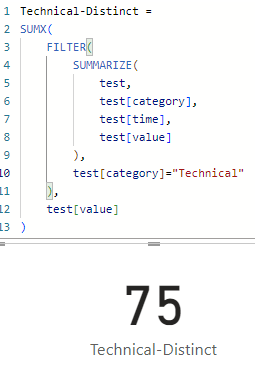
Hi @2023Lee ,
try like:
Technical-Distinct =
SUMX(
    FILTER(
        SUMMARIZE(
            test,
            test[category],
            test[time],
            test[value]
        ),
        test[category]="Technical"
    ),
    test[value]
)
it worked like:

- Mark as New
- Bookmark
- Subscribe
- Mute
- Subscribe to RSS Feed
- Permalink
- Report Inappropriate Content
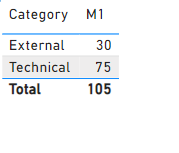
@2023Lee
Add a table visual on your canves, add the category and the following measure:
M1 =
SUMX(
    SUMMARIZE( Table10 , Table10[Category] , Table10[Time] ) ,
    CALCULATE( MAX( Table10[Value] ) )
)
⭕ Subscribe and learn Power BI from these videos
⚪ Website ⚪ LinkedIn ⚪ PBI User Group
- Mark as New
- Bookmark
- Subscribe
- Mute
- Subscribe to RSS Feed
- Permalink
- Report Inappropriate Content
So nice of you!
Very thanks you give the solution of this case, that is what I want.
I also can apply this to many similar cases.🤗
- Mark as New
- Bookmark
- Subscribe
- Mute
- Subscribe to RSS Feed
- Permalink
- Report Inappropriate Content
@2023Lee
Add a table visual on your canves, add the category and the following measure:
M1 =
SUMX(
    SUMMARIZE( Table10 , Table10[Category] , Table10[Time] ) ,
    CALCULATE( MAX( Table10[Value] ) )
)
⭕ Subscribe and learn Power BI from these videos
⚪ Website ⚪ LinkedIn ⚪ PBI User Group
- Mark as New
- Bookmark
- Subscribe
- Mute
- Subscribe to RSS Feed
- Permalink
- Report Inappropriate Content
Hi @Fowmy
I tried your solutions, it looks very well when I use use a table or chart visual, just need to add the category as column/legend.
Tnanks for your sharing, which also gives me some ideas to get more data.😀
- Mark as New
- Bookmark
- Subscribe
- Mute
- Subscribe to RSS Feed
- Permalink
- Report Inappropriate Content
Hi @2023Lee ,
try like:
Technical-Distinct =
SUMX(
    FILTER(
        SUMMARIZE(
            test,
            test[category],
            test[time],
            test[value]
        ),
        test[category]="Technical"
    ),
    test[value]
)
it worked like:
- Mark as New
- Bookmark
- Subscribe
- Mute
- Subscribe to RSS Feed
- Permalink
- Report Inappropriate Content
So nice of you!
Very thanks you give the solution of this case, that is what I want.
I also can apply this to many similar cases.🤗

- Mark as New
- Bookmark
- Subscribe
- Mute
- Subscribe to RSS Feed
- Permalink
- Report Inappropriate Content
@2023Lee Hi! Try with:
DistinctSum =
SUMX (
VALUES ( 'Test'[Time] ),
CALCULATE (
SUM ( 'Test'[Value] ),
ALLEXCEPT ( 'Test', 'Test'[Category] )
)
)
BBF

Helpful resources

Power BI Dataviz World Championships
The Power BI Data Visualization World Championships is back! Get ahead of the game and start preparing now!

Power BI Monthly Update - December 2025
Check out the December 2025 Power BI Holiday Recap!

FabCon Atlanta 2026
Join us at FabCon Atlanta, March 16-20, for the ultimate Fabric, Power BI, AI and SQL community-led event. Save $200 with code FABCOMM.

| User | Count |
|---|---|
| 19 | |
| 13 | |
| 9 | |
| 4 | |
| 4 |


| User | Count |
|---|---|
| 30 | |
| 26 | |
| 17 | |
| 11 | |
| 10 |


